Why Your Test Suite Lies to You at Scale

Why Your Test Suite Lies to You at Scale PRO IMPLEMENTATION
Section titled “Why Your Test Suite Lies to You at Scale ”New to Playwright reliability? Start with the fundamentals: Flaky Tests You Can’t Fix With Better Selectors — the same concepts with more explanation and simpler examples.
Green tests and broken production is a specific failure mode that gets more common as test suites grow. The locators are right, the assertions are correct, the mocks return the expected data — and none of it reflects what the system actually does under load, with real network conditions, against a real database.
This article covers three architectural problems that cause this: API non-idempotency, mock drift, and data accumulation. Each is invisible at small scale. Each becomes expensive at large scale.
Code examples are intentionally simplified — focus on the architectural pattern.
The Failure Mode Nobody Talks About
Section titled “The Failure Mode Nobody Talks About”Most flakiness guides focus on selectors and timing. That’s the visible layer. The invisible layer is data and integration:
-
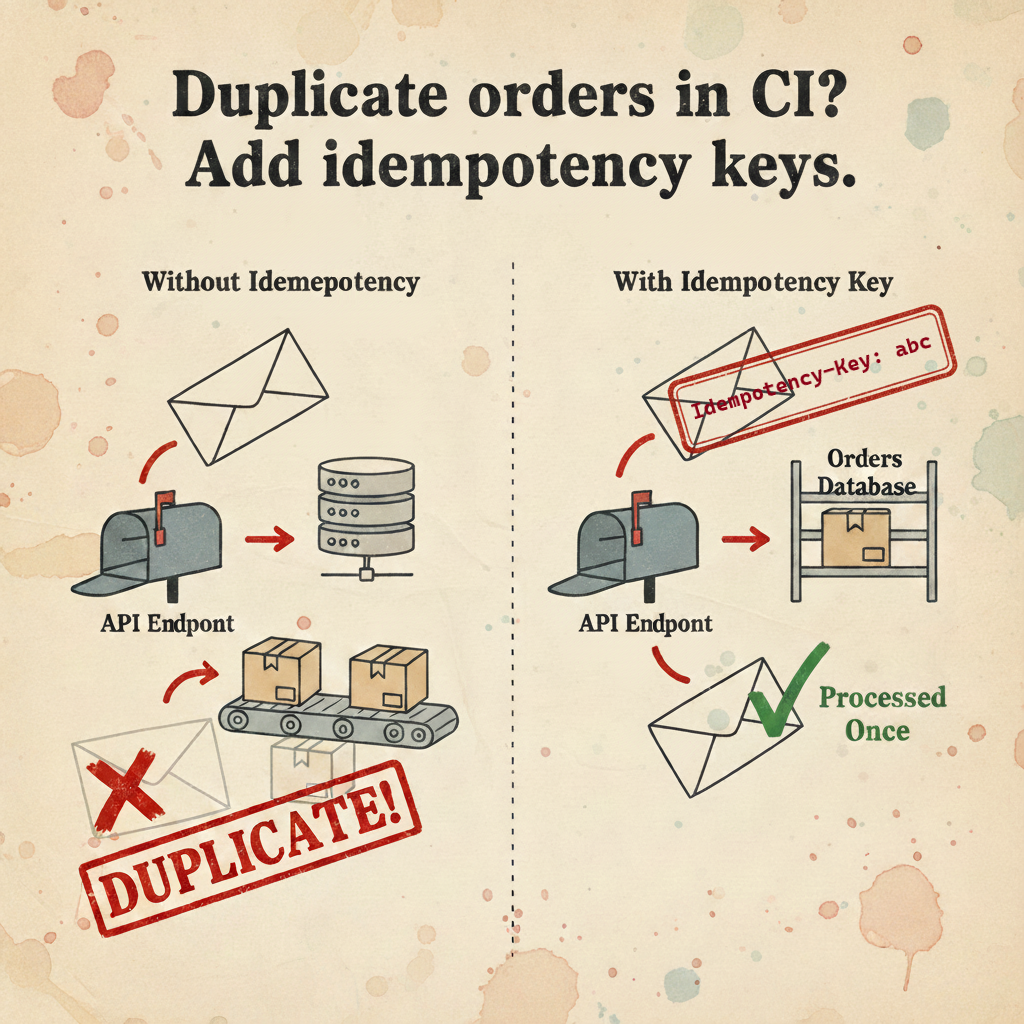
A POST request succeeds on the server, the response is lost in transit, Playwright retries, the server creates a second record. Your test now has two orders instead of one, and the assertion that checks order count fails — not because the feature is broken, but because the network hiccuped.
-
Your mock returns
{ order_id: "123" }. The backend deployed last Tuesday and now returns{ orderId: "123" }. Tests are green. The field your frontend reads is undefined. Production is broken. -
Tests create 100 users per minute. Nobody cleans up reliably. Two weeks later, unique constraint violations start appearing in unrelated tests. The database that was supposed to be isolated is shared state in disguise.
These aren’t test bugs. They’re architectural gaps. And they require architectural solutions.
Idempotency: Making POST Requests Safe to Retry
Section titled “Idempotency: Making POST Requests Safe to Retry”The standard mental model of HTTP: a request either succeeds or fails. The reality: a request can succeed on the server and fail to deliver the response. The client sees a timeout and retries. The server sees a new request.
For GET requests this is harmless. For POST requests that create or modify state, it creates duplicates.
The solution: idempotency keys
An idempotency key is a client-generated identifier that the server uses to detect duplicate requests. If the server has processed a request with this key before, it returns the cached result instead of processing again.
The key design question is how to generate the key. A static key per test fails when a test makes multiple POST requests — the server treats the second request as a duplicate of the first. A random UUID per request defeats the purpose — retries get new keys and bypass the deduplication.
The correct approach: derive the key deterministically from the request context.
import { createHash } from 'crypto';
export function generateIdempotencyKey(method: string, url: string, data: unknown): string { const payload = `${method}:${url}:${JSON.stringify(data)}`; return createHash('sha256').update(payload).digest('hex').slice(0, 16);}export abstract class BaseApiClient { protected async post(url: string, data?: unknown) { const key = generateIdempotencyKey('POST', url, data); return await this.request.post(url, { data, headers: { 'X-Idempotency-Key': key }, }); }}Two calls to createUser with identical data get identical keys — the server deduplicates. Two calls with different data (create user, then create order) get different keys — both process correctly.
Important nuance: if your test legitimately needs two identical records (same method, URL, and body), they’ll get the same key — and the server will return the cached result for the second call. This is correct behaviour for retries, but it means this approach assumes each unique operation has unique data. If you genuinely need two identical resources, add a distinguishing field (like a
requestIdor timestamp) to the body.
The backend requirement: this only works if the server implements idempotency key handling. Most payment APIs (Stripe, PayPal) support this natively. If your payment provider doesn’t — that’s their problem to solve, not yours. Use WireMock to mock them, or find their sandbox/test mode. If it’s your own internal backend that’s missing support — that’s a tech-debt conversation with your backend team. The pattern is well-documented and the database cost is minimal: store key + response hash, expire after 24 hours.
The network failure scenario:
Client → POST /orders (key: abc123) → Server processes, creates orderServer → Response lost in transitClient → Timeout, retry POST /orders (key: abc123) → Server returns cached responseResult: One order, correct stateWithout idempotency keys, the retry creates a second order. Your test’s assertion that checks order count fails, and you spend an hour investigating a “bug” that is actually a network reliability issue.
Mock Architecture: Three Levels, Three Use Cases
Section titled “Mock Architecture: Three Levels, Three Use Cases”The mistake teams make is treating mocking as a single tool. page.route for everything. Then wondering why server-side failures aren’t caught.
Level 1: Native mocks (page.route)
page.route intercepts requests made from inside the browser context. It’s the right tool for testing UI behavior in isolation.
// Testing error state UIawait page.route('**/api/orders', (route) => {  route.fulfill({ status: 503, body: JSON.stringify({ error: 'Service unavailable' }) });});
await page.goto('/orders');await expect(page.getByRole('alert')).toContainText('Service unavailable');
The architectural boundary: page.route cannot intercept requests made via Playwright’s request fixture, or any server-to-server calls your backend makes. Those requests originate outside the browser context.
| How the request is made | Intercepted by page.route? |
|---|---|
page.goto(), page.click() — browser navigation | ✅ Yes |
page.evaluate(() => fetch('/api/...')) — fetch inside browser | ✅ Yes |
page.request.get('/api/...') — browser request context | ✅ Yes |
request.get('/api/...') — standalone request fixture (Node.js) | ❌ No |
| Backend server-to-server calls (Stripe, etc.) | ❌ No |
The distinction is browser context vs Node.js context — not UI vs API.
Why
route.fulfill()instead ofroute.abort()?abort()causes the request to fail with a network error. Well-written apps handle this gracefully, but many enter an infinite retry loop waiting for a response that never comes.fulfill()returns a proper HTTP response — even a synthetic one — so the app moves on cleanly. Useabort()only when you specifically want to test network error handling.
Level 2: Infrastructure mocks (WireMock)
Server-to-server integrations — payment processors, SMS gateways, shipping APIs — need to be mocked at the network level, not the browser level.
services: wiremock: image: wiremock/wiremock:3.3.1 ports: - '8080:8080' volumes: - ./wiremock/mappings:/home/wiremock/mappings command: ['--global-response-templating', '--verbose']{ "request": { "method": "POST", "urlPattern": "/v1/payment_intents" }, "response": { "status": 200, "jsonBody": { "id": "pi_{{randomValue length=24 type='ALPHANUMERIC'}}", "status": "succeeded", "amount": "{{request.body.amount}}" }, "transformers": ["response-template"] }}Response templating lets WireMock echo back request values, making mocks feel more realistic without hardcoding specific values. Point your backend’s external API base URLs to localhost:8080 via environment variables, and the backend never makes real external calls in tests.
One prerequisite: your backend needs to use configurable base URLs for external services — not hardcoded production endpoints. In well-structured backends this is already the case. If it’s not, that’s a refactor worth doing regardless of testing — hardcoded external URLs are a deployment problem too.
Level 3: Contract testing (Pact)
WireMock solves availability. It doesn’t solve drift. Your WireMock mapping can become outdated the moment the real API changes. This is the Lying Mock problem — and it requires a different solution.
Consumer-Driven Contract Testing (CDC) creates a formal, verifiable link between your test expectations and the provider’s actual implementation.
import { PactV3, MatchersV3 } from '@pact-foundation/pact';
const { like, string, integer } = MatchersV3;
const provider = new PactV3({  consumer: 'test-suite',  provider: 'order-service',  dir: './pacts',  logLevel: 'warn',});
describe('Order Service contract', () => {  it('returns order details', async () => {    await provider      .given('order ord_123 exists')      .uponReceiving('GET /orders/ord_123')      .withRequest({        method: 'GET',        path: '/orders/ord_123',        headers: { Authorization: like('Bearer token') },      })      .willRespondWith({        status: 200,        body: {          order_id: string('ord_123'), // field name is part of the contract          status: string('CONFIRMED'),          total: integer(4999),        },      })      .executeTest(async (mockServer) => {        const order = await fetchOrder(mockServer.url, 'ord_123');        expect(order.status).toBe('CONFIRMED');      });  });});
This test runs against a local mock server and generates a ./pacts/test-suite-order-service.json contract file. The backend team publishes this contract to a Pact Broker and runs verification against their actual code:
# On the provider side, in their CI pipelinepact-provider-verifier \ --provider-base-url http://localhost:8080 \ --pact-broker-url https://your-pact-broker \ --provider order-service \ --publish-verification-resultsIf the backend renames order_id to orderId, verification fails in their pipeline before the change merges. The contract breaks at the source, not in production.
The Pact Broker is optional but valuable — it stores contract versions, tracks which consumer-provider pairs are compatible, and enables the can-i-deploy check that blocks deployments when contracts are broken. For smaller teams, storing contract files in a shared repository works as a simpler alternative.
Where to start with contracts: don’t try to contract-test everything. Start with the API calls that have caused the most incidents, or the ones that change most frequently. One contract on your critical payment or order flow is immediately valuable. Expand from there.
The organizational reality: contract testing requires the backend team to run verification in their pipeline. This is a commitment from both sides, not just a technical decision. For small teams or teams without strong cross-team coordination, a simpler starting point is storing contract JSON files in the backend repo and running verification manually — no Pact Broker required. Also worth being explicit: contracts verify response structure and field names. They don’t catch business logic bugs, side effects, or behaviour changes that preserve the schema.
Data Hygiene: The Infrastructure Approach
Section titled “Data Hygiene: The Infrastructure Approach”afterEach(() => api.deleteUser(userId)) is the standard cleanup pattern. It has two failure modes that make it unreliable at scale:
- If the test crashes before
userIdis set, the cleanup never runs - If the test runner itself crashes or is killed,
afterAllandafterEachhooks don’t execute
The result: orphaned test data accumulates. Unique constraints start failing on unrelated tests. Query performance degrades. The “isolated” test database becomes shared state.
Approach 1: TTL at the database level
Add expires_at to all test-created entities and set it to a short window:
// In your base API client or fixtureprotected async createTestEntity(url: string, data: unknown) { return this.post(url, { ...data, expires_at: new Date(Date.now() + 24 * 60 * 60 * 1000).toISOString(), is_test: true, });}The database handles cleanup automatically. In PostgreSQL with pg_cron:
-- Install pg_cron extension once-- Note: pg_cron may not be available on all managed PostgreSQL services (e.g. some cloud providers).-- If unavailable, use a server-level cron job or a background worker instead.CREATE EXTENSION IF NOT EXISTS pg_cron;
-- Schedule cleanup every hourSELECT cron.schedule('cleanup-test-entities', '0 * * * *', $$  DELETE FROM users  WHERE expires_at < NOW() AND is_test = true;
  DELETE FROM orders  WHERE expires_at < NOW() AND is_test = true;
  DELETE FROM payment_intents  WHERE expires_at < NOW() AND is_test = true;$$);
In MongoDB, a TTL index handles this natively:
db.users.createIndex( { expires_at: 1 }, { expireAfterSeconds: 0 }, // documents deleted at expires_at time);Approach 2: Cleanup queue with global teardown
For cases where TTL isn’t practical — databases that don’t support it, or entities that need ordered cleanup (delete orders before users, not after):
interface CleanupItem {  url: string;  id: string;  priority: number; // higher priority = deleted first}
class CleanupQueue {  private items: CleanupItem[] = [];
  push(item: CleanupItem) {    this.items.push(item);  }
  async flush(request: APIRequestContext) {    const sorted = this.items.sort((a, b) => b.priority - a.priority);    for (const item of sorted) {      await request.delete(`${item.url}/${item.id}`).catch(() => {        // Log but don't throw — cleanup failures shouldn't fail the suite        console.warn(`Cleanup failed for ${item.url}/${item.id}`);      });    }    this.items = [];  }}
export const cleanupQueue = new CleanupQueue();import { cleanupQueue } from './cleanup/queue';
export default async function globalTeardown() { await cleanupQueue.flush(globalApiClient);}The cleanup queue survives individual test failures. Only a full runner crash (SIGKILL, power loss) prevents it from executing — and in that case, the TTL approach serves as a second line of defense. This is why TTL should be your default: it operates at the database level, independently of your test process, and survives any kind of crash. The cleanup queue is a complement for ordered cleanup, not a replacement.
Approach 3: Table partitioning for high-volume environments
When tests run continuously and create thousands of entities per hour, even scheduled deletes can become expensive. Deleting a million rows from a PostgreSQL table is a slow, lock-intensive operation.
Partitioning by date makes cleanup instantaneous — you drop a partition rather than deleting rows:
-- Create partitioned tableCREATE TABLE orders_test (  id UUID PRIMARY KEY,  created_at TIMESTAMPTZ NOT NULL,  expires_at TIMESTAMPTZ,  -- other fields) PARTITION BY RANGE (created_at);
-- Create monthly partitionsCREATE TABLE orders_test_2024_12  PARTITION OF orders_test  FOR VALUES FROM ('2024-12-01') TO ('2025-01-01');
CREATE TABLE orders_test_2025_01  PARTITION OF orders_test  FOR VALUES FROM ('2025-01-01') TO ('2025-02-01');
Dropping last month’s partition:
-- Instantaneous, no table lock on the live partitionDROP TABLE orders_test_2024_12;This is worth the setup complexity when your test suite creates more than ~10K entities per day. Below that threshold, the TTL approach is simpler and sufficient.
Limitations worth knowing: partitioning is PostgreSQL-native and well-supported, but MySQL’s implementation has more restrictions, and some ORMs handle partitioned tables poorly. More importantly, partitioning complicates migrations — adding a column to a partitioned table requires updating all existing partitions. And you need to create future partitions in advance — either manually or via a scheduled job. Don’t reach for this pattern unless you’re genuinely hitting performance problems with TTL-based cleanup.
The Decision Framework
Section titled “The Decision Framework”| Situation | Right tool |
|---|---|
| Testing UI error states in isolation | page.route |
| Backend calls external payment/SMS API | WireMock |
| Backend API changes cause test failures | Contract tests (Pact) |
| Test creates < 1K entities/day | TTL + pg_cron |
| Cleanup order matters | Cleanup queue |
| Test creates > 10K entities/day | Table partitioning |
| POST request creates duplicates on retry | Idempotency keys |
What This Solves
Section titled “What This Solves”The patterns here don’t make individual tests faster or more readable. They make the test suite trustworthy at scale — which is a different problem.
A suite that’s trustworthy means: when tests are green, you can deploy with confidence. When tests fail, the failure points to a real problem, not a network hiccup or a stale mock. When a test fails in CI, you can reproduce it locally with the same data.
That’s the gap between a test suite that’s a liability and one that’s an asset.
Reference implementation: Playwright BDR Template