
Beyond Cucumber: A Type-Safe 4-Layer BDD Architecture with Playwright
Beyond Cucumber: A Type-Safe 4-Layer BDD Architecture with Playwright PRO IMPLEMENTATION
Section titled “Beyond Cucumber: A Type-Safe 4-Layer BDD Architecture with Playwright ”If you want the story behind why BDR exists — I wrote about it this Article. This article is the technical deep dive: architecture, real code, and implementation details.
Note: BDR (Behavior-Driven Living Requirements) is my own architectural approach to organizing Playwright tests — a Cucumber-free alternative to BDD that I designed and documented at bdr-methodology.dev.
The problem with Cucumber in one sentence
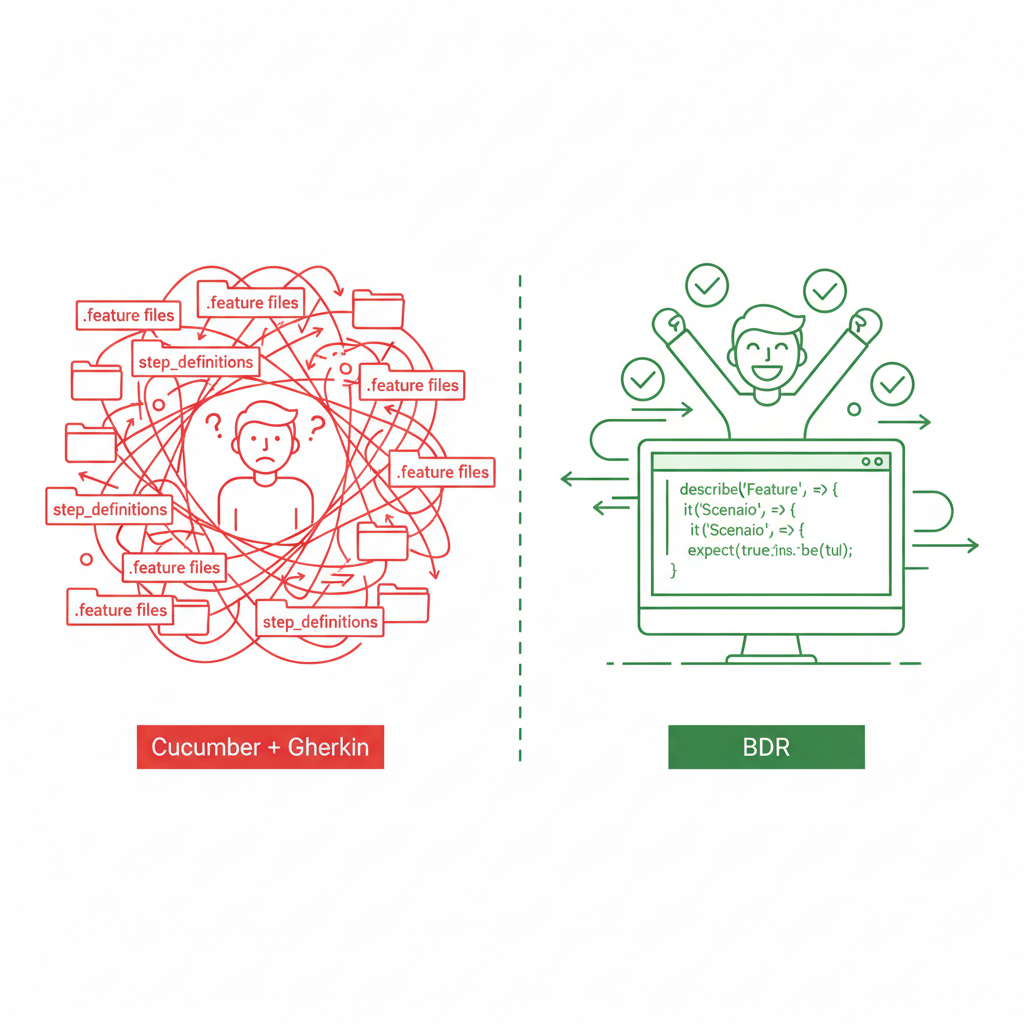
Section titled “The problem with Cucumber in one sentence”You write your scenario in a .feature file, then wire it to TypeScript in a step definition file, and your IDE has no idea they’re connected. Rename a method — nothing breaks at compile time. Run your tests — everything breaks at runtime.
BDR solves this by keeping Given/When/Then directly in TypeScript. Same BDD philosophy, zero translation layer.
The 4-Layer Architecture
Section titled “The 4-Layer Architecture”BDR enforces strict separation of concerns across 4 layers. Each layer has one job:
| Layer | Responsibility | Example |
|---|---|---|
| Specification | Business intent. Reads like a user story. | test('User can log in') |
| Scenario | Given/When/Then steps | BDR.When('User enters credentials', ...) |
| Action (Flow) | Reusable business logic | loginFlow.submitCredentials(user) |
| Technical (POM) | Raw selectors and Playwright interactions | page.getByLabel('Username').fill(value) |
The rule: no layer reaches down more than one level. Your Specification layer never touches selectors. Your POM layer never knows about business logic.
This means if you switch from Playwright to Selenium tomorrow — only the Technical layer changes. Business scenarios stay untouched.
The BDR Step Builder
Section titled “The BDR Step Builder”Instead of Gherkin strings wired to step definitions, BDR gives you a fluent API:
const createStep = (prefix: string) => {  return async (name: string, ...args: any[]): Promise<any> => {    const body = args.pop();
    if (typeof body !== 'function') {      throw new Error(`BDR.${prefix}: Last argument must be a function`);    }
    const stepName = `${prefix.toUpperCase()}: ${formatTitle(name, args)}`;    const executionFn = async () => (body.length > 0 ? body(...args) : body());
    return test.step(stepName, executionFn);  };};
export const BDR = {  Given: createStep('Given'),  When: createStep('When'),  Then: createStep('Then'),  And: createStep('And'),};
Usage in a test:
test('User can log in with valid credentials', async ({ loginPage, page }) => {  await BDR.Given('the user is on the login page', async () => {    await loginPage.goto();  });
  await BDR.When('the user enters valid credentials', async () => {    await loginPage.login('testuser', 'password123');  });
  await BDR.Then('the user is redirected to the dashboard', async () => {    await expect(page).toHaveURL('/dashboard');  });});
Your IDE fully understands this. loginPage.login is a real TypeScript method — rename it and the IDE updates every reference instantly.
Smart title interpolation with formatTitle
Section titled “Smart title interpolation with formatTitle”Step titles support argument interpolation — so your reports are always meaningful:
export function formatTitle(template: string, args: any[]): string { let argIndex = 0; return template.replace(/{(\d+|[\w.]*)}/g, (match, key) => { if (key === '') { return argIndex < args.length ? String(args[argIndex++]) : match; } const parts = key.split('.'); const index = parseInt(parts[0], 10); if (!isNaN(index) && index >= 0 && index < args.length) { let value = args[index]; for (let i = 1; i < parts.length; i++) { if (value && typeof value === 'object') { value = value[parts[i]]; } else return match; } return value !== undefined ? String(value) : match; } return match; });}This supports three interpolation modes:
// Index-basedformatTitle('Login as {0}', ['admin']);// → "Login as admin"
// SequentialformatTitle('Filter by {} and {}', ['Electronics', 'price']);// → "Filter by Electronics and price"
// Nested property accessformatTitle('Welcome {0.user.name}', [{ user: { name: 'John' } }]);// → "Welcome John"
Your Allure report shows WHEN: Filter by Electronics and price — not a generic string, but a meaningful description of what actually happened.
The @Step Decorator for Flow classes
Section titled “The @Step Decorator for Flow classes”For reusable business flows, BDR provides a @Step decorator that wraps class methods automatically:
export function Step(title: string, options: StepOptions = {}) {  return function (...args: any[]) {    const wrapMethodInStep = (originalMethod: Function) => {      return async function (this: any, ...methodArgs: any[]) {        const stepName = formatTitle(title, methodArgs);        return test.step(stepName, async () => originalMethod.apply(this, methodArgs));      };    };
    // Supports both Legacy and Stage 3 decorators    if (typeof args[1] === 'object' && 'kind' in args[1]) {      return wrapMethodInStep(args[0]); // Stage 3    }    if (typeof args[1] === 'string') {      const descriptor = args[2];      descriptor.value = wrapMethodInStep(descriptor.value);      return descriptor; // Legacy    }  };}
Usage in a Flow class:
export class ProductFlow {  constructor(private products: Product[]) {}
  @Step('GIVEN: I have a product catalog with {0} items')  async logProducts(count: number) {    await attachTable('Source Product Catalog', this.products);  }
  @Step('WHEN: I filter products by category "{0}"')  async filterByCategory(category: string) {    const filtered = this.products.filter((p) => p.category === category);    await attachTable(`Filtered Products: ${category}`, filtered);    return filtered;  }
  @Step('THEN: The total price should be calculated')  async calculateTotalPrice() {    const total = this.products.reduce((sum, p) => sum + p.price, 0);    await attachTable('Price Summary', [      { 'Total Items': this.products.length, 'Total Price': `$${total.toFixed(2)}` },    ]);    return total;  }}
Every public method is automatically wrapped in a named test.step. The report shows exactly which business action was running when something failed.
Fixtures — the glue of the architecture
Section titled “Fixtures — the glue of the architecture”Fixtures inject Page Objects and Flows into tests automatically. No manual instantiation, no shared state between tests:
import { test as base } from '@playwright/test';import { LoginPage } from '../pom/LoginPage';import { ProductsPage } from '../pom/ProductsPage';
type MyFixtures = {  loginPage: LoginPage;  productsPage: ProductsPage;};
export const test = base.extend<MyFixtures>({  loginPage: async ({ page }, use) => {    await use(new LoginPage(page));  },  productsPage: async ({ page }, use) => {    await use(new ProductsPage(page));  },});
export { expect } from '@playwright/test';
Each test gets a fresh instance. No state leaking between tests. And because it’s TypeScript — if you remove a fixture, every test that depends on it fails at compile time, not at runtime.
Rich diagnostics with attachTable
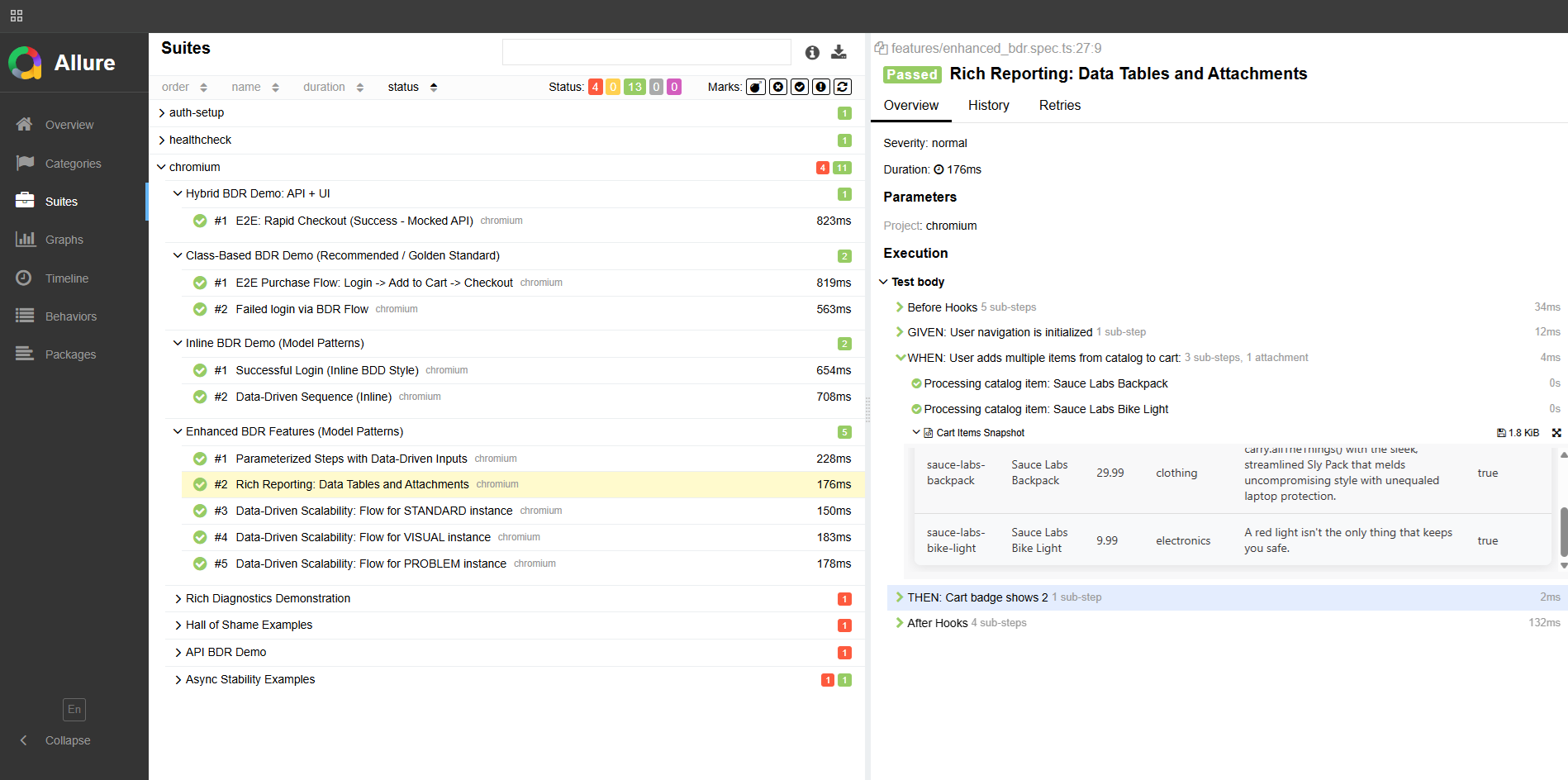
Section titled “Rich diagnostics with attachTable”This is where BDR goes beyond standard Playwright reporting. attachTable generates a styled HTML table and attaches it directly to the Allure report step:
export async function attachTable(name: string, data: any[]) {  if (!data || data.length === 0) return;  const html = generateHtmlTable(data);  await test.info().attach(name, {    body: Buffer.from(html),    contentType: 'text/html',  });}
function generateHtmlTable(data: any[]): string {  const headers = Object.keys(data[0]);  const ths = headers.map((h) => `<th>${h}</th>`).join('');  const trs = data    .map((row) => {      const tds = headers        .map((h) => {          const val = row[h];          return `<td>${val === undefined || val === null ? '' : val}</td>`;        })        .join('');      return `<tr>${tds}</tr>`;    })    .join('');
  return `    <html><head><style>        table { border-collapse: collapse; width: 100%; box-shadow: 0 2px 15px rgba(0,0,0,0.1); }        th { background-color: #2c3e50; color: #fff; padding: 12px 15px; text-transform: uppercase; }        td { padding: 12px 15px; border-bottom: 1px solid #ddd; }        tr:nth-child(even) { background-color: #f8f9fa; }        tr:hover { background-color: #f1f4f6; }    </style></head>    <body>        <table>            <thead><tr>${ths}</tr></thead>            <tbody>${trs}</tbody>        </table>    </body></html>`;}
Here’s what this looks like in the report:
attachCompareTable — Expected vs Actual
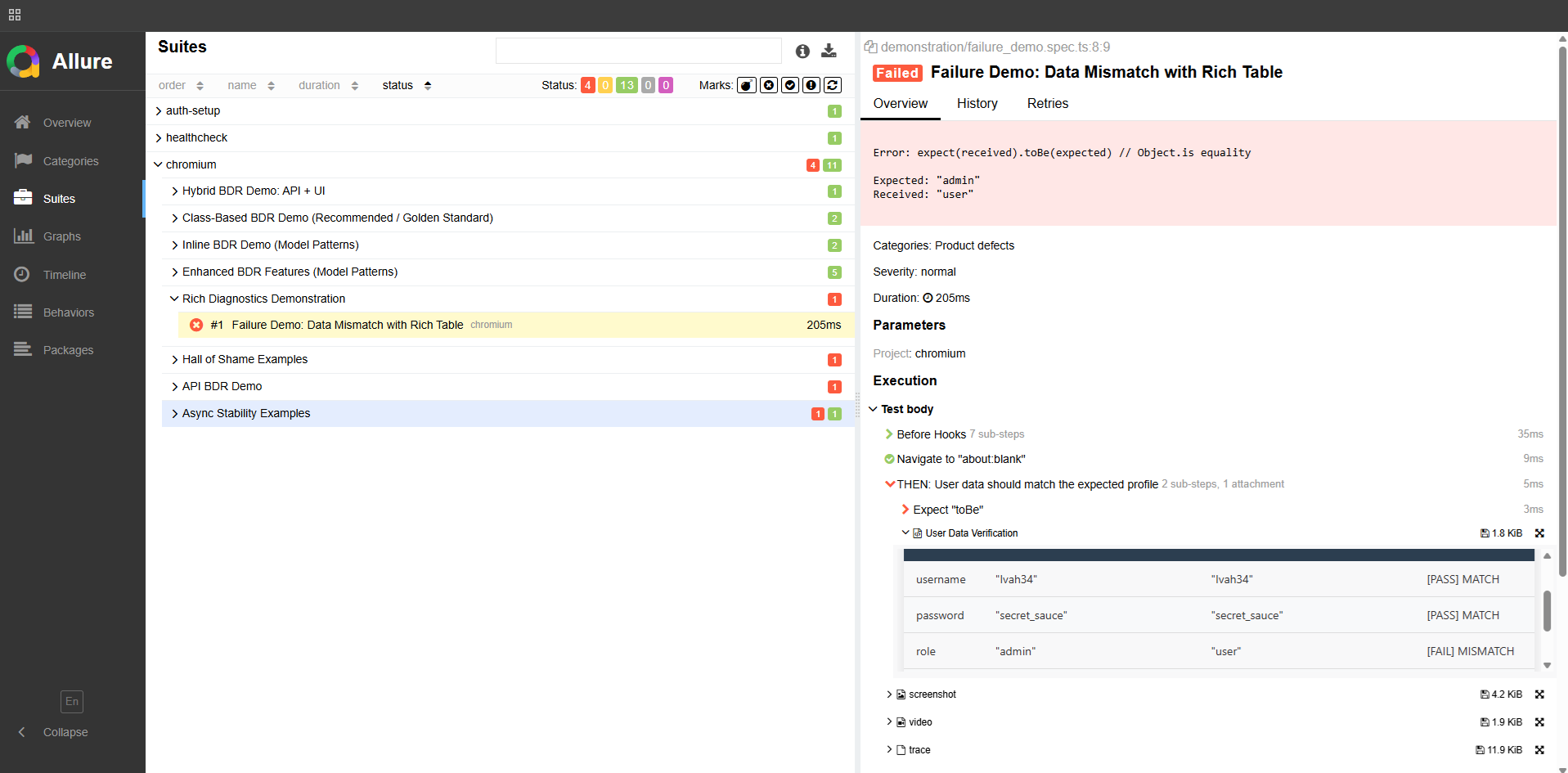
Section titled “attachCompareTable — Expected vs Actual”This is the diagnostic killer feature. When a test fails on a data mismatch, attachCompareTable shows you exactly which fields don’t match:
export async function attachCompareTable(name: string, expected: any, actual: any) { const allKeys = Array.from(new Set([...Object.keys(expected), ...Object.keys(actual)])); const comparisonData = allKeys.map((key) => { const exp = expected[key]; const act = actual[key]; const isMatch = JSON.stringify(exp) === JSON.stringify(act); return { Field: key, Expected: exp === undefined ? '<undefined>' : JSON.stringify(exp), Actual: act === undefined ? '<undefined>' : JSON.stringify(act), Result: isMatch ? '✅ MATCH' : '❌ MISMATCH', }; }); await attachTable(name, comparisonData);}Instead of:
AssertionError: expected { role: 'admin' } to equal { role: 'user' }You get a table in the report:
| Field | Expected | Actual | Result |
|---|---|---|---|
| id | ”123" | "123” | MATCH |
| ”john@example.com" | "john@example.com” | MATCH | |
| role | ”user" | "admin” | MISMATCH |
A complete hybrid scenario: API setup + UI verification
Section titled “A complete hybrid scenario: API setup + UI verification”Here’s a real-world scenario that uses all the layers together:
test('User created via API can log in through UI', async ({ loginPage, page, request }) => {  const newUser = {    email: 'john.doe@example.com',    password: 'SecurePass123',    role: 'customer',  };
  await BDR.Given('a user exists in the system', async () => {    await attachTable('New User Payload', [newUser]);    const response = await request.post('/users', { data: newUser });    expect(response.status()).toBe(201);    const created = await response.json();    await attachTable('Created User Response', [created]);  });
  await BDR.When('the user logs in through the UI', async () => {    await loginPage.goto();    await loginPage.login(newUser.email, newUser.password);  });
  await BDR.Then('the user sees their dashboard', async () => {    await expect(page).toHaveURL('/dashboard');  });});
When this test fails, your report shows: the exact payload sent to the API, the response received, and a screenshot at the moment of failure. No reproduction needed.
Cucumber vs BDR — the technical comparison
Section titled “Cucumber vs BDR — the technical comparison”| Cucumber + Gherkin | BDR | |
|---|---|---|
| Where scenarios live | Separate .feature files | Directly in TypeScript |
| IDE support | Steps are strings — no autocomplete | Full TypeScript — autocomplete, go-to-definition |
| Compile-time safety | None — errors at runtime | Full — broken references caught immediately |
| Renaming a method | Hunt across .feature files manually | IDE updates every reference instantly |
| Report richness | Basic pass/fail + step names | Steps + styled HTML tables + screenshots + API logs |
| Decorator support | N/A | @Step with title interpolation and nested property access |
| Maintenance cost | Two places to update | One place |
Try it
Section titled “Try it”- BDR Methodology — full architecture docs, guides, and manifesto
- Playwright BDR Template — working implementation, clone and run
I’m open to QA Automation roles — remote, contract, or full-time. If you’re building a team and care about test architecture, reach out. _dmitryAQA@outlook.com | @DmitryMeAQA_