
Your test failed. But why? — How I built BDR to actually answer that question

Your test failed. But why? — How I built BDR to actually answer that question CONCEPT
Section titled “Your test failed. But why? — How I built BDR to actually answer that question ”Note: BDR (Behavior-Driven Living Requirements) is my own architectural approach to organizing Playwright tests — a Cucumber-free alternative to BDD that I designed and documented at bdr-methodology.dev.
A developer once left a comment on one of my articles about test automation. He described something painfully familiar:
“You can see the button is disabled, so the click doesn’t work. But now the question is — why? And where is the developer supposed to find the answer? You try to reproduce it manually… and suddenly it works fine. So what happened? Nobody knows. You need logs. You need video. You need something.”
He was right. And that comment stuck with me.
Because that’s not a rare edge case. That’s Tuesday in QA.
Test fails in CI. You open the report. You see: Error: element not clickable. That’s it. No context. No screenshot at the right moment. No API logs. No idea what the app state was. You spend an hour trying to reproduce it locally — and it doesn’t reproduce. The ticket gets closed as “flaky”. The bug stays in production.
This is the real problem with most test automation: tests tell you that something broke, but not why.
Of course, you can enable Playwright Trace Viewer, videos, and screenshots. It’s the standard advice. But here’s the reality:
- Trace Viewer is a firehose of data. If you have 300 tests running in parallel, opening a 50MB trace file for every single flaky test is a full-time job. It shows you what happened, but it doesn’t tell you why the business logic failed.
- Videos are useless for high-speed flaky bugs. You spend minutes watching a 30-second video at 0.5x speed, trying to catch that one flicker of an error message.
- The core problem remains: These tools tell you how it failed, but they don’t explain what the application state was from a business perspective.
My goal with BDR wasn’t just to see the crash — it was to make the crash self-explanatory.
I looked at BDD. Then I looked at Cucumber. Then I had a problem.
Section titled “I looked at BDD. Then I looked at Cucumber. Then I had a problem.”BDD made sense to me. Given/When/Then is a great way to write tests that humans can actually read. Business-readable scenarios. Living documentation. Tests that explain intent, not just implementation.
The promise of BDD is powerful:
- Business sees exactly what the product does — in plain language
- Engineers write tests that serve as living requirements
- When a test fails, it’s a signal that a business requirement is broken
So I looked at Cucumber. And I saw the idea was right — but the implementation was painful.
Here’s what you actually get with Cucumber in practice:
.featurefiles that live separately from your code- Step definitions that need to be wired up manually
- A developer renames a button → you spend an afternoon hunting which
.featurefile broke - A test fails → you read the Gherkin, then find the step definition, then find the actual code, then maybe understand what happened
- Every new scenario requires writing in two places: the
.featurefile AND the TypeScript
You’re not writing tests anymore. You’re maintaining a translation layer between English and code. That’s the Gherkin tax — and it compounds as your suite grows.
And here’s the painful irony: business still doesn’t read those .feature files. They’re buried in a repository nobody outside engineering opens. You paid the Gherkin tax and got nothing for it.
Cucumber vs BDR — side by side
Section titled “Cucumber vs BDR — side by side”| Cucumber + Gherkin | BDR | |
|---|---|---|
| Where scenarios live | Separate .feature files | Directly in code |
| IDE support | Limited — steps are strings | Full — TypeScript, autocomplete, refactoring |
| Renaming a method | Hunt across .feature files | IDE updates everything instantly |
| Error caught | At runtime | At compile time |
| Report richness | Basic pass/fail + steps | Steps + tables + screenshots + API logs |
| Business reads it? | Rarely (it’s in a repo) | Yes — via Allure report, no repo access needed |
| Maintenance cost | High — two places to update | Low — one place |
What if Given/When/Then lived directly in code?
Section titled “What if Given/When/Then lived directly in code?”That’s the question that led me to build BDR — Behavior-Driven Living Requirements.
BDR is not a framework. It’s a methodology. The core idea is simple:
Keep everything that’s good about BDD. Remove the part that slows you down.
- Given/When/Then structure — kept
- Business-readable scenarios — kept
- Living documentation — kept, and made richer
.featurefiles — gone- Step definition wiring — gone
- Gherkin maintenance — gone
The result: a happy engineer makes a transparent product for the business.
The 4-Layer Architecture
Section titled “The 4-Layer Architecture”BDR separates concerns into 4 layers. Each layer has one job and doesn’t bleed into others:
| Layer | What it does | Example |
|---|---|---|
| Specification | Business intent. Reads like a user story. | test('User can log in with valid credentials') |
| Scenario | Given/When/Then steps | test.step('When user enters credentials') |
| Action | Business logic. Reusable flows. | loginPage.login(username, password) |
| Technical | Raw selectors and Playwright interactions | page.getByLabel('Username').fill(value) |
This separation means: if you switch from Playwright to Selenium tomorrow, only the Technical layer changes. Your business scenarios stay untouched.
What it looks like in practice
Section titled “What it looks like in practice”Technical Layer — Page Objects with robust locators
Section titled “Technical Layer — Page Objects with robust locators”import { Page, Locator } from '@playwright/test';
export class LoginPage { constructor(private page: Page) {}
get usernameInput(): Locator { return this.page.getByLabel('Username'); }
get passwordInput(): Locator { return this.page.getByLabel('Password'); }
get loginButton(): Locator { return this.page.getByRole('button', { name: 'Log In' }); }
async goto() { await this.page.goto('/login'); }
async login(username: string, password: string) { await this.usernameInput.fill(username); await this.passwordInput.fill(password); await this.loginButton.click(); }}No magic strings. No CSS selectors that break on every UI change. Full IDE support.
How fixtures wire everything together
Section titled “How fixtures wire everything together”This is the glue of the whole architecture. Fixtures inject Page Objects into your tests automatically — no manual instantiation, no boilerplate:
import { test as base } from '@playwright/test';import { LoginPage } from './pages/LoginPage';import { ProductsPage } from './pages/ProductsPage';
type MyFixtures = {  loginPage: LoginPage;  productsPage: ProductsPage;};
export const test = base.extend<MyFixtures>({  loginPage: async ({ page }, use) => {    await use(new LoginPage(page));  },  productsPage: async ({ page }, use) => {    await use(new ProductsPage(page));  },});
export { expect } from '@playwright/test';
Now every test gets a fresh, properly initialized Page Object — just by declaring it as an argument.
Specification Layer — Given/When/Then in code
Section titled “Specification Layer — Given/When/Then in code”import { test, expect } from '../baseFixtures';
test('User can log in with valid credentials', async ({ loginPage, page }) => { await test.step('Given the user is on the login page', async () => { await loginPage.goto(); });
await test.step('When the user enters valid credentials', async () => { await loginPage.login('testuser', 'password123'); });
await test.step('Then the user should be redirected to the dashboard', async () => { await expect(page).toHaveURL('/dashboard'); });});This reads exactly like a BDD scenario. But it’s real TypeScript. Your IDE catches errors at compile time, not when CI runs at 2am.
Rich reporting with attachTable
Section titled “Rich reporting with attachTable”This is where BDR goes beyond what Gherkin can do. Every step can carry structured data — tables, payloads, state snapshots — directly in the report.
import { test, expect } from '../baseFixtures';import { attachTable } from '@bdr/core';
test('Product search filters correctly', async ({ productsPage }) => {  await test.step('Given products are available', async () => {    await attachTable('Available Products', [      ['ID', 'Name', 'Category', 'Price'],      ['101', 'Laptop Pro', 'Electronics', '1200'],      ['102', 'Mouse X', 'Electronics', '25'],    ]);    await productsPage.goto();  });
  await test.step('When the user filters by "Electronics"', async () => {    await productsPage.filterByCategory('Electronics');  });
  await test.step('Then only Electronics products are displayed', async () => {    const displayed = await productsPage.getDisplayedProductNames();    expect(displayed).toEqual(['Laptop Pro', 'Mouse X']);    await attachTable('Filtered Results', [      ['Name', 'Category'],      ['Laptop Pro', 'Electronics'],      ['Mouse X', 'Electronics'],    ]);  });});
Here’s what this looks like in the Allure report:
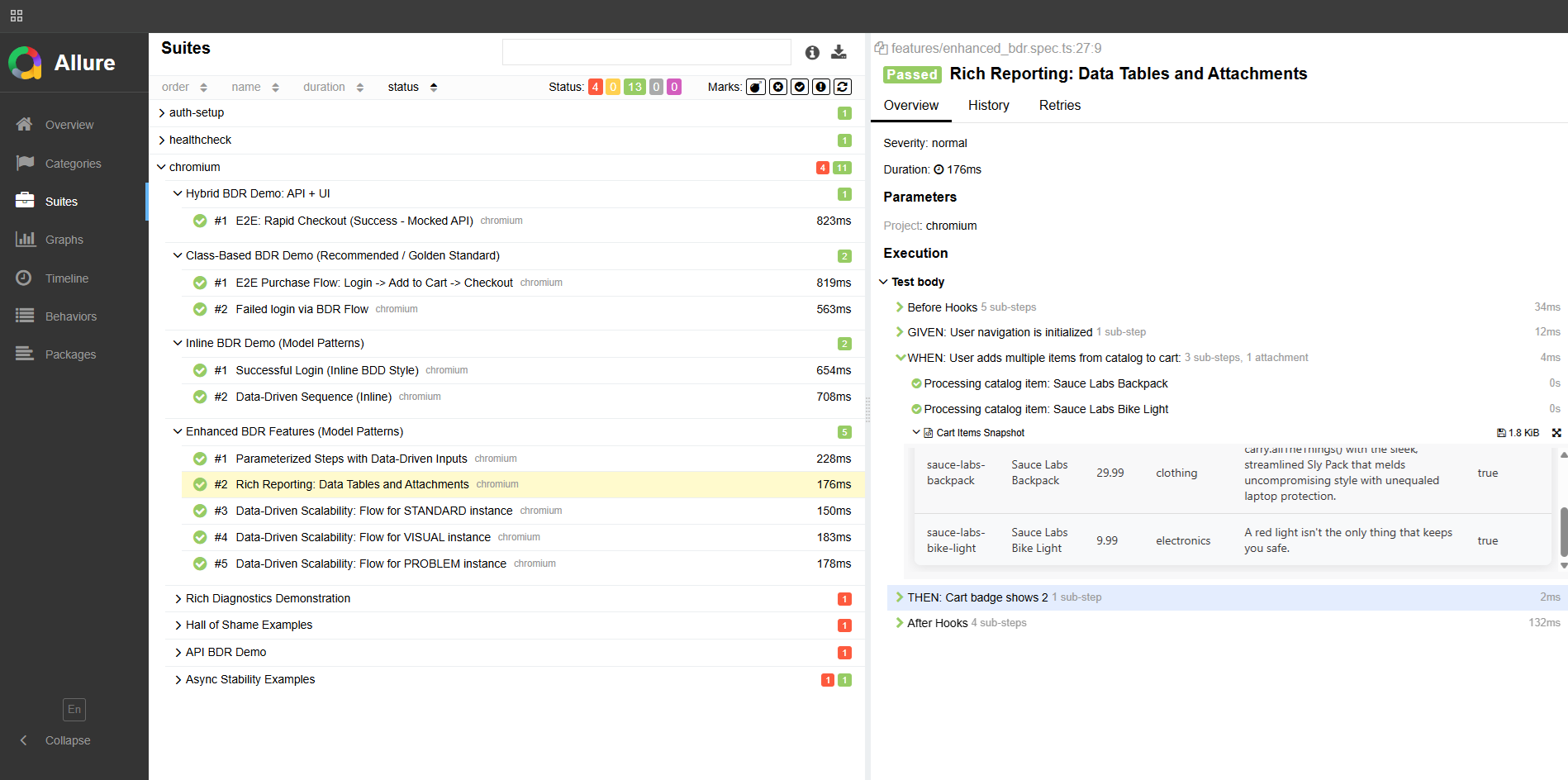
Business opens this report and sees exactly what happened — without touching the codebase. That’s living documentation.
Diagnostics: before and after
Section titled “Diagnostics: before and after”Remember the developer’s comment from the beginning? Here’s what debugging looks like with and without BDR.
Without BDR:
Error: Timeout 30000ms exceededThat’s it. Good luck.
With BDR:
The report shows:
- The scenario stopped at step:
"When: user submits the login form" - Attached table: Form state before click — username filled, password filled, button status:
disabled - Attached: API request log —
POST /authreturned403 Forbidden - Screenshot: captured automatically at the moment of failure
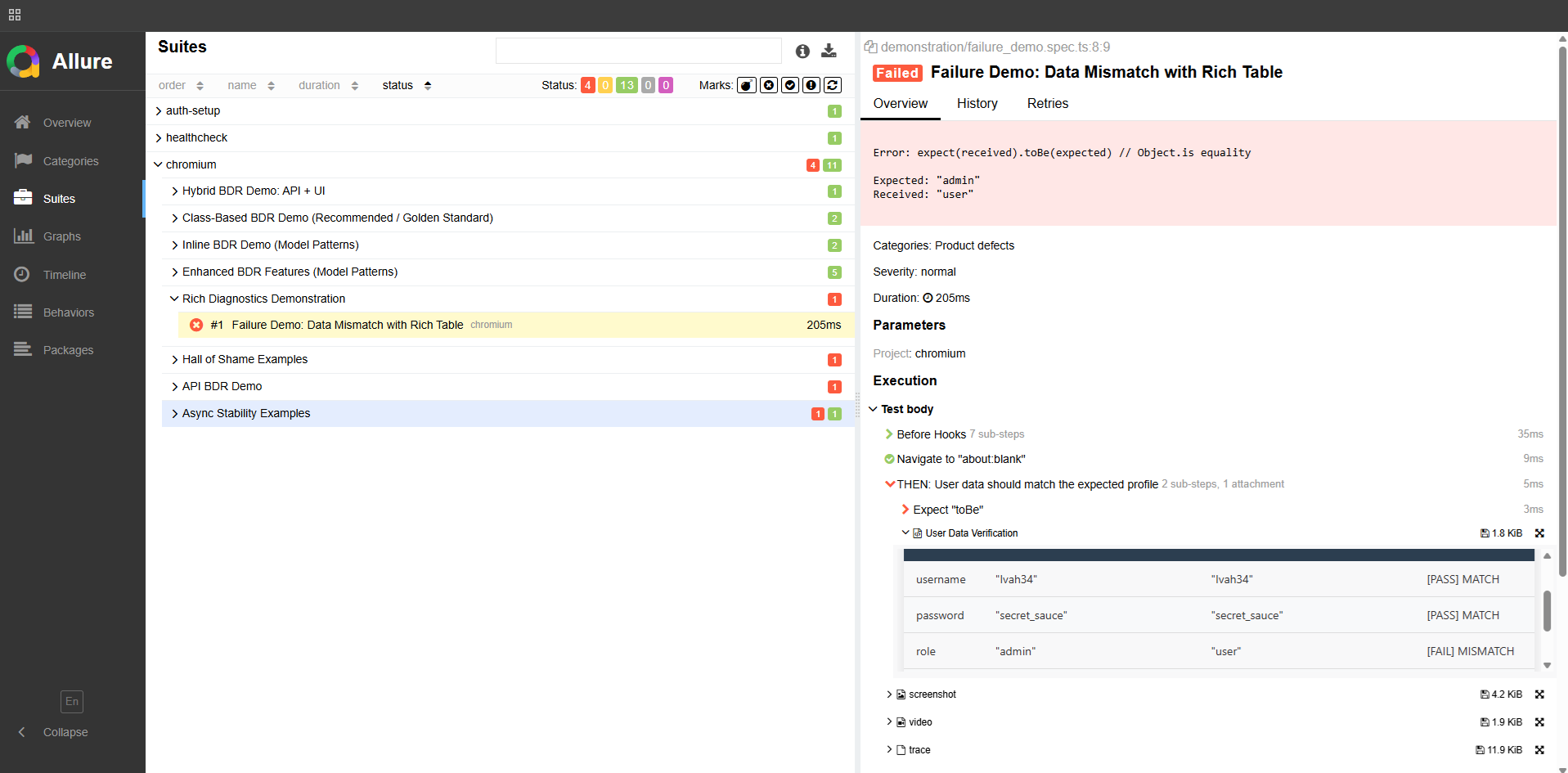
Now you know exactly what happened. No reproduction needed. The report IS the reproduction.
API testing with full payload visibility
Section titled “API testing with full payload visibility”import { test, expect } from '@playwright/test';import { attachTable } from '@bdr/core';
test('Create a new user via API', async ({ request }) => { const newUser = { firstName: 'John', lastName: 'Doe', email: 'john.doe@example.com', role: 'customer', };
await test.step('When a POST request is sent to /users', async () => { await attachTable('Request Payload', Object.entries(newUser)); const response = await request.post('/users', { data: newUser }); expect(response.status()).toBe(201); });
await test.step('Then the user is created successfully', async () => { const verify = await request.get(`/users?email=${newUser.email}`); const users = await verify.json(); const created = users.find((u: any) => u.email === newUser.email); expect(created).toMatchObject({ email: 'john.doe@example.com' }); await attachTable( 'Response', Object.entries(created).filter(([k]) => ['id', 'email'].includes(k)), ); });});Every request payload, every response — attached to the report. When something breaks in CI, you open the report and see exactly what was sent and what came back.
What BDR actually gives you
Section titled “What BDR actually gives you”For engineers:
- Full IDE support — autocomplete, compile-time errors, instant refactoring
- One place to update when things change
- Reports that answer “why?” without manual reproduction
For business:
- Allure reports readable without engineering knowledge
- Living documentation that’s always current — if the test runs, the doc is up to date
- Clear signal when a business requirement is broken
The result: a happy engineer makes a transparent product for the business.
Try it
Section titled “Try it”- BDR Methodology — the full philosophy, 4-layer architecture, and guides
- Playwright BDR Template — working implementation you can clone today
I’m open to QA Automation roles — remote, contract, or full-time. If you’re building a team and care about test architecture, I’d love to talk. _dmitryAQA@outlook.com | @DmitryMeAQA_