Skip to content

Blog

Why Your Playwright Tests Fail in CI (And Never Locally)
Why Your Playwright Tests Fail in CI (And Never Locally) CONCEPT

Section titled “Why Your Playwright Tests Fail in CI (And Never Locally) ”

You run your tests locally — everything is green. You push to CI — three tests fail. You run CI again — different three tests fail. Sound familiar?

This isn’t bad luck. It’s a set of fixable architectural mistakes. In this guide I’ll walk you through the six rules that eliminated flakiness in our test suite. No magic, no “just increase the timeout” advice.

All code examples are simplified for clarity — focus on the idea, not the boilerplate.


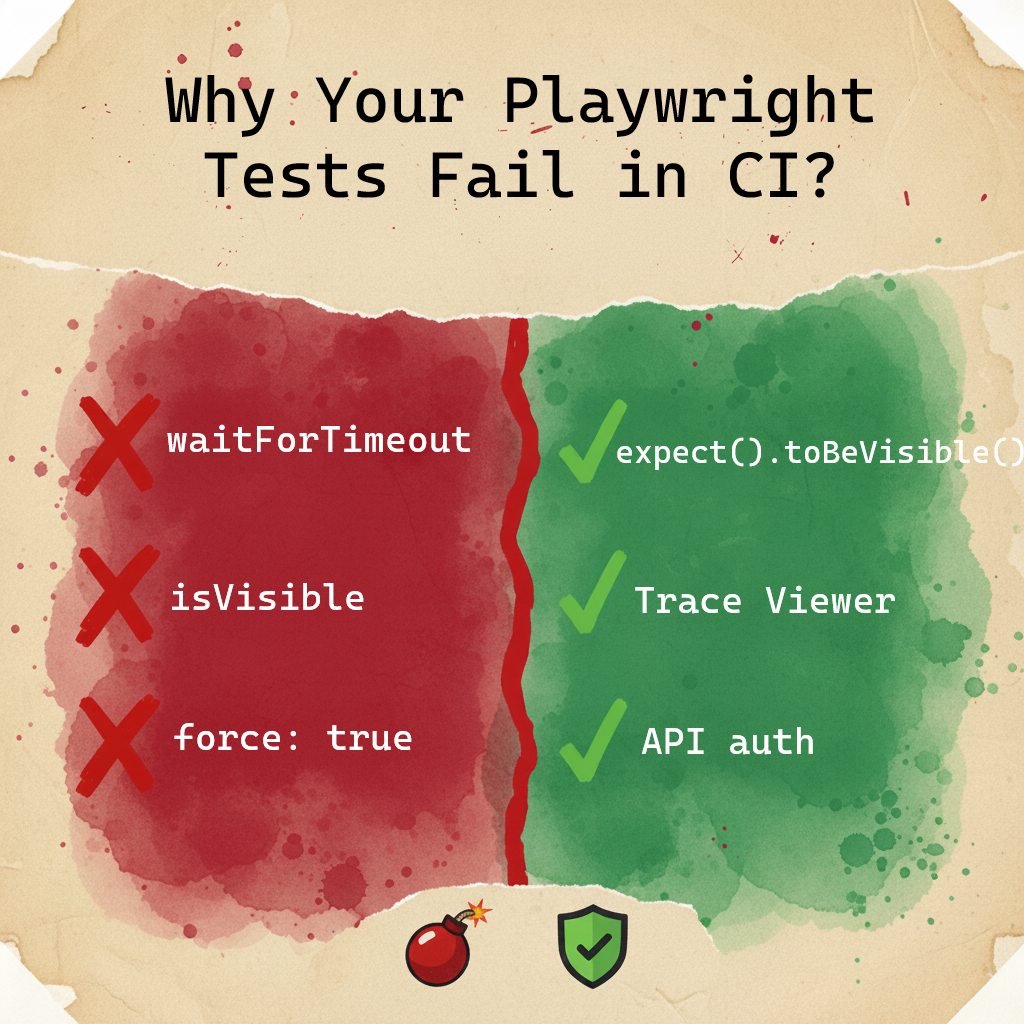
  1. Use Dependency Projects instead of globalSetup — if the environment is down, stop immediately instead of running 1000 failing tests
  2. Locator priority: getByRole > getByLabel > getByTestId. CSS selectors — last resort only
  3. Never use isVisible() in assertions — it’s a snapshot. Use Web-first assertions that wait
  4. Block analytics and tracking scripts with page.route — they cause networkidle to hang
  5. Trace Viewer is your debugging tool. Screenshots show you what, traces show you why
  6. Always authenticate via API, not UI — 50ms vs 5 seconds, per test

Your local machine is fast. CI is not. Less CPU, higher latency between services, multiple parallel processes all competing for resources. Asynchronous problems exist locally too — a powerful machine and fast network just hide them. When conditions get slightly worse, timings fall apart.

This is why “works on my machine” is such a common story in test automation.


When your staging environment goes down at night, do you want to run 1000 tests just to get 1000 failures? Of course not. But that’s exactly what happens without a proper dependency chain.

The solution: Dependency Projects

Instead of one big globalSetup file, build a dependency graph in your Playwright config:

playwright.config.ts
export default defineConfig({
projects: [
// Step 1: Authenticate and save session
{
name: 'auth-setup',
testMatch: /.*\.auth\.setup\.ts/,
},
// Step 2: Check if the environment is actually alive
{
name: 'healthcheck',
testMatch: /.*\.health\.setup\.ts/,
dependencies: ['auth-setup'],
},
// Step 3: Only run real tests if steps 1 and 2 passed
{
name: 'chromium',
use: { ...devices['Desktop Chrome'] },
dependencies: ['healthcheck'],
},
],
});

If auth fails or the environment is down — Playwright stops immediately. No wasted CI minutes, no flood of useless alerts.

Why not globalSetup?

globalSetup gives you dry logs when something fails. Dependency Projects give you full Trace Viewer support — you can see exactly what happened during setup: network requests, screenshots, console errors. And you can run just one project in isolation: npx playwright test --project=auth-setup.


UI login is slow. A full page load with all assets and rendering takes 2–5 seconds. An API login call takes 50–100ms. At CI scale, this difference adds up fast.

More importantly: you shouldn’t be testing your login form 500 times. Test it once, in a dedicated test. For everything else, just reuse the session.

auth.setup.ts
test('authenticate', async ({ request }) => {
// Direct API call — no browser rendering needed
await request.post('/api/login', {
data: { username: 'user@example.com', password: 'secret' },
});
// Save cookies and storage state for all other tests
await request.storageState({ path: '.auth/user.json' });
});

Then in your config:

use: {
storageState: '.auth/user.json',
}

Every test now starts already authenticated. Zero UI login overhead.


Rule #3: Use the Right Locators — and Know Why

Section titled “Rule #3: Use the Right Locators — and Know Why”

A locator isn’t just a way to find an element. It’s a statement about what your test actually cares about. The wrong locator makes tests brittle. The right locator makes failures meaningful.

Why getByRole is the default choice

getByRole finds elements by their semantic role in the accessibility tree — button, heading, link, dialog. This matters because role is tied to behavior, not implementation. A CSS class can be renamed, a DOM structure can be refactored — but if the element is still a button, getByRole still finds it.

One important nuance: getByRole often takes a { name: '...' } parameter to narrow down which element you mean. That name comes from the button’s text or aria-label. If you rely on visible text and the app is multilingual — that name changes per locale, and your locator breaks. The role survives translation. The name doesn’t.

There’s a bonus: if getByRole can’t find your element, it often means the element has no semantic role — which is an accessibility bug. Your test is catching a real problem.

// Finds the button regardless of CSS class or DOM structure
await page.getByRole('button', { name: 'Place order' }).click();

Why getByLabel for form fields

getByLabel finds inputs by their associated label text. The label is a contract between the UI and the user — if it changes, that’s a UX change worth knowing about. This locator also catches cases where a field exists but has no label — another real bug.

await page.getByLabel('Email address').fill('user@example.com');

When getByTestId is the right answer

getByTestId is stable but semantically blind — it finds the element regardless of its role, text, or visual state. That’s a feature in specific situations:

  • Ant Design, Material UI, or other component libraries — these generate DOM structures where a single Select or Combobox contains multiple elements with the same role: a hidden native input, a trigger button, a text field. getByRole(‘combobox’) picks the first one in DOM order, which is often not the one you need to interact with — and it can change between library versions
  • Multi-language apps — button text changes per locale; getByTestId doesn’t care
  • A/B tests or personalization — the label varies per user variant
  • Icon buttons without text — SVG icons with no aria-label
// Stable regardless of language or variant
await page.getByTestId('checkout-button').click();

The tradeoff: getByTestId passes even if the button is visually broken, hidden by styles, or inaccessible to screen readers. You’re trading semantic coverage for stability. That’s a conscious choice, not a default.

The decision algorithm

  1. Try getByRole first — if the element has a semantic role, this is always better
  2. If text is dynamic (translations, A/B) or the element has no stable role — ask your developer to add an aria-label. Then use getByRole(..., { name: 'aria-label value' })
  3. If that’s not possible — use getByTestId without guilt
// Both of these use getByRole — role is stable
await page.getByRole('button', { name: 'Place order' }).click();
await expect(page.getByRole('heading')).toHaveText('Order confirmed');
// Both of these use getByTestId — text is dynamic
await page.getByTestId('checkout-button').click();
await expect(page.getByTestId('order-status')).toHaveText('Confirmed');

Rule #4: Stop Using isVisible() in Assertions

Section titled “Rule #4: Stop Using isVisible() in Assertions”

This is one of the most common sources of flakiness. Here’s why:

// This checks visibility at this exact millisecond
const isVisible = await page.getByRole('button').isVisible();
expect(isVisible).toBeTruthy();

If the page is still loading at that millisecond — the test fails. Not because something is broken, but because you asked too early.

Web-first assertions wait for you:

// This polls the DOM until the condition is true (or timeout)
await expect(page.getByRole('button')).toBeVisible();

The difference: expect(locator).toBeVisible() keeps checking every ~100ms until the element appears or the timeout is reached. It’s a built-in retry loop.

Quick reference:

Instead of thisUse this
await loc.isVisible()await expect(loc).toBeVisible()
await loc.textContent() === '...'await expect(loc).toHaveText('...')
await loc.count()await expect(loc).toHaveCount(3)
await loc.isChecked()await expect(loc).toBeChecked()
await loc.isEnabled()await expect(loc).toBeEnabled()

One exception: isVisible() is fine inside conditional logic — for example, to decide whether to close a cookie banner before continuing. Just don’t use it as a final assertion.


Rule #5: waitForTimeout is not a solution — here’s what to use instead

Section titled “Rule #5: waitForTimeout is not a solution — here’s what to use instead”

If you feel the urge to add waitForTimeout — stop. In 95% of cases there’s a better tool. The question is which one.

Use web-first assertions (toBeVisible, toHaveText, toHaveURL, etc.) when:

  • An element appears or disappears after a click
  • The URL changes after navigation
  • Text updates after data loads
  • A form shows a validation error
  • Anything that is visible in the UI

This covers the vast majority of cases. Web-first assertions have built-in retry — you don’t need anything else.

// Built-in retry — no polling needed
await expect(page.getByText('Order confirmed')).toBeVisible();
await expect(page).toHaveURL('/dashboard');

Use expect.poll when:

  • A background job updated order status in the DB, and the UI only shows a spinner
  • A payment webhook arrived from Stripe or PayPal and updated the payment status
  • A message was processed from a queue (Kafka, RabbitMQ) by another service

The common pattern: you clicked something, the UI shows nothing useful (or just a spinner), but something should have happened behind the scenes. You can only verify it via a direct API call.

// Background job updated order status — not visible in UI
await expect
.poll(
async () => {
const response = await request.get(`/api/orders/${orderId}`);
const order = await response.json();
return order.status;
},
{
message: 'Waiting for order status to become PAID',
timeout: 30_000,
},
)
.toBe('PAID');

Use expect.toPass when:

  • You need to click a button repeatedly until the UI shows the expected result
  • An action needs to be repeated until a condition is met
// Click Refresh until status appears in UI
await expect(async () => {
await page.getByRole('button', { name: 'Refresh' }).click();
await expect(page.getByText('Status: Ready')).toBeVisible();
}).toPass({
intervals: [1_000, 2_000, 5_000],
timeout: 15_000,
});

Warning: If you find yourself writing expect.poll more than once or twice per test file — stop and reconsider. Either the UI is missing proper loading indicators, or the architecture needs rethinking. expect.poll is a last resort, not a default tool.


Rule #6: Block Analytics and Tracking Scripts

Section titled “Rule #6: Block Analytics and Tracking Scripts”

Your app loads Google Analytics, a support chat widget, maybe a heatmap tool. These services are slow, sometimes unreliable, and completely irrelevant to what you’re testing. They also interfere with networkidle waits.

Block them:

// In your fixture or beforeEach
await page.route(/google-analytics\.com|intercom\.io|hotjar\.com/, (route) => {
// Use fulfill instead of abort so the app doesn't hang waiting for a response
route.fulfill({ status: 200, body: 'ok' });
});

Watch out for fonts: Blocking external fonts can cause layout shifts, which may trigger Playwright’s stability checks and slow things down. Either allow fonts through or make sure your app handles missing fonts gracefully.


Rule #7: Use Trace Viewer, Not Screenshots

Section titled “Rule #7: Use Trace Viewer, Not Screenshots”

When a test fails in CI, a screenshot shows you what the page looked like. Trace Viewer shows you why it failed.

A screenshot: a frozen image of a page that looks fine.

Trace Viewer: every action, every network request, every console error, the DOM state before and after each step — all in a timeline you can scrub through.

Enable it in your config:

playwright.config.ts
use: {
// Only save traces when tests fail — keeps your artifacts small
trace: 'retain-on-failure',
screenshot: 'only-on-failure',
}

What to look for in Trace Viewer:

  • Actionability tab: If a click didn’t work, this tells you exactly which element was blocking it (a loading skeleton, an overlay, a tooltip)
  • Network tab: See which API calls were slow or failed
  • Console tab: See JavaScript errors that don’t show up in your test output
  • Snapshots: The actual DOM state at each step — you can open DevTools on a past moment in time

When a test fails because a button was “covered by another element” — Trace Viewer shows you the exact element, with a red dot on the snapshot. No guessing required.


Hydration: Why Clicks Sometimes Do Nothing

Section titled “Hydration: Why Clicks Sometimes Do Nothing”

If you work with React, Next.js, Vue, or Nuxt — you’ve probably seen this: Playwright clicks a button, no error is thrown, but nothing happens.

This is hydration. The server sends HTML that looks like a working page, but the JavaScript hasn’t loaded yet. The button exists in the DOM but has no event listeners. Playwright clicks it, the click lands, and nothing responds.

The fix: Wait for a signal that the app is ready before interacting:

// Wait for a loading indicator to disappear
await expect(page.locator('#global-loader')).toBeHidden();
// Or wait for a class that your app adds when hydration is complete
await page.waitForSelector('.app-ready', { state: 'attached' });

About force: true:

You might be tempted to use force: true to bypass Playwright’s checks. Before you do, understand what you’re skipping. Playwright’s actionability checks verify that an element is:

  • Visible — not hidden by CSS or outside the viewport
  • Stable — not moving (animations, transitions)
  • Enabled — not disabled or read-only
  • Receiving events — not covered by another element like a modal or overlay

When you add force: true, all four checks are disabled. You’re no longer testing what a real user experiences — you’re manipulating the DOM directly. The test passes, the user is still stuck.

There is one legitimate exception: hidden file inputs (<input type="file">). Browsers render this element as a native, hard-to-style button. Developers often intentionally hide it (make it invisible) and draw a custom button on top, consistent with the rest of the design. In such cases, Playwright cannot interact with the hidden element without force: true.

// force: true required — file input is visually hidden by design,
// replaced by a styled button that triggers it
await page.locator('input[type="file"]').setInputFiles('file.pdf', { force: true });

For everything else — find the root cause. If an element is covered, wait for the overlay to disappear. If it’s disabled, wait for the enabled state. force: true without a comment is a red flag in code review.


Don’t explain these rules in every code review. Automate it:

.eslintrc.js
module.exports = {
extends: ['plugin:playwright/recommended'],
rules: {
'playwright/no-wait-for-timeout': 'error', // No sleeps
'playwright/no-focused-test': 'error', // No test.only in commits
'playwright/no-page-pause': 'error', // No page.pause() in commits
'playwright/prefer-web-first-assertions': 'warn', // Nudge toward better assertions
'playwright/no-force-option': 'warn', // Flag force: true usage
},
};

error for things that definitely break your tests or CI. warn for architectural debt that’s worth addressing but not blocking.

One more thing: rules exist to be broken consciously. If you’re working with a component library that generates dynamic selectors you can’t control, // eslint-disable-next-line is sometimes the honest answer. The key word is consciously — disable the rule, write a comment explaining why, and move on. What you want to avoid is blanket disables that hide real problems.


Migration Cheat Sheet: Old Playwright vs Current

Section titled “Migration Cheat Sheet: Old Playwright vs Current”

If you’re coming from Selenium or older Playwright patterns, here’s the direct translation:

What you used to doWhat to do nowWhy
page.$(), page.$$()getByRole(), getByLabel(), getByTestId()Lazy evaluation + automatic retry on assertions
waitForSelector()Not needed — built into actionsPlaywright waits for actionability before every click/fill
waitForTimeout(3000)expect(loc).toBeVisible()Polls until ready instead of guessing
waitForNavigation()await expect(page).toHaveURL('/dashboard')toHaveURL has built-in polling, no race condition
isVisible() in assertionsexpect(loc).toBeVisible()One is a snapshot, the other waits
console.log('HERE')Trace ViewerFull timeline with network, DOM, console — in CI

SymptomLikely causeFix
Click lands, nothing happensHydrationWait for app-ready signal
Timeout in CI, passes locallySlow network / analyticsBlock third-party scripts
Selector not found after deployFragile CSS / text changedUse data-testid or getByRole
Random failures, no patternRace condition in assertionsSwitch to Web-first assertions
All tests fail at onceEnvironment downAdd healthcheck dependency

These six rules cover the most common sources of flakiness. Once you have them in place, the next level is async handling at scale — expect.poll, idempotency keys, contract testing, and data hygiene.

Want to go deeper into the architecture? Check out the advanced version of this guide: Playwright CI: What Senior Engineers Do Differently


All patterns in this article are implemented in the Playwright BDR Template on GitHub — clone it and see how everything fits together.
Why flat test architectures fail: Moving beyond POM to a 3-layer BDR approach

Why flat test architectures fail: Moving beyond POM to a 3-layer BDR approach PRO IMPLEMENTATION

Section titled “Why flat test architectures fail: Moving beyond POM to a 3-layer BDR approach ”

This is a technical deep dive into BDR’s layered architecture. For an introduction to why BDR exists and how the @Step decorator works internally, see Beyond Cucumber: A Type-Safe 4-Layer BDD Architecture with Playwright.

Note: BDR (Behavior-Driven Living Requirements) is my own architectural approach to organizing Playwright tests — a Cucumber-free alternative to BDD that I designed and documented at bdr-methodology.dev.


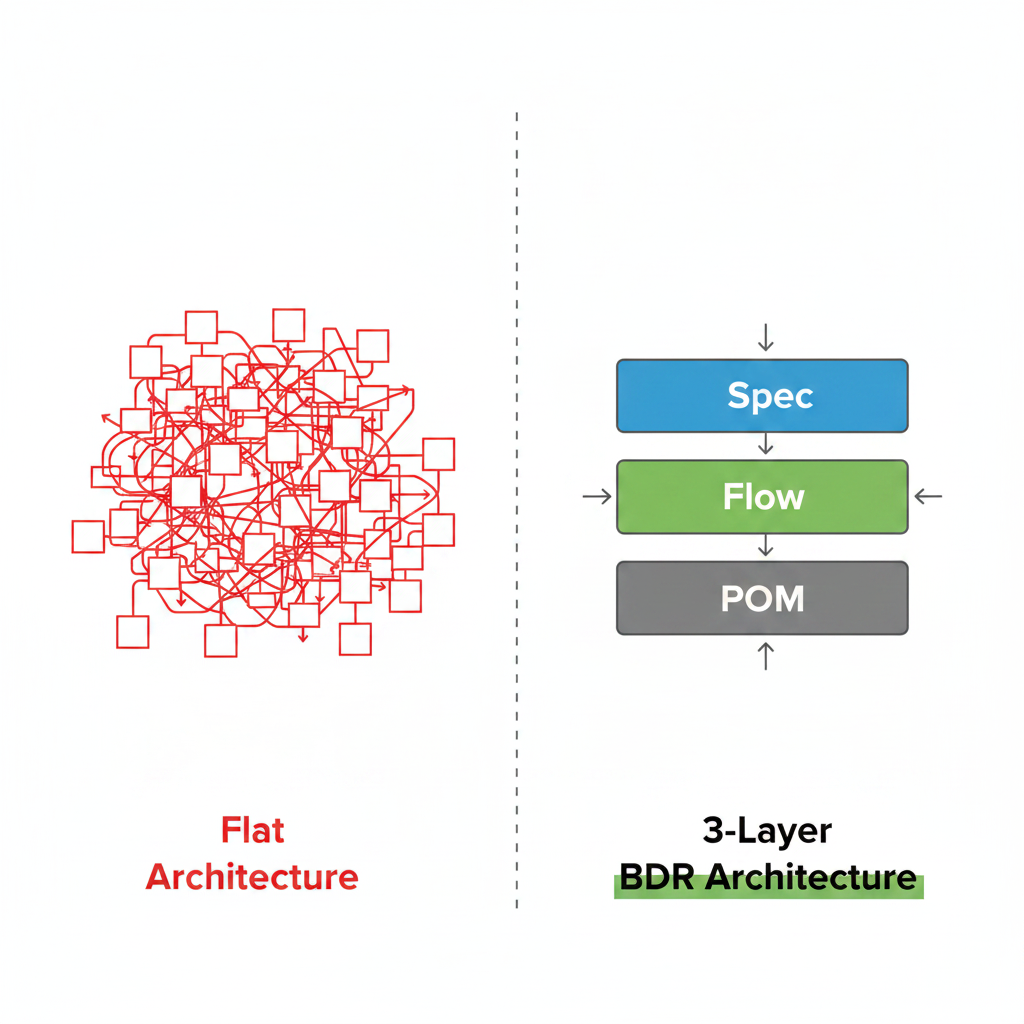
Most Playwright projects start with two layers: Page Objects and tests. It works fine at twenty tests. At two hundred, it collapses.

Here’s a typical flat architecture failure:

// The test knows too much
test('User can complete purchase', async ({ page }) => {
// Setup — copy-pasted from 40 other tests
await page.goto('/login');
await page.getByLabel('Email').fill('user@example.com');
await page.getByLabel('Password').fill('password123');
await page.getByRole('button', { name: 'Log In' }).click();
// The actual test
await page.getByTestId('add-to-cart').click();
await page.getByTestId('checkout-submit').click();
await page.getByLabel('Card Number').fill('4242424242424242');
await page.getByRole('button', { name: 'Pay' }).click();
await expect(page.getByText('Order confirmed')).toBeVisible();
});

When this test fails, your report shows:

✗ Test: User can complete purchase
- goto
- fill
- fill
- click
- click
- click
- fill
- click

Which click failed? What was the state? What was being tested — login, cart, or payment? Nobody knows without reading the entire test.


The standard advice is “add a Flow layer”. But most teams add it for the wrong reason — DRY. They think “I keep copy-pasting the cart setup, let me extract it into a Flow.”

DRY is a nice side effect. It’s not the point.

The real reason for three layers is separation of abstraction levels. Each layer speaks a different language:

  • POM speaks the language of markup: “click this button”, “fill this field”, “find this element”
  • Flow speaks the language of business: “add product to cart”, “place order”, “process payment” — these are self-contained business entities, not just reusable helpers
  • Spec speaks the language of scenarios: assembles business entities like Lego to express intent

Here’s what that looks like in practice with an e-commerce app:

// Three separate business entities — each its own Flow
class CartFlow { async addProduct(product: Product) {...} }
class CheckoutFlow { async placeOrder(address: Address) {...} }
class PaymentFlow { async pay(card: Card) {...} }
// Spec assembles them for different scenarios
test('Full purchase flow', async ({ cart, checkout, payment }) => {
await cart.addProduct(laptop);
await checkout.placeOrder(address);
await payment.pay(card);
});
test('Cart total updates correctly', async ({ cart }) => {
await cart.addProduct(laptop);
await cart.addProduct(mouse);
await cart.verifyTotal(1225);
});

Same building blocks, different scenarios. CartFlow exists not because you’ll reuse it (though you will), but because “managing the cart” is a real business concept with its own rules and boundaries.

This distinction matters because it changes how you design Flows. A DRY-driven Flow is shaped by what’s convenient to reuse. A business-entity Flow is shaped by what the business actually does. The second one is stable. The first one drifts.

Here’s the precise responsibility of each layer:

Job: Encapsulate raw Playwright interactions. Know about selectors. Know nothing else.

pom/CartPage.ts
export class CartPage {
constructor(private page: Page) {}
// Exposes WHAT can be done, not HOW the business uses it
get checkoutButton(): Locator {
return this.page.getByTestId('checkout-submit');
}
async clickCheckout() {
await this.checkoutButton.click();
}
}

What it must NOT do:

// WRONG: POM containing business logic
async proceedToCheckoutAndVerify() {
await this.checkoutButton.click();
// This is business logic — it doesn't belong here
await expect(this.page).toHaveURL('/payment');
}

Why? Because the URL /payment is a business rule, not a UI detail. If the business decides to show a modal instead of navigating — your POM shouldn’t need to change.


Job: Orchestrate business processes using Page Objects. Know about business rules. Know nothing about selectors.

flows/CheckoutFlow.ts
export class CheckoutFlow {
// Dependency Injection: receives ready Page Object instances
constructor(
private cartPage: CartPage,
private paymentPage: PaymentPage,
) {}
async completePurchase(orderData: OrderData) {
await test.step('WHEN: User proceeds to checkout', async () => {
await this.cartPage.clickCheckout();
// Business rule: payment form must appear
await expect(this.paymentPage.form).toBeVisible();
});
await test.step('WHEN: User fills payment details', async () => {
// Data comes from outside — no hardcoded values in Flows
await this.paymentPage.fillDetails(orderData.card);
await this.paymentPage.submit();
});
}
}

What it must NOT do:

// WRONG: Flow reaching into selectors
async completePurchase(orderData: OrderData) {
// This bypasses the POM entirely — now Flow is coupled to selectors
await this.page.getByTestId('checkout-submit').click();
}

Why does this matter? If checkout-submit becomes checkout-btn, you now have to find and fix this in every Flow that touches it — instead of fixing it once in CartPage.


Job: Express business intent. Read like a user story. Know nothing about implementation.

tests/checkout.spec.ts
test('User can complete a purchase', async ({ checkoutFlow }) => {
await BDR.Given('the user has items in their cart', async () => {
await checkoutFlow.addProductToCart(testProduct);
});
await BDR.When('the user completes the purchase', async () => {
await checkoutFlow.completePurchase(testOrderData);
});
await BDR.Then('the order is confirmed', async () => {
await checkoutFlow.verifyOrderConfirmation();
});
});

A non-engineer can read this and understand exactly what’s being tested. That’s the goal.

What it must NOT do:

// WRONG: Test reaching into POM directly
test('User can complete a purchase', async ({ page }) => {
// Test now knows about selectors — living documentation is broken
await page.getByTestId('checkout-submit').click();
});

Here’s what actually happens when teams blur the boundaries:

Month 1: “It’s just one selector in the Flow, it’s fine.”

Month 2: The selector changes. You fix it in the POM — but the Flow breaks too. Two places to fix instead of one.

Month 3: A new developer adds business logic to the POM because “that’s where the page stuff is”. Now the POM has assertions.

Month 6: Every layer knows about every other layer. Changing anything breaks everything. Nobody knows where to look when a test fails.

The three-layer rule isn’t aesthetic. It’s the thing that keeps your test suite maintainable at scale.


What the report looks like with proper layering

Section titled “What the report looks like with proper layering”

With this architecture, your Allure report becomes a business document:

✓ User can complete a purchase
✓ GIVEN: The user has items in their cart
📊 Cart Contents: [Laptop Pro x1, $1200]
✓ WHEN: User proceeds to checkout
✓ WHEN: User fills payment details
📊 Payment Data: [Card: **** 4242, Amount: $1200]
✓ THEN: Order is confirmed
📊 Order Summary: [ID: #12345, Status: confirmed]

When a test fails:

✗ User can complete a purchase
✓ GIVEN: The user has items in their cart
✗ WHEN: User proceeds to checkout
📊 Cart State before click: [button status: disabled, reason: stock_unavailable]
❌ Expected payment form to be visible

Thirty seconds from opening the report to understanding the failure. No code diving required.


Fixtures: the dependency injection container

Section titled “Fixtures: the dependency injection container”

The glue that makes all this work without boilerplate is Playwright’s fixture system:

fixtures/index.ts
import { test as base } from '@playwright/test';
import { CartPage } from '../pom/CartPage';
import { PaymentPage } from '../pom/PaymentPage';
import { CheckoutFlow } from '../flows/CheckoutFlow';
type Fixtures = {
cartPage: CartPage;
paymentPage: PaymentPage;
checkoutFlow: CheckoutFlow;
};
export const test = base.extend<Fixtures>({
cartPage: async ({ page }, use) => {
await use(new CartPage(page));
},
paymentPage: async ({ page }, use) => {
await use(new PaymentPage(page));
},
// Flow receives its Page Objects automatically via DI
checkoutFlow: async ({ cartPage, paymentPage }, use) => {
await use(new CheckoutFlow(cartPage, paymentPage));
},
});

Your test declares what it needs — Playwright provides it. Fresh instance per test, no shared state, no manual wiring.


Anti-pattern 1: The God Test The test does everything: setup, interaction, assertion, cleanup — all with raw Playwright calls. Sign: test file is 100+ lines.

Anti-pattern 2: The Smart POM Page Object contains assertions, navigation logic, or business rules. Sign: expect() calls inside a POM method.

Anti-pattern 3: The Leaky Flow Flow accesses page directly or imports locators. Sign: this.page.getBy... inside a Flow class.

Anti-pattern 4: The Copy-Paste Chain Same setup code (login, navigate, seed data) repeated across test files. Sign: changing one thing requires a grep-and-replace.


Each layer talks only to the layer directly below it. Spec → Flow → POM. Never skip a level. Never reach up.

Follow this and your test suite stays maintainable. Violate it and you’ll be rewriting everything in six months.


This architecture is implemented in the BDR Playwright template — ready to clone and use:


I’m open to QA Automation roles — remote, contract, or full-time. dmitryAQA@outlook.com | @DmitryMeAQA

Nobody reads your test reports. Here's how I re-engineered them with a 3-layer architecture

Nobody reads your test reports. Here’s how I re-engineered them with a 3-layer architecture. CONCEPT

Section titled “Nobody reads your test reports. Here’s how I re-engineered them with a 3-layer architecture. ”

Note: BDR (Behavior-Driven Living Requirements) is my own architectural approach to organizing Playwright tests — a Cucumber-free alternative to BDD that I designed and documented at bdr-methodology.dev.


Monday morning. Coffee. You open GitLab — and CI is red. Classic.

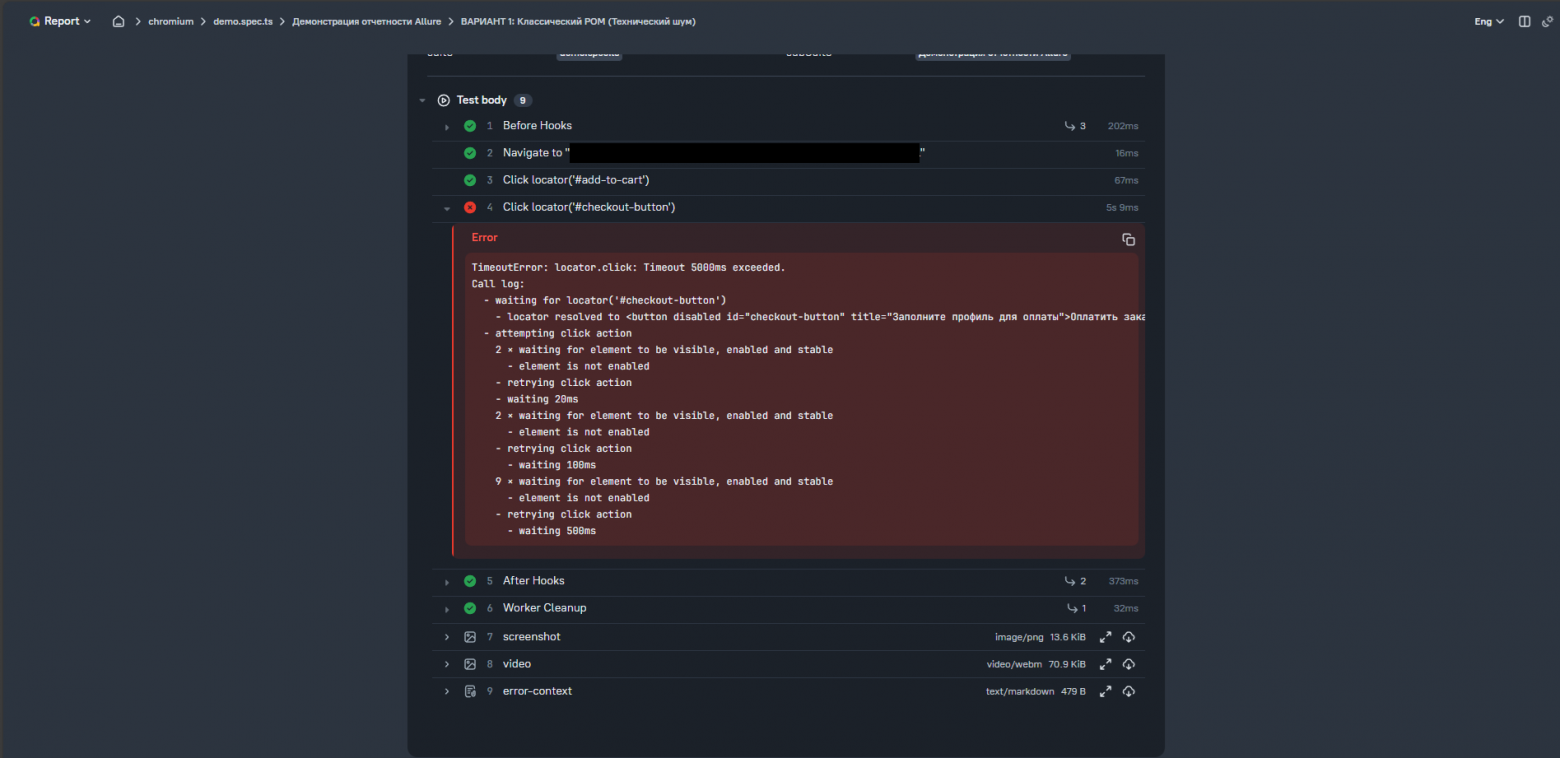
You open the report. There’s a wall of text, five screens long. Somewhere in there: TimeoutError on a click. The selector looks fine — data-testid="checkout-submit". But why did it fail? Was the database down? Did the frontend not render the button? Did some API return an unexpected response?

To find out, you have to dive into the test code and debug it line by line. Mentally reconstruct what the app state was. Read through fifty lines of setup just to understand what was being tested.

This is the real cost of unreadable test reports. Not the failure itself — but the hour you spend just figuring out what failed and why.


The classic POM: looks clean, reports terribly

Section titled “The classic POM: looks clean, reports terribly”

Most teams start here. You write a clean Page Object:

import { Page } from '@playwright/test';
export class CartPage {
constructor(private readonly page: Page) {}
async clickCheckout() {
await this.page.getByTestId('checkout-submit').click();
}
}

The code looks great. Clean, atomic, no logic in the wrong place.

But the report? It looks like this:

✓ Test: User can complete purchase
- clickCheckout
- fillDetails
- submit

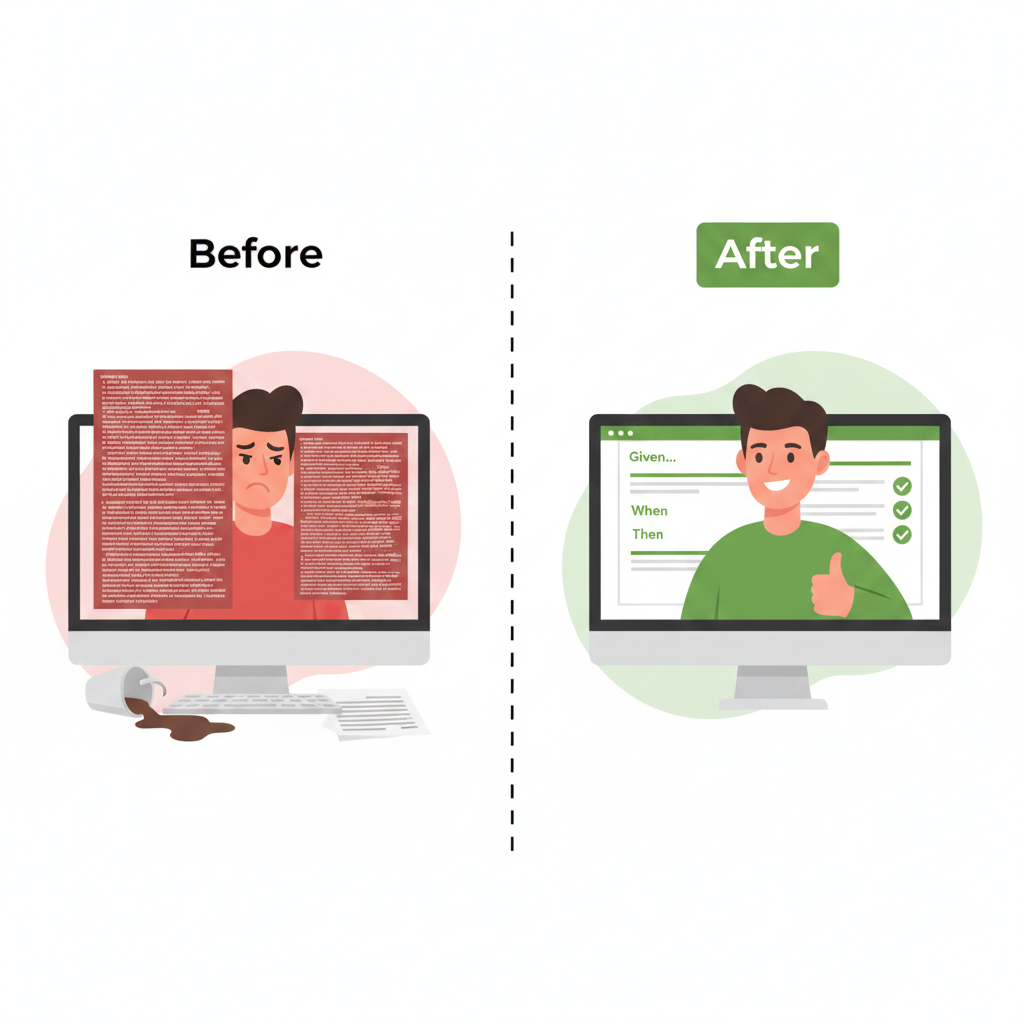
How do you understand the context from that in five seconds? You can’t. The developer opens the test code, reads through it, swears, mentally reconstructs what was happening. Time gone.


Example of a bad report — raw method names, no context


“Just use test.step everywhere” — don’t do this

Section titled ““Just use test.step everywhere” — don’t do this”

Someone will suggest: “Just wrap everything in test.step, what’s the problem?”

Don’t. It works for three tests. At a hundred, it kills the project.

Copy-paste will destroy you. The login → cart → checkout chain ends up in most test files. Login logic changes? Congratulations, you’re editing fifty files by hand.

Maintenance becomes a nightmare. Checkout now requires a “agree to terms” checkbox? Go insert await page.click(...) in a hundred places.

Tests lose their meaning. A ten-line test balloons to fifty lines of await test.step(...) noise. The actual business intent disappears behind the boilerplate.


The fix: a Flow layer between POM and tests

Section titled “The fix: a Flow layer between POM and tests”

The solution is a layer between “dumb” pages and tests. But here’s the key insight most teams miss: a Flow is not just a reusable helper. It’s a business entity.

Think of an e-commerce app. You have three distinct business actions:

  • Adding a product to the cart — a self-contained business event
  • Placing an order — another self-contained business event
  • Processing payment — yet another

Each of these deserves its own Flow class. Not because of DRY (though that’s a nice side effect), but because each one represents a real business concept with its own rules and responsibilities.

Then your Spec just assembles them like Lego:

// Scenario 1: full happy path
await cart.addProduct(laptop);
await checkout.placeOrder(address);
await payment.pay(card);
// Scenario 2: just verify cart behaviour
await cart.addProduct(laptop);
await cart.verifyTotal(1200);

Same building blocks, different scenarios. The Spec doesn’t care how “add product” works internally — it just uses the business entity.

This distinction has a real consequence. If the business process for checkout changes from one screen to three, your test remains the same:

await checkoutFlow.completePurchase(orderData);

You change the implementation inside the Flow, but the test — the business intent — stays untouched. That’s the difference between a brittle script and a resilient test framework.

A Flow is a conductor — it knows nothing about selectors or clicks. It only knows about the business process.

export class CheckoutFlow {
constructor(
private cartPage: CartPage,
private paymentPage: PaymentPage,
) {}
async completePurchase(orderData: OrderData) {
await test.step('WHEN: User proceeds to checkout', async () => {
await this.cartPage.clickCheckout();
await expect(this.paymentPage.form).toBeVisible();
});
await test.step('WHEN: User fills payment details', async () => {
await this.paymentPage.fillDetails(orderData.card);
await this.paymentPage.submit();
});
}
}

Now the report looks like this:

✓ Test: User can complete purchase
✓ WHEN: User proceeds to checkout
✓ WHEN: User fills payment details
✓ THEN: Order confirmation is displayed

Clean report with business-level step names


Test failed? The developer opens the report. Thirty seconds — and they know exactly which business step broke. No code diving required.


Why three layers — and what breaks if you skip one

Section titled “Why three layers — and what breaks if you skip one”

This is the part most teams skip. They add a Flow layer but let the boundaries blur. A month later, everything is tangled again.

Here’s why each layer exists and what happens when you violate it:

POM knows about selectors. Nothing else. If your POM starts containing business logic — “click checkout AND verify the payment page appeared” — you’ve coupled UI structure to business rules. Change the UI, and your business logic breaks with it.

Flow knows about business processes. Nothing about selectors. If your Flow starts calling page.getByTestId(...) directly, you’ve lost the separation that makes refactoring safe. Now a selector change requires touching both the POM and the Flow.

Spec knows about intent. Nothing about implementation. Your test should read like a user story. If it’s full of .fill() and .click() calls, a non-engineer can’t read it — and you’ve lost the “living documentation” value entirely.

The rule: each layer talks only to the layer directly below it. Spec → Flow → POM. Never skip a level.


With this architecture, your Allure report stops being a log of browser actions and becomes a record of business events.

When a test fails, the report answers three questions immediately:

  • What was being tested (the test name)
  • Where it broke (the step name)
  • What the state was (attached tables with data)

That’s the difference between a report that developers ignore and one they actually use.


This architecture is the foundation of BDR — Behavior-Driven Living Requirements.


I’m open to QA Automation roles — remote, contract, or full-time. dmitryAQA@outlook.com | @DmitryMeAQA

Beyond Cucumber: A Type-Safe 4-Layer BDD Architecture with Playwright

Beyond Cucumber: A Type-Safe 4-Layer BDD Architecture with Playwright PRO IMPLEMENTATION

Section titled “Beyond Cucumber: A Type-Safe 4-Layer BDD Architecture with Playwright ”

If you want the story behind why BDR exists — I wrote about it this Article. This article is the technical deep dive: architecture, real code, and implementation details.

Note: BDR (Behavior-Driven Living Requirements) is my own architectural approach to organizing Playwright tests — a Cucumber-free alternative to BDD that I designed and documented at bdr-methodology.dev.


You write your scenario in a .feature file, then wire it to TypeScript in a step definition file, and your IDE has no idea they’re connected. Rename a method — nothing breaks at compile time. Run your tests — everything breaks at runtime.

BDR solves this by keeping Given/When/Then directly in TypeScript. Same BDD philosophy, zero translation layer.


BDR enforces strict separation of concerns across 4 layers. Each layer has one job:

LayerResponsibilityExample
SpecificationBusiness intent. Reads like a user story.test('User can log in')
ScenarioGiven/When/Then stepsBDR.When('User enters credentials', ...)
Action (Flow)Reusable business logicloginFlow.submitCredentials(user)
Technical (POM)Raw selectors and Playwright interactionspage.getByLabel('Username').fill(value)

The rule: no layer reaches down more than one level. Your Specification layer never touches selectors. Your POM layer never knows about business logic.

This means if you switch from Playwright to Selenium tomorrow — only the Technical layer changes. Business scenarios stay untouched.


Instead of Gherkin strings wired to step definitions, BDR gives you a fluent API:

bdr/bdr.ts
const createStep = (prefix: string) => {
return async (name: string, ...args: any[]): Promise<any> => {
const body = args.pop();
if (typeof body !== 'function') {
throw new Error(`BDR.${prefix}: Last argument must be a function`);
}
const stepName = `${prefix.toUpperCase()}: ${formatTitle(name, args)}`;
const executionFn = async () => (body.length > 0 ? body(...args) : body());
return test.step(stepName, executionFn);
};
};
export const BDR = {
Given: createStep('Given'),
When: createStep('When'),
Then: createStep('Then'),
And: createStep('And'),
};

Usage in a test:

test('User can log in with valid credentials', async ({ loginPage, page }) => {
await BDR.Given('the user is on the login page', async () => {
await loginPage.goto();
});
await BDR.When('the user enters valid credentials', async () => {
await loginPage.login('testuser', 'password123');
});
await BDR.Then('the user is redirected to the dashboard', async () => {
await expect(page).toHaveURL('/dashboard');
});
});

Your IDE fully understands this. loginPage.login is a real TypeScript method — rename it and the IDE updates every reference instantly.


Smart title interpolation with formatTitle

Section titled “Smart title interpolation with formatTitle”

Step titles support argument interpolation — so your reports are always meaningful:

bdr/utils.ts
export function formatTitle(template: string, args: any[]): string {
let argIndex = 0;
return template.replace(/{(\d+|[\w.]*)}/g, (match, key) => {
if (key === '') {
return argIndex < args.length ? String(args[argIndex++]) : match;
}
const parts = key.split('.');
const index = parseInt(parts[0], 10);
if (!isNaN(index) && index >= 0 && index < args.length) {
let value = args[index];
for (let i = 1; i < parts.length; i++) {
if (value && typeof value === 'object') {
value = value[parts[i]];
} else return match;
}
return value !== undefined ? String(value) : match;
}
return match;
});
}

This supports three interpolation modes:

// Index-based
formatTitle('Login as {0}', ['admin']);
// → "Login as admin"
// Sequential
formatTitle('Filter by {} and {}', ['Electronics', 'price']);
// → "Filter by Electronics and price"
// Nested property access
formatTitle('Welcome {0.user.name}', [{ user: { name: 'John' } }]);
// → "Welcome John"

Your Allure report shows WHEN: Filter by Electronics and price — not a generic string, but a meaningful description of what actually happened.


For reusable business flows, BDR provides a @Step decorator that wraps class methods automatically:

bdr/decorators.ts
export function Step(title: string, options: StepOptions = {}) {
return function (...args: any[]) {
const wrapMethodInStep = (originalMethod: Function) => {
return async function (this: any, ...methodArgs: any[]) {
const stepName = formatTitle(title, methodArgs);
return test.step(stepName, async () => originalMethod.apply(this, methodArgs));
};
};
// Supports both Legacy and Stage 3 decorators
if (typeof args[1] === 'object' && 'kind' in args[1]) {
return wrapMethodInStep(args[0]); // Stage 3
}
if (typeof args[1] === 'string') {
const descriptor = args[2];
descriptor.value = wrapMethodInStep(descriptor.value);
return descriptor; // Legacy
}
};
}

Usage in a Flow class:

flows/ProductFlow.ts
export class ProductFlow {
constructor(private products: Product[]) {}
@Step('GIVEN: I have a product catalog with {0} items')
async logProducts(count: number) {
await attachTable('Source Product Catalog', this.products);
}
@Step('WHEN: I filter products by category "{0}"')
async filterByCategory(category: string) {
const filtered = this.products.filter((p) => p.category === category);
await attachTable(`Filtered Products: ${category}`, filtered);
return filtered;
}
@Step('THEN: The total price should be calculated')
async calculateTotalPrice() {
const total = this.products.reduce((sum, p) => sum + p.price, 0);
await attachTable('Price Summary', [
{ 'Total Items': this.products.length, 'Total Price': `$${total.toFixed(2)}` },
]);
return total;
}
}

Every public method is automatically wrapped in a named test.step. The report shows exactly which business action was running when something failed.


Fixtures inject Page Objects and Flows into tests automatically. No manual instantiation, no shared state between tests:

fixtures/index.ts
import { test as base } from '@playwright/test';
import { LoginPage } from '../pom/LoginPage';
import { ProductsPage } from '../pom/ProductsPage';
type MyFixtures = {
loginPage: LoginPage;
productsPage: ProductsPage;
};
export const test = base.extend<MyFixtures>({
loginPage: async ({ page }, use) => {
await use(new LoginPage(page));
},
productsPage: async ({ page }, use) => {
await use(new ProductsPage(page));
},
});
export { expect } from '@playwright/test';

Each test gets a fresh instance. No state leaking between tests. And because it’s TypeScript — if you remove a fixture, every test that depends on it fails at compile time, not at runtime.


This is where BDR goes beyond standard Playwright reporting. attachTable generates a styled HTML table and attaches it directly to the Allure report step:

bdr/tables.ts
export async function attachTable(name: string, data: any[]) {
if (!data || data.length === 0) return;
const html = generateHtmlTable(data);
await test.info().attach(name, {
body: Buffer.from(html),
contentType: 'text/html',
});
}
function generateHtmlTable(data: any[]): string {
const headers = Object.keys(data[0]);
const ths = headers.map((h) => `<th>${h}</th>`).join('');
const trs = data
.map((row) => {
const tds = headers
.map((h) => {
const val = row[h];
return `<td>${val === undefined || val === null ? '' : val}</td>`;
})
.join('');
return `<tr>${tds}</tr>`;
})
.join('');
return `
<html><head><style>
table { border-collapse: collapse; width: 100%; box-shadow: 0 2px 15px rgba(0,0,0,0.1); }
th { background-color: #2c3e50; color: #fff; padding: 12px 15px; text-transform: uppercase; }
td { padding: 12px 15px; border-bottom: 1px solid #ddd; }
tr:nth-child(even) { background-color: #f8f9fa; }
tr:hover { background-color: #f1f4f6; }
</style></head>
<body>
<table>
<thead><tr>${ths}</tr></thead>
<tbody>${trs}</tbody>
</table>
</body></html>`;
}

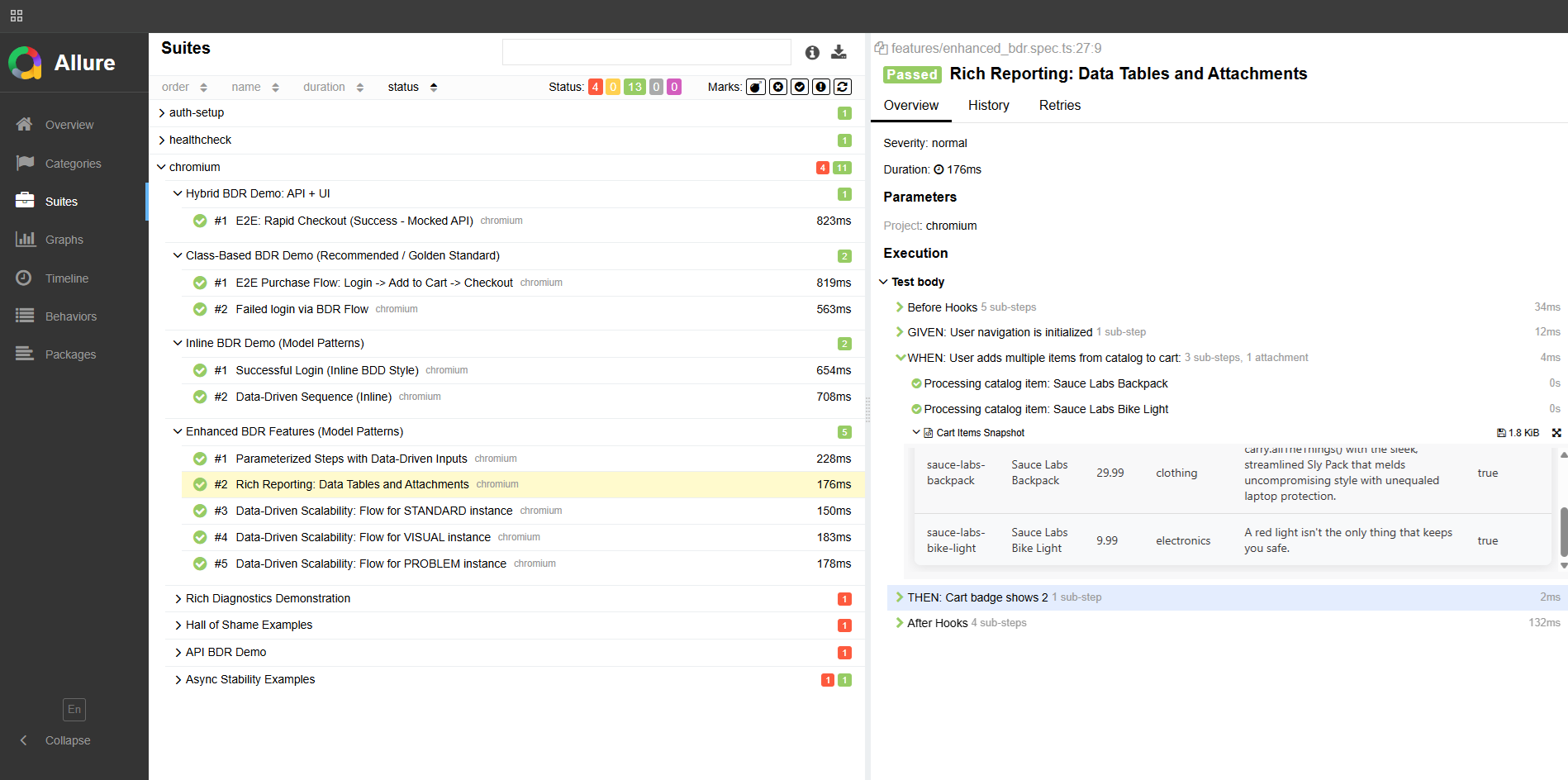
Here’s what this looks like in the report:


Allure report — test step with attachTable showing a styled HTML table inside the step


This is the diagnostic killer feature. When a test fails on a data mismatch, attachCompareTable shows you exactly which fields don’t match:

export async function attachCompareTable(name: string, expected: any, actual: any) {
const allKeys = Array.from(new Set([...Object.keys(expected), ...Object.keys(actual)]));
const comparisonData = allKeys.map((key) => {
const exp = expected[key];
const act = actual[key];
const isMatch = JSON.stringify(exp) === JSON.stringify(act);
return {
Field: key,
Expected: exp === undefined ? '<undefined>' : JSON.stringify(exp),
Actual: act === undefined ? '<undefined>' : JSON.stringify(act),
Result: isMatch ? '✅ MATCH' : '❌ MISMATCH',
};
});
await attachTable(name, comparisonData);
}

Instead of:

AssertionError: expected { role: 'admin' } to equal { role: 'user' }

You get a table in the report:

FieldExpectedActualResult
id”123""123”MATCH
emailjohn@example.com""john@example.comMATCH
role”user""admin”MISMATCH

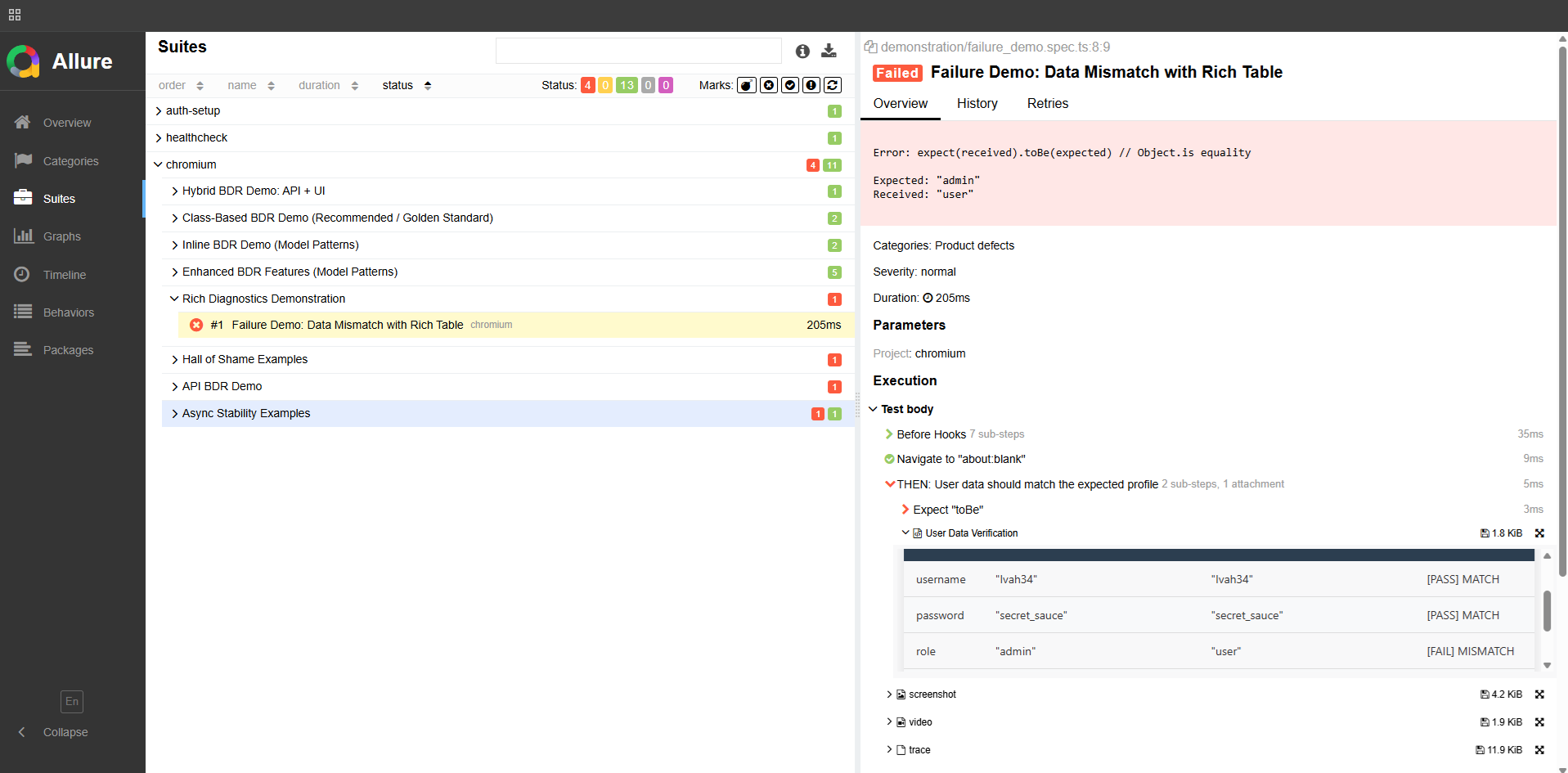
Allure report — attachCompareTable showing Expected vs Actual with MATCH/MISMATCH status per field


A complete hybrid scenario: API setup + UI verification

Section titled “A complete hybrid scenario: API setup + UI verification”

Here’s a real-world scenario that uses all the layers together:

test('User created via API can log in through UI', async ({ loginPage, page, request }) => {
const newUser = {
email: 'john.doe@example.com',
password: 'SecurePass123',
role: 'customer',
};
await BDR.Given('a user exists in the system', async () => {
await attachTable('New User Payload', [newUser]);
const response = await request.post('/users', { data: newUser });
expect(response.status()).toBe(201);
const created = await response.json();
await attachTable('Created User Response', [created]);
});
await BDR.When('the user logs in through the UI', async () => {
await loginPage.goto();
await loginPage.login(newUser.email, newUser.password);
});
await BDR.Then('the user sees their dashboard', async () => {
await expect(page).toHaveURL('/dashboard');
});
});

When this test fails, your report shows: the exact payload sent to the API, the response received, and a screenshot at the moment of failure. No reproduction needed.


Cucumber vs BDR — the technical comparison

Section titled “Cucumber vs BDR — the technical comparison”
Cucumber + GherkinBDR
Where scenarios liveSeparate .feature filesDirectly in TypeScript
IDE supportSteps are strings — no autocompleteFull TypeScript — autocomplete, go-to-definition
Compile-time safetyNone — errors at runtimeFull — broken references caught immediately
Renaming a methodHunt across .feature files manuallyIDE updates every reference instantly
Report richnessBasic pass/fail + step namesSteps + styled HTML tables + screenshots + API logs
Decorator supportN/A@Step with title interpolation and nested property access
Maintenance costTwo places to updateOne place


I’m open to QA Automation roles — remote, contract, or full-time. If you’re building a team and care about test architecture, reach out. _dmitryAQA@outlook.com | @DmitryMeAQA_

Your test failed. But why? — How I built BDR to actually answer that question

Your test failed. But why? — How I built BDR to actually answer that question CONCEPT

Section titled “Your test failed. But why? — How I built BDR to actually answer that question ”

Note: BDR (Behavior-Driven Living Requirements) is my own architectural approach to organizing Playwright tests — a Cucumber-free alternative to BDD that I designed and documented at bdr-methodology.dev.


A developer once left a comment on one of my articles about test automation. He described something painfully familiar:

“You can see the button is disabled, so the click doesn’t work. But now the question is — why? And where is the developer supposed to find the answer? You try to reproduce it manually… and suddenly it works fine. So what happened? Nobody knows. You need logs. You need video. You need something.”

He was right. And that comment stuck with me.

Because that’s not a rare edge case. That’s Tuesday in QA.

Test fails in CI. You open the report. You see: Error: element not clickable. That’s it. No context. No screenshot at the right moment. No API logs. No idea what the app state was. You spend an hour trying to reproduce it locally — and it doesn’t reproduce. The ticket gets closed as “flaky”. The bug stays in production.

This is the real problem with most test automation: tests tell you that something broke, but not why.

Of course, you can enable Playwright Trace Viewer, videos, and screenshots. It’s the standard advice. But here’s the reality:

  • Trace Viewer is a firehose of data. If you have 300 tests running in parallel, opening a 50MB trace file for every single flaky test is a full-time job. It shows you what happened, but it doesn’t tell you why the business logic failed.
  • Videos are useless for high-speed flaky bugs. You spend minutes watching a 30-second video at 0.5x speed, trying to catch that one flicker of an error message.
  • The core problem remains: These tools tell you how it failed, but they don’t explain what the application state was from a business perspective.

My goal with BDR wasn’t just to see the crash — it was to make the crash self-explanatory.


I looked at BDD. Then I looked at Cucumber. Then I had a problem.

Section titled “I looked at BDD. Then I looked at Cucumber. Then I had a problem.”

BDD made sense to me. Given/When/Then is a great way to write tests that humans can actually read. Business-readable scenarios. Living documentation. Tests that explain intent, not just implementation.

The promise of BDD is powerful:

  • Business sees exactly what the product does — in plain language
  • Engineers write tests that serve as living requirements
  • When a test fails, it’s a signal that a business requirement is broken

So I looked at Cucumber. And I saw the idea was right — but the implementation was painful.

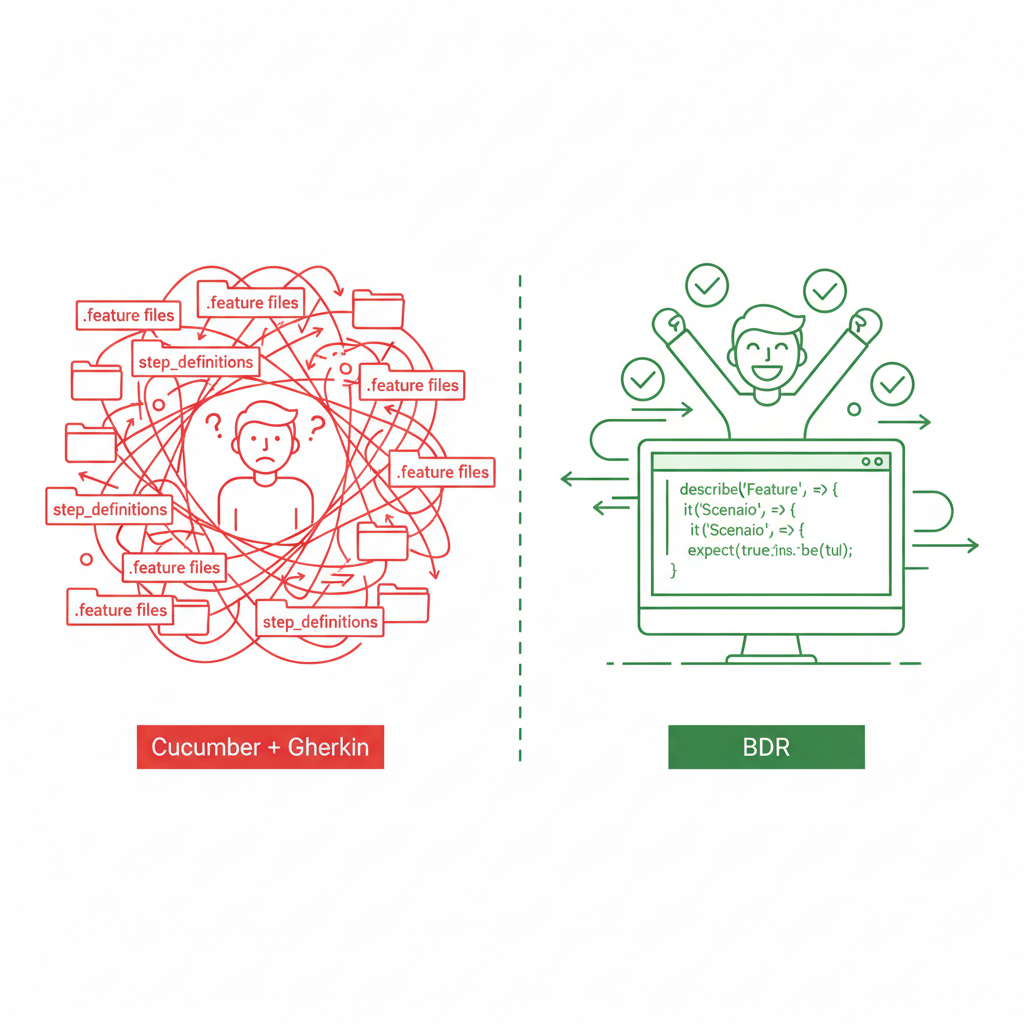
Here’s what you actually get with Cucumber in practice:

  • .feature files that live separately from your code
  • Step definitions that need to be wired up manually
  • A developer renames a button → you spend an afternoon hunting which .feature file broke
  • A test fails → you read the Gherkin, then find the step definition, then find the actual code, then maybe understand what happened
  • Every new scenario requires writing in two places: the .feature file AND the TypeScript

You’re not writing tests anymore. You’re maintaining a translation layer between English and code. That’s the Gherkin tax — and it compounds as your suite grows.

And here’s the painful irony: business still doesn’t read those .feature files. They’re buried in a repository nobody outside engineering opens. You paid the Gherkin tax and got nothing for it.


Cucumber + GherkinBDR
Where scenarios liveSeparate .feature filesDirectly in code
IDE supportLimited — steps are stringsFull — TypeScript, autocomplete, refactoring
Renaming a methodHunt across .feature filesIDE updates everything instantly
Error caughtAt runtimeAt compile time
Report richnessBasic pass/fail + stepsSteps + tables + screenshots + API logs
Business reads it?Rarely (it’s in a repo)Yes — via Allure report, no repo access needed
Maintenance costHigh — two places to updateLow — one place

What if Given/When/Then lived directly in code?

Section titled “What if Given/When/Then lived directly in code?”

That’s the question that led me to build BDR — Behavior-Driven Living Requirements.

BDR is not a framework. It’s a methodology. The core idea is simple:

Keep everything that’s good about BDD. Remove the part that slows you down.

  • Given/When/Then structure — kept
  • Business-readable scenarios — kept
  • Living documentation — kept, and made richer
  • .feature files — gone
  • Step definition wiring — gone
  • Gherkin maintenance — gone

The result: a happy engineer makes a transparent product for the business.


BDR separates concerns into 4 layers. Each layer has one job and doesn’t bleed into others:

LayerWhat it doesExample
SpecificationBusiness intent. Reads like a user story.test('User can log in with valid credentials')
ScenarioGiven/When/Then stepstest.step('When user enters credentials')
ActionBusiness logic. Reusable flows.loginPage.login(username, password)
TechnicalRaw selectors and Playwright interactionspage.getByLabel('Username').fill(value)

This separation means: if you switch from Playwright to Selenium tomorrow, only the Technical layer changes. Your business scenarios stay untouched.


Technical Layer — Page Objects with robust locators

Section titled “Technical Layer — Page Objects with robust locators”
pages/LoginPage.ts
import { Page, Locator } from '@playwright/test';
export class LoginPage {
constructor(private page: Page) {}
get usernameInput(): Locator {
return this.page.getByLabel('Username');
}
get passwordInput(): Locator {
return this.page.getByLabel('Password');
}
get loginButton(): Locator {
return this.page.getByRole('button', { name: 'Log In' });
}
async goto() {
await this.page.goto('/login');
}
async login(username: string, password: string) {
await this.usernameInput.fill(username);
await this.passwordInput.fill(password);
await this.loginButton.click();
}
}

No magic strings. No CSS selectors that break on every UI change. Full IDE support.

This is the glue of the whole architecture. Fixtures inject Page Objects into your tests automatically — no manual instantiation, no boilerplate:

baseFixtures.ts
import { test as base } from '@playwright/test';
import { LoginPage } from './pages/LoginPage';
import { ProductsPage } from './pages/ProductsPage';
type MyFixtures = {
loginPage: LoginPage;
productsPage: ProductsPage;
};
export const test = base.extend<MyFixtures>({
loginPage: async ({ page }, use) => {
await use(new LoginPage(page));
},
productsPage: async ({ page }, use) => {
await use(new ProductsPage(page));
},
});
export { expect } from '@playwright/test';

Now every test gets a fresh, properly initialized Page Object — just by declaring it as an argument.

Specification Layer — Given/When/Then in code

Section titled “Specification Layer — Given/When/Then in code”
tests/ui/login.spec.ts
import { test, expect } from '../baseFixtures';
test('User can log in with valid credentials', async ({ loginPage, page }) => {
await test.step('Given the user is on the login page', async () => {
await loginPage.goto();
});
await test.step('When the user enters valid credentials', async () => {
await loginPage.login('testuser', 'password123');
});
await test.step('Then the user should be redirected to the dashboard', async () => {
await expect(page).toHaveURL('/dashboard');
});
});

This reads exactly like a BDD scenario. But it’s real TypeScript. Your IDE catches errors at compile time, not when CI runs at 2am.


This is where BDR goes beyond what Gherkin can do. Every step can carry structured data — tables, payloads, state snapshots — directly in the report.

tests/ui/products.spec.ts
import { test, expect } from '../baseFixtures';
import { attachTable } from '@bdr/core';
test('Product search filters correctly', async ({ productsPage }) => {
await test.step('Given products are available', async () => {
await attachTable('Available Products', [
['ID', 'Name', 'Category', 'Price'],
['101', 'Laptop Pro', 'Electronics', '1200'],
['102', 'Mouse X', 'Electronics', '25'],
]);
await productsPage.goto();
});
await test.step('When the user filters by "Electronics"', async () => {
await productsPage.filterByCategory('Electronics');
});
await test.step('Then only Electronics products are displayed', async () => {
const displayed = await productsPage.getDisplayedProductNames();
expect(displayed).toEqual(['Laptop Pro', 'Mouse X']);
await attachTable('Filtered Results', [
['Name', 'Category'],
['Laptop Pro', 'Electronics'],
['Mouse X', 'Electronics'],
]);
});
});

Here’s what this looks like in the Allure report:


Allure report showing a passed test.


Business opens this report and sees exactly what happened — without touching the codebase. That’s living documentation.


Remember the developer’s comment from the beginning? Here’s what debugging looks like with and without BDR.

Without BDR:

Error: Timeout 30000ms exceeded

That’s it. Good luck.

With BDR:

The report shows:

  • The scenario stopped at step: "When: user submits the login form"
  • Attached table: Form state before click — username filled, password filled, button status: disabled
  • Attached: API request logPOST /auth returned 403 Forbidden
  • Screenshot: captured automatically at the moment of failure

Allure report showing a failed test with a detailed comparison table.


Now you know exactly what happened. No reproduction needed. The report IS the reproduction.


tests/api/users.spec.ts
import { test, expect } from '@playwright/test';
import { attachTable } from '@bdr/core';
test('Create a new user via API', async ({ request }) => {
const newUser = {
firstName: 'John',
lastName: 'Doe',
email: 'john.doe@example.com',
role: 'customer',
};
await test.step('When a POST request is sent to /users', async () => {
await attachTable('Request Payload', Object.entries(newUser));
const response = await request.post('/users', { data: newUser });
expect(response.status()).toBe(201);
});
await test.step('Then the user is created successfully', async () => {
const verify = await request.get(`/users?email=${newUser.email}`);
const users = await verify.json();
const created = users.find((u: any) => u.email === newUser.email);
expect(created).toMatchObject({ email: 'john.doe@example.com' });
await attachTable(
'Response',
Object.entries(created).filter(([k]) => ['id', 'email'].includes(k)),
);
});
});

Every request payload, every response — attached to the report. When something breaks in CI, you open the report and see exactly what was sent and what came back.


For engineers:

  • Full IDE support — autocomplete, compile-time errors, instant refactoring
  • One place to update when things change
  • Reports that answer “why?” without manual reproduction

For business:

  • Allure reports readable without engineering knowledge
  • Living documentation that’s always current — if the test runs, the doc is up to date
  • Clear signal when a business requirement is broken

The result: a happy engineer makes a transparent product for the business.


I’m open to QA Automation roles — remote, contract, or full-time. If you’re building a team and care about test architecture, I’d love to talk. _dmitryAQA@outlook.com | @DmitryMeAQA_