
Playwright CI: What Senior Engineers Do Differently
Playwright CI: What Senior Engineers Do Differently PRO IMPLEMENTATION
Section titled “Playwright CI: What Senior Engineers Do Differently ”New to Playwright architecture? Start with the fundamentals first: Why Your Playwright Tests Fail in CI (And Never Locally) — the same concepts with more explanation and simpler examples.
Most teams reach a point where their test suite becomes a liability. Green locally, red in CI. Passes on retry, fails on the next run. The usual response is to increase timeouts, add waitForTimeout, and move on. The problem compounds quietly until someone spends a full day debugging a test that was never actually broken.
This guide is about the architectural decisions that prevent that from happening. Not “use better selectors” — you already know that. The decisions that determine whether your test infrastructure scales or slowly collapses under its own weight.
Code examples are intentionally simplified — focus on the architectural pattern, not the implementation details.
Mental Model Shift: Leaving Legacy Baggage Behind
Section titled “Mental Model Shift: Leaving Legacy Baggage Behind”Dependency Projects over globalSetup — fail fast when the environment is down, not after 800 tests. API auth in 50ms, not UI auth in 5 seconds. getByRole queries the accessibility tree — role survives refactoring, { name } doesn’t survive translation. Web-first assertions poll until ready — isVisible() is a snapshot. expect.poll for state that changes outside the UI — webhooks, background jobs, queues. Trace Viewer’s Action/Before/After snapshots show you why a click failed, not just that it did.
Before getting into architecture, a quick audit. Senior engineers migrating from Selenium or Puppeteer often bring habits that fight Playwright instead of leveraging it. These aren’t stylistic preferences — they’re architectural differences that affect reliability at scale.
If any of these look familiar in your codebase, fix them before layering on anything else:
-
page.$()orpage.$$()→getByRole(),getByLabel(),getByTestId()Playwright locators are lazy and auto-retried on assertions.$()executes immediately against the current DOM state and cannot be polled. -
waitForSelector()orwaitForTimeout()→ Remove them Playwright auto-waits for actionability before every interaction. Explicit waits are almost always either redundant or masking a real problem. -
waitForNavigation()→await expect(page).toHaveURL('/dashboard')waitForNavigation()is prone to race conditions — it can resolve before the page is actually ready.toHaveURLpolls until the URL matches, which is what you actually want. -
isVisible(),isEnabled()in assertions →expect(loc).toBeVisible(),expect(loc).toBeEnabled()Snapshot methods return the state at one millisecond. Web-first assertions retry until the condition is true or the timeout expires. -
console.log('HERE')→ Trace Viewer Logs tell you that something happened. Traces show you the DOM, network, and console at the exact moment it happened — in CI, after the fact.
If your team is mid-migration, this is worth a dedicated refactor sprint. The patterns below assume you’re past this baseline.
The Problem With How Most Teams Structure Test Infrastructure
Section titled “The Problem With How Most Teams Structure Test Infrastructure”The typical Playwright setup looks like this: a globalSetup file that handles authentication, maybe some shared fixtures, and a flat list of test files. This works at 50 tests. At 500, the cracks appear.
globalSetup runs once, outside Playwright’s normal execution context. When it fails, you get dry Node.js logs. No trace, no network timeline, no DOM snapshots. You’re debugging blind.
More critically: there’s no built-in way to say “don’t run 800 tests if the environment is down.” You get 800 failures that all say the same thing and tell you nothing useful.
The Architecture: Dependency Projects as a Dependency Graph
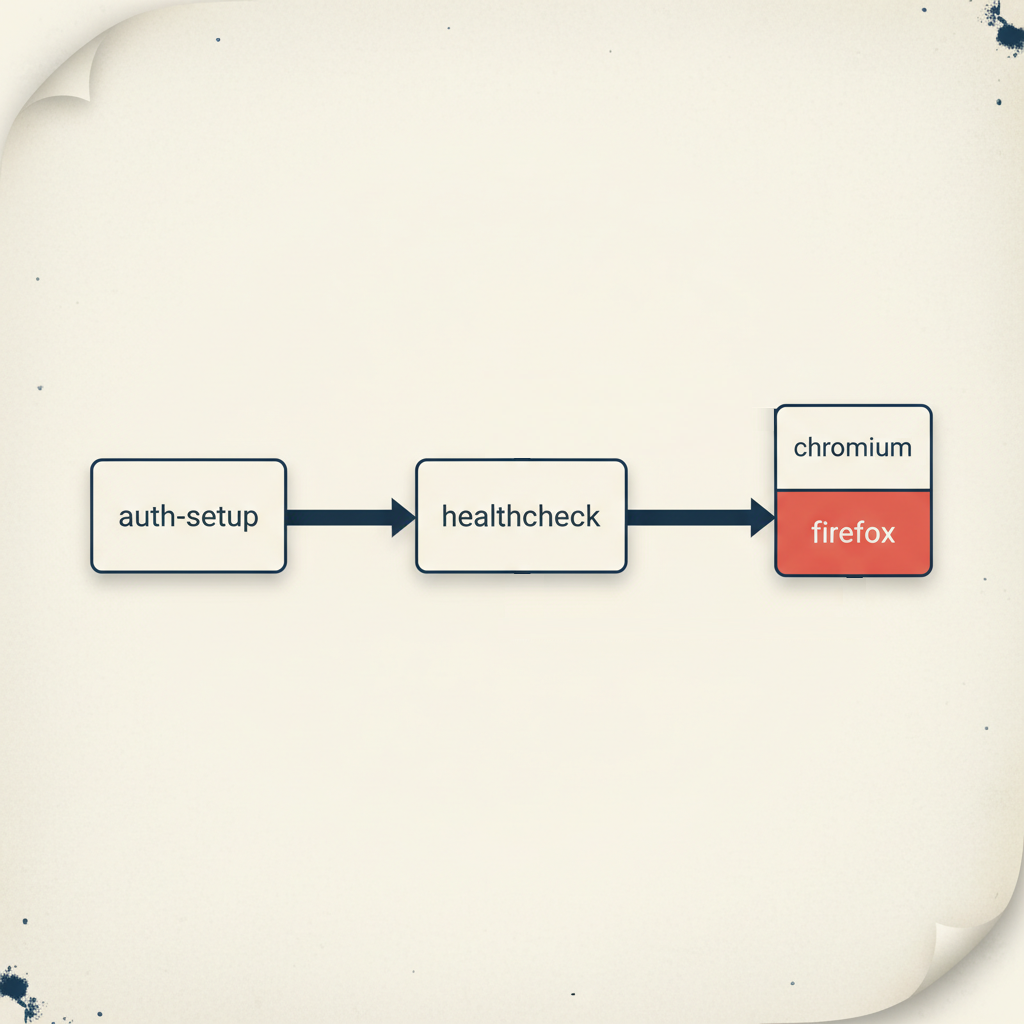
Section titled “The Architecture: Dependency Projects as a Dependency Graph”The senior approach treats test infrastructure as a directed acyclic graph. Each node has prerequisites. If a prerequisite fails, dependent nodes don’t run.
export default defineConfig({ projects: [ { name: 'auth-setup', testMatch: /.*\.auth\.setup\.ts/, }, { name: 'healthcheck', testMatch: /.*\.health\.setup\.ts/, dependencies: ['auth-setup'], }, { name: 'chromium', use: { ...devices['Desktop Chrome'] }, dependencies: ['healthcheck'], }, { name: 'firefox', use: { ...devices['Desktop Firefox'] }, dependencies: ['healthcheck'], }, ],});The order in the array doesn’t matter — Playwright builds the graph automatically. What matters is the dependencies field.
What this buys you:
When the staging environment goes down at 2am, your CI doesn’t burn 40 minutes running tests that will all fail for the same reason. The healthcheck fails, Playwright stops, you get one clear failure instead of eight hundred.
When auth breaks after a backend deploy, you know immediately — not after waiting for the full suite to time out.
And crucially: every node in this graph is a real Playwright test. That means full Trace Viewer support. When auth setup fails in CI, you open the trace and see exactly which API call returned 401, what the response body said, and what the DOM looked like if there was a redirect. Compare that to parsing a stack trace from globalSetup.
Authentication: The 50ms vs 4 Second Decision
Section titled “Authentication: The 50ms vs 4 Second Decision”Every test that needs authentication has to pay the auth cost. The question is how much.
UI login on a realistic app with SSR, asset loading, and form rendering: 2–5 seconds. API login: 50–100ms. At 500 tests, that’s 2500 seconds vs 50 seconds of auth overhead — before you’ve even started testing anything.
test('authenticate', async ({ request }) => {  const response = await request.post('/api/auth/login', {    data: {      email: process.env.TEST_USER_EMAIL,      password: process.env.TEST_USER_PASSWORD,    },  });
  expect(response.status()).toBe(200);
// Cookies are automatically captured from the request context await request.storageState({ path: '.auth/user.json' });});use: { storageState: '.auth/user.json',}The non-obvious part: you should have exactly one test that tests the login UI. Every other test that requires authentication just consumes the saved state. You’re not testing login 500 times — you’re testing it once and reusing the result.
This also means your login test is isolated. If the login flow changes, one test fails, clearly, with a good error message. Not 400 tests failing with “element not found” somewhere in the middle of an unrelated scenario.
Locator Strategy: Understanding the Model, Not Memorizing the Rules
Section titled “Locator Strategy: Understanding the Model, Not Memorizing the Rules”The common framing — “use getByRole for actions, getByTestId for stable anchors” — is a simplification that leads engineers to make wrong choices in edge cases. The more useful mental model is understanding what each locator actually queries and what that means for test reliability.
What getByRole actually does
getByRole queries the accessibility tree, not the DOM. The accessibility tree is a parallel representation of the page that browsers expose to screen readers and assistive technology. It’s built from semantic HTML — <button>, <input>, <h1> — plus ARIA attributes.
This distinction matters: CSS classes, DOM structure, and visual styling don’t affect the accessibility tree. A <div class="btn-primary"> has no role. A <button> always has role button regardless of how it’s styled.
One important nuance: getByRole usually takes a { name: '...' } parameter to identify which element you mean. That name is resolved from the element’s text content, aria-label, or aria-labelledby. The role itself survives refactoring — but the name is tied to visible text, which means it breaks in multilingual apps when the locale changes. This is why getByTestId or a fixed aria-label are better choices when text is dynamic.
When getByRole fails to find an element, it usually means one of two things: the element genuinely doesn’t exist yet (timing issue), or the element has no semantic role (accessibility issue). The second case is a real bug in your application — your test is catching it.
// This finds the button by its role and accessible name// Works regardless of CSS class, DOM nesting, or visual stylingawait page.getByRole('button', { name: 'Place order' }).click();
// If this fails because there's no button role —// that's an accessibility bug worth fixing, not a test bug
The accessible name in { name: '...' } can come from: the element’s text content, an aria-label attribute, or an aria-labelledby reference. Playwright checks all three automatically.
Why getByLabel is semantically stronger than getByTestId for forms
getByLabel finds form inputs by their associated label. The label is a contract: it tells users (and screen readers) what the field is for. If that contract changes, your test should know.
// If the label changes from 'Email address' to 'Work email'// this test fails — correctly, because the UX changedawait page.getByLabel('Email address').fill('user@example.com');getByTestId on the same field would pass silently. You might want that stability, or you might want the test to catch the label change. The choice depends on whether the label is a UX requirement or an implementation detail.
When getByTestId is the right choice — and why
getByTestId bypasses the accessibility tree entirely. It finds elements by a data-testid attribute you add to the DOM. This makes it stable in specific situations where semantic locators genuinely don’t work:
- Complex component libraries (Ant Design, MUI) — these generate DOM structures where a single Select or Combobox contains multiple elements with the same role: a hidden native input, a trigger button, a text field.
getByRole('combobox')picks the first in DOM order — deterministic, but often wrong. And it can change between library versions as internal structure shifts - Multi-language applications —
getByRole('button', { name: 'Submit' })breaks when the locale changes to French.getByTestId('submit-button')doesn’t care about the label language - A/B tests and personalization — button text varies per user variant;
getByTestIdgives you a stable anchor - Icon-only buttons — SVG icons without
aria-labelhave no accessible name;getByTestIdis the fallback
The tradeoff is real: getByTestId passes even if the element is visually broken, hidden by styles, or completely inaccessible to screen readers. You’re opting out of semantic validation.
The decision algorithm
1. Does the element have a reliable semantic role?   → Yes: use getByRole   → No: continue
2. Is it a form field with a label?   → Yes: use getByLabel   → No: continue
3. Can you ask the developer to add aria-label?   → Yes: add it, then use getByRole(..., { name: 'aria-label value' })   → No: continue
4. Use getByTestId — consciously, not by default
The correction to the “actions vs assertions” mental model
The framing “use getByTestId for clicks, getByRole for assertions” is wrong in both directions. The question is not what you’re doing with the element — it’s how stable the element’s semantics are.
// Both clicks — different locators because semantics differawait page.getByRole('button', { name: 'Place order' }).click(); // stable role + nameawait page.getByTestId('lang-switcher').click(); // dynamic text, no stable role
// Both assertions — different locators for the same reasonawait expect(page.getByRole('heading')).toHaveText('Order confirmed'); // content IS the requirementawait expect(page.getByTestId('order-status')).toBeVisible(); // existence matters, not label
Use getByRole whenever the element has reliable semantics — for both clicks and assertions. Use getByTestId when semantics are unreliable — for both clicks and assertions.
Web-First Assertions: Why the Implementation Matters
Section titled “Web-First Assertions: Why the Implementation Matters”The difference between isVisible() and expect(locator).toBeVisible() isn’t just syntax. It’s the difference between a point-in-time snapshot and a polling loop.
isVisible() makes one DOM query and returns immediately. If the element isn’t there at that exact millisecond, you get false. If your app is 10ms slower than usual in CI, the test fails.
expect(locator).toBeVisible() polls the DOM every ~100ms until the condition is true or the timeout expires. It’s designed for asynchronous UIs.
// Snapshot — fails if element isn't ready at this exact momentconst visible = await page.getByRole('dialog').isVisible();expect(visible).toBe(true);
// Polling — waits for the element to appearawait expect(page.getByRole('dialog')).toBeVisible();
The more interesting case is expect.poll for non-UI state — and the contrast with waitForTimeout is worth making explicit.
The tempting pattern:
// Guessing — works until it doesn'tawait page.getByText('Place order').click();await page.waitForTimeout(5000);const order = await api.getOrder(id);expect(order.status).toBe('PAID');This works in development where the backend is fast and the machine is unloaded. In CI under parallel execution, the backend takes 5001ms on a slow run. The test fails — not because the feature is broken, but because you guessed wrong about timing.
waitForTimeout is deterministic in the wrong direction: it fails on the system being slower than expected, but also wastes time when the system is faster. At 1000 tests, those wasted seconds add up to real CI cost.
The boundary that matters: web-first assertions (toBeVisible, toHaveURL, toHaveText) cover 95% of cases — they have built-in retry and should always be your first choice. expect.poll is for the remaining 5%: state that changes outside the UI with no visible indicator. A background job updating order status in the DB. A payment webhook from Stripe arriving and updating payment state. A message processed from Kafka by another service. The common pattern: you triggered something, the UI has nothing useful to show, and you can only verify the result via a direct API call.
// Background job updated order status — only verifiable via APIawait expect .poll( async () => { const response = await request.get(`/api/orders/${orderId}`); const order = await response.json(); return order.status; }, { message: 'Order should reach CONFIRMED status', timeout: 30_000, }, ) .toBe('CONFIRMED');This is the correct tool for Eventual Consistency scenarios — distributed systems where the UI updates before the database has committed, or where background jobs need to complete before the state is queryable.
A common mistake: manually setting intervals: [1000, 2000, 5000] on every poll. Playwright’s default intervals are reasonable. If you need custom timing, set a global timeout via test.setTimeout(60_000) for slow scenarios rather than tuning every individual poll.
expect.toPass: When You Need to Retry an Entire Interaction
Section titled “expect.toPass: When You Need to Retry an Entire Interaction”expect.poll retries a single assertion. Sometimes you need to retry a whole sequence of actions — click a button, wait for a state change, verify the result. That’s expect.toPass:
await expect(async () => { await page.getByRole('button', { name: 'Sync' }).click(); await expect(page.getByTestId('sync-status')).toHaveText('Complete');}).toPass({ intervals: [1_000, 2_000, 5_000], timeout: 15_000,});Here the intervals make sense — you’re controlling how often to repeat a user-visible action, not an internal polling check.
The decision boundary between poll and toPass:
Use expect.poll when you’re checking state without side effects — reading an API endpoint, querying a value. The polling itself is invisible to the system.
Use expect.toPass when the check requires triggering an action — clicking a refresh button, submitting a form, calling an endpoint that changes state. Here you want explicit control over retry frequency because each attempt has a visible effect.
Mixing them up creates subtle problems: using expect.toPass for a pure state check works but fires unnecessary user actions. Using expect.poll when you need to click something doesn’t work at all — poll only retries the assertion, not the preceding action.
Hydration: The Silent Test Killer in SSR Applications
Section titled “Hydration: The Silent Test Killer in SSR Applications”If your application uses Next.js, Nuxt, or any other SSR framework, you’ve likely hit this: Playwright clicks a button, no error is thrown, but the application doesn’t respond. The test eventually times out waiting for a state change that never came.
The cause is hydration. The server sends fully-rendered HTML — the page looks complete, the button is in the DOM, Playwright’s actionability checks pass. But the JavaScript bundle hasn’t executed yet. There are no event listeners. The click lands on a dead element.
The solution is to wait for a signal that hydration is complete before starting meaningful interactions:
// Many frameworks add a class or attribute when hydration completesawait page.waitForSelector('[data-hydrated="true"]', { state: 'attached' });
// Or wait for a loading indicator to disappearawait expect(page.locator('#app-loading')).toBeHidden();
// Or wait for a specific element that only appears post-hydrationawait expect(page.getByRole('navigation')).toBeVisible();
The right signal depends on your application. Work with your frontend team to add a reliable hydration marker if one doesn’t exist. It’s a small investment that eliminates an entire category of intermittent failures.
A note on force: true:
When a click does nothing, force: true is tempting. Understand what you’re actually disabling. Playwright’s actionability checks verify four things before every interaction:
- Visible — element is not hidden by CSS or outside the viewport
- Stable — element is not moving (animations, transitions in progress)
- Enabled — element is not in a disabled or read-only state
- Receiving events — element is not covered by another element
Bypassing these means your test no longer reflects what a real user can do. The test passes; the user is still stuck.
There is one legitimate exception: hidden file inputs (<input type="file">). The native element is hard to style, so developers often intentionally hide it and show a custom button instead. In such cases, Playwright cannot interact with the hidden element without force: true. When you genuinely need force: true, document it:
// force: true required — file input is visually hidden by designawait page.locator('input[type="file"]').setInputFiles('document.pdf', { force: true });For everything else: find what’s blocking the element and wait for it to clear. force: true without a comment is a code smell that should fail review.
Network Hygiene: What’s Actually Slowing Your Tests
Section titled “Network Hygiene: What’s Actually Slowing Your Tests”Third-party scripts are a common source of CI flakiness that’s easy to overlook. Analytics, support chat, session recording tools — these make network requests that can:
- Trigger
networkidlewaits to never settle (if a script sends requests every 400ms) - Add latency to page loads
- Occasionally fail with 5xx errors that your application handles gracefully but that affect timing
The fix is straightforward:
// In a base fixture, applied to all testsawait page.route(/google-analytics\.com|segment\.com|intercom\.io|fullstory\.com/, (route) => { // fulfill with 200 rather than abort — prevents apps from retrying indefinitely route.fulfill({ status: 200, body: '' });});One subtlety: don’t block web fonts unless you’ve confirmed your app handles them gracefully. Missing fonts cause layout shifts, which fail Playwright’s stability checks and can make elements appear to move right before you try to interact with them.
Trace Viewer: Making CI Failures Debuggable
Section titled “Trace Viewer: Making CI Failures Debuggable”The difference between a test suite that’s maintainable and one that isn’t often comes down to how debuggable failures are. A screenshot tells you what the page looked like. A trace tells you everything that happened.
use: { trace: 'retain-on-failure', screenshot: 'only-on-failure', video: 'retain-on-failure', // optional but useful for complex interactions}Navigating a trace effectively:
Metadata tab — check this first when a test fails in CI but passes locally. It shows the browser version, viewport size, and launch parameters. “Element not found” failures that only happen in CI are often caused by a different viewport — the element exists but is off-screen or hidden by a responsive breakpoint.
Snapshots: Action / Before / After — this is where most debugging happens. Each action in the trace has three states:
- Before: DOM state before Playwright started the action
- Action: The moment of interaction — you’ll see a red dot showing exactly where Playwright clicked
- After: DOM state after the action completed
When a click does nothing, open the Action snapshot. If you see the red dot landing on a loading skeleton or an overlay div instead of your button, that’s your answer. The button was there, but something was on top of it.
Network tab — click any request to see headers, payload, and response body. When a test fails because a state change didn’t happen, check whether the API call was made, what it returned, and how long it took. A 200 response with an error in the body is a common cause of tests that fail without obvious reason.
Interactive DOM — snapshots aren’t screenshots. They’re live DOM captures you can inspect with DevTools. Open any snapshot, right-click an element, and you have full access to computed styles, attributes, and the element tree — at the exact moment in time when the action occurred. This is the feature that makes Trace Viewer genuinely different from video recording.
ESLint: Enforcing Architecture Automatically
Section titled “ESLint: Enforcing Architecture Automatically”The best architectural rules are the ones that don’t require human enforcement. Configure these once and they apply to every PR forever:
// .eslintrc.js (ESLint v8)module.exports = {  extends: ['plugin:playwright/recommended'],  rules: {    // Hard failures — these break things    'playwright/no-wait-for-timeout': 'error',    'playwright/no-focused-test': 'error',    'playwright/no-page-pause': 'error',    'playwright/missing-playwright-await': 'error',
    // Warnings — architectural debt worth addressing    'playwright/prefer-web-first-assertions': 'warn',    'playwright/no-force-option': 'warn',    'playwright/no-skipped-test': 'warn',
    // Prevent bypassing seeded faker (if you use deterministic test data)    'no-restricted-imports': [      'error',      {        paths: [          {            name: '@faker-js/faker',            message: 'Use the seeded faker fixture from test context for reproducible test data.',          },        ],      },    ],  },};
For ESLint v9+:
import playwright from 'eslint-plugin-playwright';
export default [  {    files: ['tests/**'],    ...playwright.configs['flat/recommended'],    rules: {      ...playwright.configs['flat/recommended'].rules,      'playwright/no-wait-for-timeout': 'error',      'playwright/no-focused-test': 'error',      'playwright/no-page-pause': 'error',      'playwright/missing-playwright-await': 'error',      'playwright/prefer-web-first-assertions': 'warn',      'playwright/no-force-option': 'warn',    },  },];
The error vs warn distinction matters. error means the CI pipeline fails. warn means the developer sees it in their IDE and in the PR, but it doesn’t block a merge. Use error for things that will definitely cause test failures or leave debug artifacts in CI. Use warn for patterns that indicate technical debt but may have legitimate exceptions.
On that note: rules exist to be broken consciously. If you’re working with a heavy component library — Ant Design, MUI with deeply nested generated selectors — sometimes // eslint-disable-next-line is the honest answer. The difference between a senior and a junior here isn’t that the senior never disables rules. It’s that they write a comment explaining why, and they don’t do it as a reflex.
The Flakiness Diagnostic Framework
Section titled “The Flakiness Diagnostic Framework”When a test fails intermittently, the question isn’t “why did it fail this time?” It’s “what class of problem is this?”
| Symptom | Root cause | Solution |
|---|---|---|
| Click lands, nothing happens | Hydration — JS not loaded yet | Wait for hydration signal |
| Passes locally, fails in CI consistently | Resource contention / network latency | Block third-party scripts, check workers config |
| Fails on 1 in 10 runs, no pattern | Race condition in assertion | Replace snapshot assertion with Web-first assertion |
| All tests fail simultaneously | Environment down / auth broken | Add healthcheck dependency project |
| Fails after deploy, selector not found | Fragile locator | Replace CSS with getByTestId or getByRole |
| Timeout waiting for state change | Eventual consistency | Replace waitForTimeout with expect.poll |
The last row is where most teams go wrong. When a test times out waiting for a database state change, the instinct is to increase the timeout. The correct fix is to stop guessing how long the operation takes and start asking the system when it’s done.
Worker Configuration: The Resource Math
Section titled “Worker Configuration: The Resource Math”fullyParallel: true is one line. The consequences of getting the worker count wrong are dozens of intermittent failures that look like application bugs.
The math: each Playwright worker runs a browser instance. A Chromium instance needs roughly 200–300MB of RAM under load. On a CI agent with 4GB RAM, running 20 workers means 4–6GB just for browsers — before Node.js, your application server, and the OS.
export default defineConfig({ fullyParallel: true, workers: process.env.CI ? '50%' : undefined,});50% of available cores leaves headroom for everything else. The tests run slightly slower than theoretical maximum, but they run reliably. The alternative — running at 100% and getting OOM kills that look like test failures — is worse in every way.
What This Architecture Actually Buys You
Section titled “What This Architecture Actually Buys You”None of these patterns are difficult to implement. The dependency graph takes an afternoon. API auth is 20 lines. ESLint config is copy-paste.
The compounding value is that they change the economics of flakiness. Without them, every intermittent failure requires investigation — is this a real bug or noise? With them, most failures are deterministic and self-explanatory.
A healthcheck that fails clearly is better than 800 timeouts that might be anything. A trace that shows “button covered by loading overlay” is better than 40 minutes of local reproduction attempts. An ESLint error that prevents waitForTimeout from being committed is better than a code review comment that gets ignored.
The goal isn’t zero flakiness — distributed systems are inherently non-deterministic. The goal is failures that tell you something useful.
The patterns in this article are implemented in the Playwright BDR Template — a reference implementation you can clone and run.