Skip to content

Dmitry

10 posts by Dmitry

Why Your Test Suite Lies to You at Scale

Why Your Test Suite Lies to You at Scale PRO IMPLEMENTATION

Section titled “Why Your Test Suite Lies to You at Scale ”

New to Playwright reliability? Start with the fundamentals: Flaky Tests You Can’t Fix With Better Selectors — the same concepts with more explanation and simpler examples.

Green tests and broken production is a specific failure mode that gets more common as test suites grow. The locators are right, the assertions are correct, the mocks return the expected data — and none of it reflects what the system actually does under load, with real network conditions, against a real database.

This article covers three architectural problems that cause this: API non-idempotency, mock drift, and data accumulation. Each is invisible at small scale. Each becomes expensive at large scale.

Code examples are intentionally simplified — focus on the architectural pattern.


Most flakiness guides focus on selectors and timing. That’s the visible layer. The invisible layer is data and integration:

  • A POST request succeeds on the server, the response is lost in transit, Playwright retries, the server creates a second record. Your test now has two orders instead of one, and the assertion that checks order count fails — not because the feature is broken, but because the network hiccuped.

  • Your mock returns { order_id: "123" }. The backend deployed last Tuesday and now returns { orderId: "123" }. Tests are green. The field your frontend reads is undefined. Production is broken.

  • Tests create 100 users per minute. Nobody cleans up reliably. Two weeks later, unique constraint violations start appearing in unrelated tests. The database that was supposed to be isolated is shared state in disguise.

These aren’t test bugs. They’re architectural gaps. And they require architectural solutions.


Idempotency: Making POST Requests Safe to Retry

Section titled “Idempotency: Making POST Requests Safe to Retry”

The standard mental model of HTTP: a request either succeeds or fails. The reality: a request can succeed on the server and fail to deliver the response. The client sees a timeout and retries. The server sees a new request.

For GET requests this is harmless. For POST requests that create or modify state, it creates duplicates.

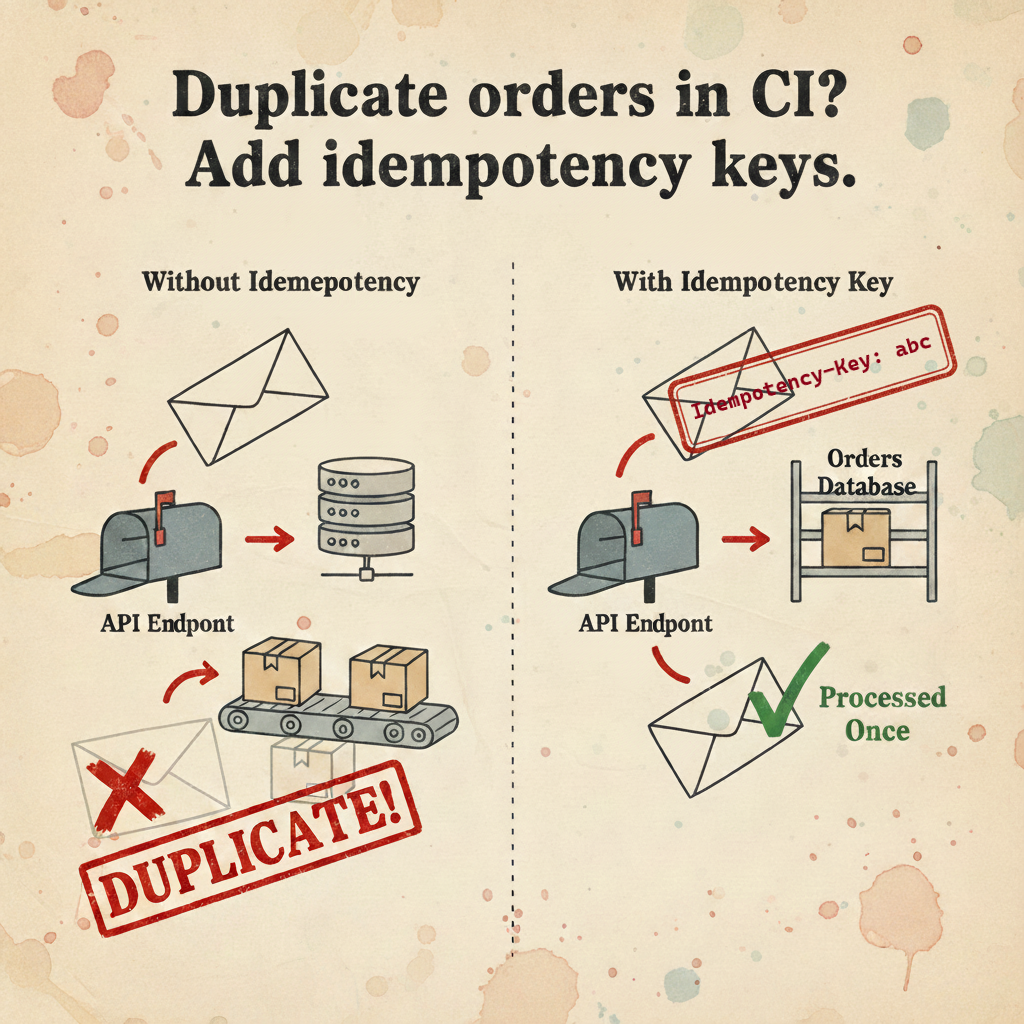
The solution: idempotency keys

An idempotency key is a client-generated identifier that the server uses to detect duplicate requests. If the server has processed a request with this key before, it returns the cached result instead of processing again.

The key design question is how to generate the key. A static key per test fails when a test makes multiple POST requests — the server treats the second request as a duplicate of the first. A random UUID per request defeats the purpose — retries get new keys and bypass the deduplication.

The correct approach: derive the key deterministically from the request context.

api/infrastructure/idempotency.ts
import { createHash } from 'crypto';
export function generateIdempotencyKey(method: string, url: string, data: unknown): string {
const payload = `${method}:${url}:${JSON.stringify(data)}`;
return createHash('sha256').update(payload).digest('hex').slice(0, 16);
}
api/clients/BaseApiClient.ts
export abstract class BaseApiClient {
protected async post(url: string, data?: unknown) {
const key = generateIdempotencyKey('POST', url, data);
return await this.request.post(url, {
data,
headers: { 'X-Idempotency-Key': key },
});
}
}

Two calls to createUser with identical data get identical keys — the server deduplicates. Two calls with different data (create user, then create order) get different keys — both process correctly.

Important nuance: if your test legitimately needs two identical records (same method, URL, and body), they’ll get the same key — and the server will return the cached result for the second call. This is correct behaviour for retries, but it means this approach assumes each unique operation has unique data. If you genuinely need two identical resources, add a distinguishing field (like a requestId or timestamp) to the body.

The backend requirement: this only works if the server implements idempotency key handling. Most payment APIs (Stripe, PayPal) support this natively. If your payment provider doesn’t — that’s their problem to solve, not yours. Use WireMock to mock them, or find their sandbox/test mode. If it’s your own internal backend that’s missing support — that’s a tech-debt conversation with your backend team. The pattern is well-documented and the database cost is minimal: store key + response hash, expire after 24 hours.

The network failure scenario:

Client → POST /orders (key: abc123) → Server processes, creates order
Server → Response lost in transit
Client → Timeout, retry POST /orders (key: abc123) → Server returns cached response
Result: One order, correct state

Without idempotency keys, the retry creates a second order. Your test’s assertion that checks order count fails, and you spend an hour investigating a “bug” that is actually a network reliability issue.


Mock Architecture: Three Levels, Three Use Cases

Section titled “Mock Architecture: Three Levels, Three Use Cases”

The mistake teams make is treating mocking as a single tool. page.route for everything. Then wondering why server-side failures aren’t caught.

Level 1: Native mocks (page.route)

page.route intercepts requests made from inside the browser context. It’s the right tool for testing UI behavior in isolation.

// Testing error state UI
await page.route('**/api/orders', (route) => {
route.fulfill({ status: 503, body: JSON.stringify({ error: 'Service unavailable' }) });
});
await page.goto('/orders');
await expect(page.getByRole('alert')).toContainText('Service unavailable');

The architectural boundary: page.route cannot intercept requests made via Playwright’s request fixture, or any server-to-server calls your backend makes. Those requests originate outside the browser context.

How the request is madeIntercepted by page.route?
page.goto(), page.click() — browser navigation✅ Yes
page.evaluate(() => fetch('/api/...')) — fetch inside browser✅ Yes
page.request.get('/api/...') — browser request context✅ Yes
request.get('/api/...') — standalone request fixture (Node.js)❌ No
Backend server-to-server calls (Stripe, etc.)❌ No

The distinction is browser context vs Node.js context — not UI vs API.

Why route.fulfill() instead of route.abort()? abort() causes the request to fail with a network error. Well-written apps handle this gracefully, but many enter an infinite retry loop waiting for a response that never comes. fulfill() returns a proper HTTP response — even a synthetic one — so the app moves on cleanly. Use abort() only when you specifically want to test network error handling.

Level 2: Infrastructure mocks (WireMock)

Server-to-server integrations — payment processors, SMS gateways, shipping APIs — need to be mocked at the network level, not the browser level.

docker-compose.yml
services:
wiremock:
image: wiremock/wiremock:3.3.1
ports:
- '8080:8080'
volumes:
- ./wiremock/mappings:/home/wiremock/mappings
command: ['--global-response-templating', '--verbose']
wiremock/mappings/stripe.json
{
"request": {
"method": "POST",
"urlPattern": "/v1/payment_intents"
},
"response": {
"status": 200,
"jsonBody": {
"id": "pi_{{randomValue length=24 type='ALPHANUMERIC'}}",
"status": "succeeded",
"amount": "{{request.body.amount}}"
},
"transformers": ["response-template"]
}
}

Response templating lets WireMock echo back request values, making mocks feel more realistic without hardcoding specific values. Point your backend’s external API base URLs to localhost:8080 via environment variables, and the backend never makes real external calls in tests.

One prerequisite: your backend needs to use configurable base URLs for external services — not hardcoded production endpoints. In well-structured backends this is already the case. If it’s not, that’s a refactor worth doing regardless of testing — hardcoded external URLs are a deployment problem too.

Level 3: Contract testing (Pact)

WireMock solves availability. It doesn’t solve drift. Your WireMock mapping can become outdated the moment the real API changes. This is the Lying Mock problem — and it requires a different solution.

Consumer-Driven Contract Testing (CDC) creates a formal, verifiable link between your test expectations and the provider’s actual implementation.

tests/contracts/orders.pact.spec.ts
import { PactV3, MatchersV3 } from '@pact-foundation/pact';
const { like, string, integer } = MatchersV3;
const provider = new PactV3({
consumer: 'test-suite',
provider: 'order-service',
dir: './pacts',
logLevel: 'warn',
});
describe('Order Service contract', () => {
it('returns order details', async () => {
await provider
.given('order ord_123 exists')
.uponReceiving('GET /orders/ord_123')
.withRequest({
method: 'GET',
path: '/orders/ord_123',
headers: { Authorization: like('Bearer token') },
})
.willRespondWith({
status: 200,
body: {
order_id: string('ord_123'), // field name is part of the contract
status: string('CONFIRMED'),
total: integer(4999),
},
})
.executeTest(async (mockServer) => {
const order = await fetchOrder(mockServer.url, 'ord_123');
expect(order.status).toBe('CONFIRMED');
});
});
});

This test runs against a local mock server and generates a ./pacts/test-suite-order-service.json contract file. The backend team publishes this contract to a Pact Broker and runs verification against their actual code:

Terminal window
# On the provider side, in their CI pipeline
pact-provider-verifier \
--provider-base-url http://localhost:8080 \
--pact-broker-url https://your-pact-broker \
--provider order-service \
--publish-verification-results

If the backend renames order_id to orderId, verification fails in their pipeline before the change merges. The contract breaks at the source, not in production.

The Pact Broker is optional but valuable — it stores contract versions, tracks which consumer-provider pairs are compatible, and enables the can-i-deploy check that blocks deployments when contracts are broken. For smaller teams, storing contract files in a shared repository works as a simpler alternative.

Where to start with contracts: don’t try to contract-test everything. Start with the API calls that have caused the most incidents, or the ones that change most frequently. One contract on your critical payment or order flow is immediately valuable. Expand from there.

The organizational reality: contract testing requires the backend team to run verification in their pipeline. This is a commitment from both sides, not just a technical decision. For small teams or teams without strong cross-team coordination, a simpler starting point is storing contract JSON files in the backend repo and running verification manually — no Pact Broker required. Also worth being explicit: contracts verify response structure and field names. They don’t catch business logic bugs, side effects, or behaviour changes that preserve the schema.


afterEach(() => api.deleteUser(userId)) is the standard cleanup pattern. It has two failure modes that make it unreliable at scale:

  1. If the test crashes before userId is set, the cleanup never runs
  2. If the test runner itself crashes or is killed, afterAll and afterEach hooks don’t execute

The result: orphaned test data accumulates. Unique constraints start failing on unrelated tests. Query performance degrades. The “isolated” test database becomes shared state.

Approach 1: TTL at the database level

Add expires_at to all test-created entities and set it to a short window:

// In your base API client or fixture
protected async createTestEntity(url: string, data: unknown) {
return this.post(url, {
...data,
expires_at: new Date(Date.now() + 24 * 60 * 60 * 1000).toISOString(),
is_test: true,
});
}

The database handles cleanup automatically. In PostgreSQL with pg_cron:

-- Install pg_cron extension once
-- Note: pg_cron may not be available on all managed PostgreSQL services (e.g. some cloud providers).
-- If unavailable, use a server-level cron job or a background worker instead.
CREATE EXTENSION IF NOT EXISTS pg_cron;
-- Schedule cleanup every hour
SELECT cron.schedule('cleanup-test-entities', '0 * * * *', $$
DELETE FROM users
WHERE expires_at < NOW() AND is_test = true;
DELETE FROM orders
WHERE expires_at < NOW() AND is_test = true;
DELETE FROM payment_intents
WHERE expires_at < NOW() AND is_test = true;
$$);

In MongoDB, a TTL index handles this natively:

db.users.createIndex(
{ expires_at: 1 },
{ expireAfterSeconds: 0 }, // documents deleted at expires_at time
);

Approach 2: Cleanup queue with global teardown

For cases where TTL isn’t practical — databases that don’t support it, or entities that need ordered cleanup (delete orders before users, not after):

cleanup/queue.ts
interface CleanupItem {
url: string;
id: string;
priority: number; // higher priority = deleted first
}
class CleanupQueue {
private items: CleanupItem[] = [];
push(item: CleanupItem) {
this.items.push(item);
}
async flush(request: APIRequestContext) {
const sorted = this.items.sort((a, b) => b.priority - a.priority);
for (const item of sorted) {
await request.delete(`${item.url}/${item.id}`).catch(() => {
// Log but don't throw — cleanup failures shouldn't fail the suite
console.warn(`Cleanup failed for ${item.url}/${item.id}`);
});
}
this.items = [];
}
}
export const cleanupQueue = new CleanupQueue();
global-teardown.ts
import { cleanupQueue } from './cleanup/queue';
export default async function globalTeardown() {
await cleanupQueue.flush(globalApiClient);
}

The cleanup queue survives individual test failures. Only a full runner crash (SIGKILL, power loss) prevents it from executing — and in that case, the TTL approach serves as a second line of defense. This is why TTL should be your default: it operates at the database level, independently of your test process, and survives any kind of crash. The cleanup queue is a complement for ordered cleanup, not a replacement.

Approach 3: Table partitioning for high-volume environments

When tests run continuously and create thousands of entities per hour, even scheduled deletes can become expensive. Deleting a million rows from a PostgreSQL table is a slow, lock-intensive operation.

Partitioning by date makes cleanup instantaneous — you drop a partition rather than deleting rows:

-- Create partitioned table
CREATE TABLE orders_test (
id UUID PRIMARY KEY,
created_at TIMESTAMPTZ NOT NULL,
expires_at TIMESTAMPTZ,
-- other fields
) PARTITION BY RANGE (created_at);
-- Create monthly partitions
CREATE TABLE orders_test_2024_12
PARTITION OF orders_test
FOR VALUES FROM ('2024-12-01') TO ('2025-01-01');
CREATE TABLE orders_test_2025_01
PARTITION OF orders_test
FOR VALUES FROM ('2025-01-01') TO ('2025-02-01');

Dropping last month’s partition:

-- Instantaneous, no table lock on the live partition
DROP TABLE orders_test_2024_12;

This is worth the setup complexity when your test suite creates more than ~10K entities per day. Below that threshold, the TTL approach is simpler and sufficient.

Limitations worth knowing: partitioning is PostgreSQL-native and well-supported, but MySQL’s implementation has more restrictions, and some ORMs handle partitioned tables poorly. More importantly, partitioning complicates migrations — adding a column to a partitioned table requires updating all existing partitions. And you need to create future partitions in advance — either manually or via a scheduled job. Don’t reach for this pattern unless you’re genuinely hitting performance problems with TTL-based cleanup.


SituationRight tool
Testing UI error states in isolationpage.route
Backend calls external payment/SMS APIWireMock
Backend API changes cause test failuresContract tests (Pact)
Test creates < 1K entities/dayTTL + pg_cron
Cleanup order mattersCleanup queue
Test creates > 10K entities/dayTable partitioning
POST request creates duplicates on retryIdempotency keys

The patterns here don’t make individual tests faster or more readable. They make the test suite trustworthy at scale — which is a different problem.

A suite that’s trustworthy means: when tests are green, you can deploy with confidence. When tests fail, the failure points to a real problem, not a network hiccup or a stale mock. When a test fails in CI, you can reproduce it locally with the same data.

That’s the gap between a test suite that’s a liability and one that’s an asset.


Reference implementation: Playwright BDR Template
Flaky Tests You Can't Fix With Better Selectors

Flaky Tests You Can’t Fix With Better Selectors CONCEPT

Section titled “Flaky Tests You Can’t Fix With Better Selectors ”

You’ve fixed your locators. You’ve switched to web-first assertions. Your tests still fail intermittently — but now the failures look different. Duplicate records in the database. Tests that pass alone but fail in parallel. Mocks that say everything is fine while production is broken.

This is the next layer of flakiness. It lives in your API calls, your test doubles, and your database. Better selectors won’t help here.

Code examples are simplified for clarity — focus on the idea, not the boilerplate.


  1. Use idempotency keys on POST requests — one network glitch shouldn’t create two orders
  2. page.route mocks the browser, not your server — know the difference
  3. Use WireMock for server-to-server integrations you can’t control
  4. Contract tests catch API drift before it reaches production
  5. Never rely on afterEach for database cleanup — use TTL or a cleanup queue instead

The Problem: Flakiness That Looks Like Application Bugs

Section titled “The Problem: Flakiness That Looks Like Application Bugs”

When a selector fails, the error is obvious. When a test creates a duplicate order because a network request was retried, the error looks like a business logic bug. You spend an hour investigating something that has nothing to do with your application code.

Three categories cause this:

API flakiness — a request succeeds on the server but the response never arrives. Playwright retries. Now you have two orders.

Lying mocks — your mocks say the API returns { order_id: "123" }. The backend deployed last week and now returns { orderId: "123" }. Tests are green. Production is broken.

Data pollution — tests create users, orders, and transactions but don’t clean up reliably. After a week, the test database is a graveyard that slows down queries and causes unique constraint violations.


Rule #1: Idempotency Keys — One Request, One Result

Section titled “Rule #1: Idempotency Keys — One Request, One Result”

Networks are unreliable. A POST request can reach the server, create a record, and then the response gets lost in transit. Playwright sees a timeout and retries. The server sees a new request and creates another record.

The fix is an idempotency key — a unique header that tells the server “if you’ve seen this request before, return the same result instead of processing it again.”

api/infrastructure/idempotency.ts
import { createHash } from 'crypto';
export function generateIdempotencyKey(method: string, url: string, data: unknown): string {
const payload = `${method}:${url}:${JSON.stringify(data)}`;
return createHash('sha256').update(payload).digest('hex').slice(0, 16);
}
api/clients/BaseApiClient.ts
export abstract class BaseApiClient {
protected async post(url: string, data?: unknown) {
const key = generateIdempotencyKey('POST', url, data);
return await this.request.post(url, {
data,
headers: { 'X-Idempotency-Key': key },
});
}
}

The key is generated from the request method, URL, and body — so two identical requests get the same key, but two different requests (create user, then create order) get different keys. One network glitch no longer creates two records.

Important nuance: if your test legitimately creates two identical orders (same body, same URL), they’ll get the same key — and the server will return the first result for both. This is intentional behaviour for retries, but it means this approach assumes each unique operation has unique data. If you need two genuinely identical records, add a unique field (like requestId) to the body.

Note: This only works if your backend handles the X-Idempotency-Key header. Check with your backend team — many order APIs support this out of the box. If your payment provider doesn’t support it — that’s their problem to solve, not yours. Look for their sandbox or test mode, or use WireMock to mock them entirely. If it’s your own backend that’s missing support — that’s a tech-debt conversation with your backend team, not something to work around in tests.


Rule #2: Know What Your Mocks Actually Cover

Section titled “Rule #2: Know What Your Mocks Actually Cover”

page.route is Playwright’s built-in way to intercept requests. It’s great for testing UI behavior in isolation — how does the page look when the API returns an error?

// ✅ Good use of page.route — testing UI error state
await page.route('**/api/orders', (route) => {
route.fulfill({
status: 500,
body: JSON.stringify({ error: 'Internal Server Error' }),
});
});
await page.goto('/orders');
await expect(page.getByText('Something went wrong')).toBeVisible();

The catch: page.route only intercepts requests made from inside the browser. If your test makes API calls directly through Playwright’s request fixture — server-side, without a browser — page.route won’t see them.

// This request bypasses page.route entirely
const response = await request.post('/api/orders', { data: orderData });
// But this goes through the browser context and IS intercepted by page.route
const response = await page.evaluate(() =>
fetch('/api/orders', { method: 'POST' }).then((r) => r.json()),
);

Why route.fulfill() instead of route.abort()? abort() causes the request to fail with a network error. Some apps handle this gracefully, but others enter an infinite retry loop waiting for a response that never comes. fulfill() returns a proper HTTP response (even a fake one) so the app moves on cleanly.

For direct API calls in tests, you need mocks at a different level — either a wrapper around request, or an infrastructure mock like WireMock.


Rule #3: WireMock for Integrations You Don’t Control

Section titled “Rule #3: WireMock for Integrations You Don’t Control”

Your backend calls Stripe for payments. It calls Twilio for SMS. It calls a shipping provider to get rates. In tests, you don’t want any of that to actually happen.

page.route can’t help here — these are server-to-server calls that never touch the browser. The solution is WireMock: a mock server that runs alongside your test environment and intercepts HTTP calls at the network level.

docker-compose.yml
services:
wiremock:
image: wiremock/wiremock:3.3.1
ports:
- '8080:8080'
volumes:
- ./wiremock/mappings:/home/wiremock/mappings
wiremock/mappings/stripe-payment.json
{
"request": {
"method": "POST",
"url": "/v1/payment_intents"
},
"response": {
"status": 200,
"jsonBody": {
"id": "pi_test_123",
"status": "succeeded"
}
}
}

Now your backend hits localhost:8080 in tests instead of the real Stripe API. Tests are fast, isolated, and don’t depend on external uptime.

Point your backend’s base URLs to WireMock via environment variables in your test environment:

Terminal window
STRIPE_BASE_URL=http://localhost:8080
TWILIO_BASE_URL=http://localhost:8080

One thing to be aware of: this requires your backend to use configurable base URLs for external services. In most well-structured backends this is already the case. If it’s not — that’s a conversation with the backend team, not a reason to skip WireMock.


Rule #4: Contract Tests — Stop Trusting Your Mocks

Section titled “Rule #4: Contract Tests — Stop Trusting Your Mocks”

Here’s the problem with all mocks: they can lie. Your WireMock returns { payment_id: "pay_123" }. The backend team renames the field to paymentId. Your tests stay green. Production breaks.

This is called a Lying Mock — a test double that no longer matches reality.

Contract testing fixes this. Instead of just mocking the response, you write a contract: “I expect this request to return this response.” The backend then verifies that contract against its actual code.

tests/contracts/payment.pact.spec.ts
import { PactV3, MatchersV3 } from '@pact-foundation/pact';
const provider = new PactV3({
consumer: 'frontend-tests',
provider: 'payment-service',
dir: './pacts',
});
describe('Payment API contract', () => {
it('returns payment confirmation', async () => {
await provider
.given('a valid payment intent exists')
.uponReceiving('POST /v1/payment_intents')
.withRequest({ method: 'POST', path: '/v1/payment_intents' })
.willRespondWith({
status: 200,
body: {
id: MatchersV3.string('pi_test_123'),
status: MatchersV3.string('succeeded'),
},
})
.executeTest(async (mockServer) => {
const result = await createPayment(mockServer.url);
expect(result.status).toBe('succeeded');
});
});
});

After this test runs, it generates a JSON contract file in ./pacts. The backend team runs that contract against their actual API. If they rename id to paymentId — the contract verification fails in their pipeline, before the change is merged.

Where to start: You don’t need to contract-test everything. Start with the APIs that change most often or have caused the most incidents. One contract on your payment flow is worth more than ten contracts on stable read-only endpoints.

One important caveat: contract testing requires the backend team to actually run the verification in their pipeline. This is an organizational commitment, not just a technical one. For small teams, storing contract JSON files in the backend repo and running verification manually is a simpler starting point than a full Pact Broker setup. Also note that contracts verify response structure — they don’t catch business logic bugs or side effects.


Rule #5: Stop Relying on afterEach for Cleanup

Section titled “Rule #5: Stop Relying on afterEach for Cleanup”

The classic approach to test data cleanup:

// ❌ Unreliable
afterEach(async () => {
await api.deleteUser(userId);
});

This fails silently when a test crashes before setting userId. It doesn’t run when the test runner itself crashes. After a CI failure mid-run, your database has orphaned records that affect the next run.

Three approaches that actually work:

TTL — let the database clean up automatically

Add an expires_at field to your test entities and set it when creating them:

// When creating test data
await api.createUser({
email: `test_${Date.now()}@example.com`,
expires_at: new Date(Date.now() + 24 * 60 * 60 * 1000).toISOString(),
});

In PostgreSQL, a scheduled job handles cleanup:

-- Runs every hour via pg_cron
SELECT cron.schedule('cleanup-test-data', '0 * * * *', $$
DELETE FROM users WHERE expires_at < NOW() AND is_test = true;
DELETE FROM orders WHERE expires_at < NOW() AND is_test = true;
$$);

In MongoDB and Redis, TTL indexes handle this natively — no cron job needed.

Cleanup queue — collect IDs, delete in bulk

Track everything your tests create, then clean it all up in a global teardown:

// In your base API client
protected async post(url: string, data?: unknown) {
const response = await this.request.post(url, { data });
const body = await response.json();
if (body.id) {
cleanupQueue.push({ url, id: body.id });
}
return response;
}
// global-teardown.ts
export default async function globalTeardown() {
for (const item of cleanupQueue) {
await api.delete(`${item.url}/${item.id}`);
}
}

Even if individual tests fail, the global teardown runs and cleans up the queue.

Which approach to use: TTL is the more reliable default — it works even if the test runner is killed with SIGKILL, because cleanup happens at the database level independently of your test process. Use TTL as your first line of defence. The cleanup queue is a good complement when you need guaranteed cleanup order or when your database doesn’t support scheduled jobs — but it won’t run if the process is hard-killed.


Putting It Together: The Data Reliability Cheat Sheet

Section titled “Putting It Together: The Data Reliability Cheat Sheet”
SymptomRoot causeFix
Duplicate records after CI failureNo idempotency on POST requestsAdd X-Idempotency-Key header
Tests green, production brokenMocks don’t match real APIAdd contract tests for critical endpoints
page.route mock not workingRequest bypasses browserUse WireMock or request wrapper
Database full of test garbageafterEach cleanup unreliableTTL field + pg_cron or cleanup queue
External API causing flakinessReal network calls in testsWireMock for server-to-server calls

You now have three layers covered: test infrastructure, object lifecycle, and data reliability. The next layer is observability — how do you measure test health, identify patterns in flakiness, and prove to your manager that stability work has business value?

Want to go deeper on any of these topics? Check out the advanced version: Why Your Test Suite Lies to You at Scale


All patterns in this article are implemented in the Playwright BDR Template on GitHub.

Playwright Fixtures as a Dependency Injection Container: The Architecture That Scales

Playwright Fixtures as a Dependency Injection Container: The Architecture That Scales PRO IMPLEMENTATION

Section titled “Playwright Fixtures as a Dependency Injection Container: The Architecture That Scales ”

New to Playwright architecture? Start with the fundamentals: Your Playwright Tests Will Need Refactoring. Here’s How to Make It Painless — the same concepts with more explanation.

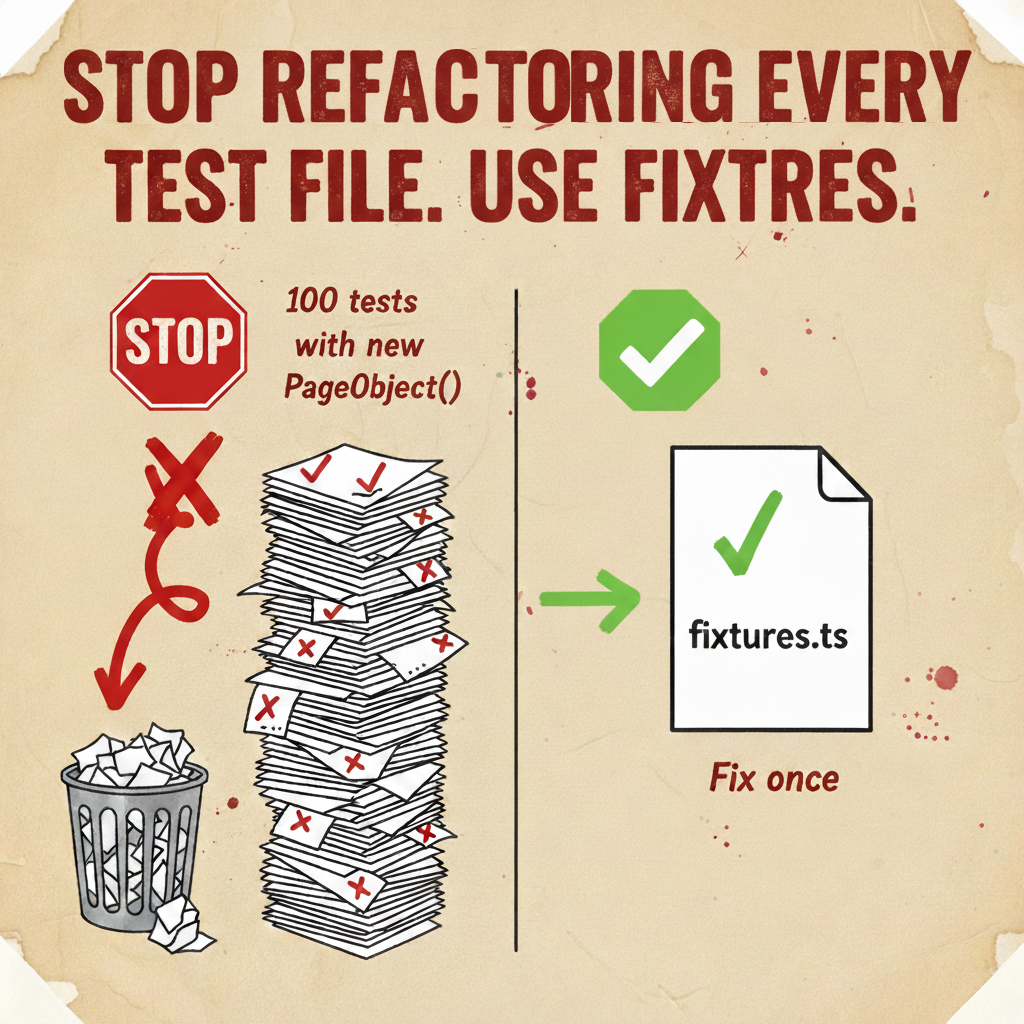
Most Playwright codebases start the same way: Page Objects instantiated with new inside tests, fixtures as an afterthought, test data seeded with workerIndex. This works at 50 tests. At 500, the maintenance cost becomes visible. At 1000, it becomes the primary engineering problem.

This article is about the architectural decisions that prevent that progression — specifically, treating Playwright’s fixture system as a proper DI container, not just a convenience wrapper around beforeEach.

Code examples are intentionally simplified — focus on the architectural pattern.


Three-Layer Architecture: POM, Flow, and Tests

Section titled “Three-Layer Architecture: POM, Flow, and Tests”

##TL;DR

Fixtures are a DI container with lifecycle management — not just a beforeEach wrapper. Getters enforce statelessness architecturally, not stylistically. Seed from testId + RUN_ID + repeatEachIndex — workerIndex breaks across shards. Domain-split fixtures with namespacing eliminate silent collisions. Builder pattern when factory overrides get unwieldy. test.step() for business-intent reporting.


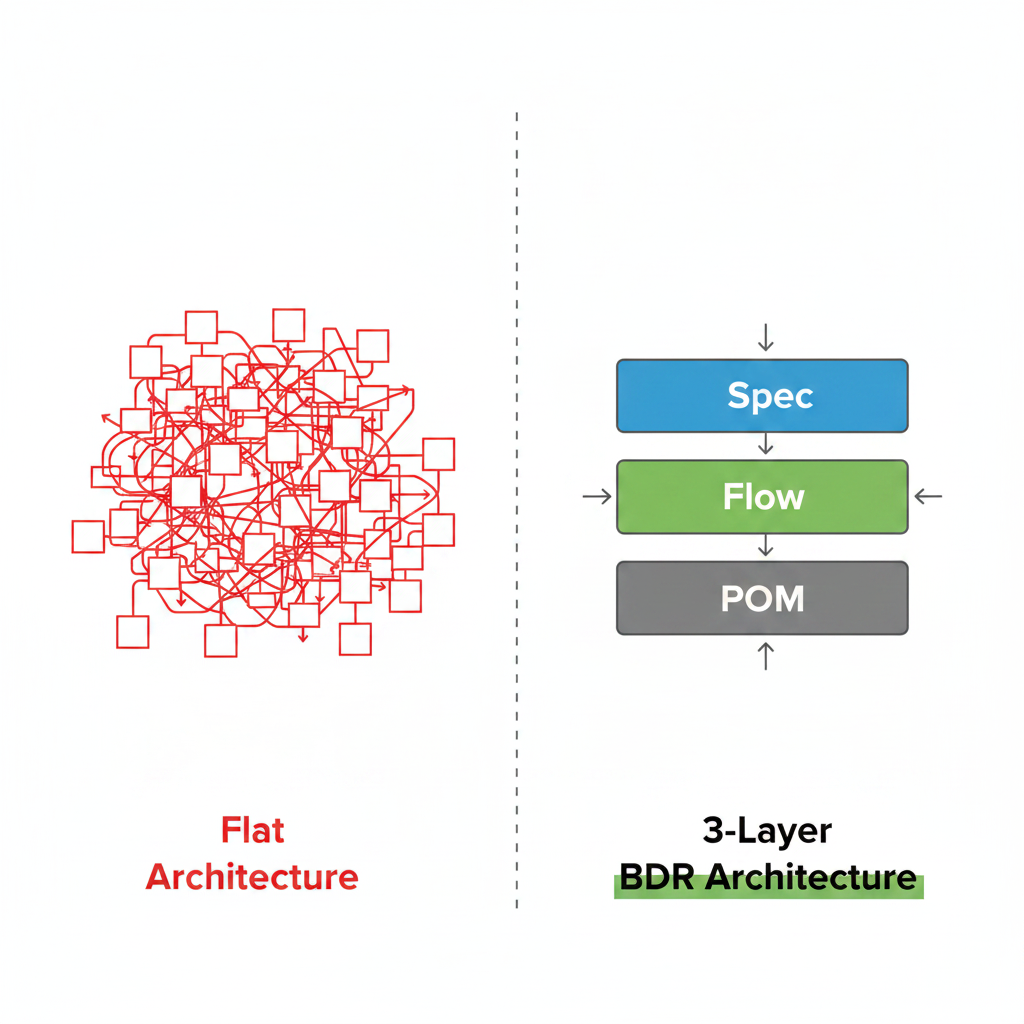
Before diving into fixtures, it’s worth establishing the architectural model this article assumes. Most Playwright codebases that scale well use three layers:

  • Page Object (POM) — responsible for interacting with elements on a specific page: locators, clicks, form fills. Knows nothing about business logic or test scenarios.
  • Flow — describes complete business scenarios: “checkout”, “user registration”, “password reset”. Orchestrates Page Objects in the right sequence. The test calls checkoutFlow.submitOrder() and Flow handles which pages to visit, in what order, and what data to fill.
  • Test — declares intent. Reads like a specification: given this user, when this action, then this result.

This separation matters because changes are isolated: UI changes only touch Page Objects, process changes only touch Flows, tests remain stable. Fixtures are what make this architecture work — they manage the lifecycle of all three layers.


The naive approach looks like this:

test('checkout flow', async ({ page }) => {
const cartPage = new CartPage(page);
const checkoutPage = new CheckoutPage(page);
const checkoutFlow = new CheckoutFlow(cartPage, checkoutPage);
await checkoutFlow.submitOrder();
});

At first glance this is fine — explicit, readable, no magic. The problem surfaces when CartPage needs a new dependency. Now every test that constructs CartPage needs updating. In a 500-test suite, that’s a multi-day refactor with non-trivial regression risk.

The deeper issue: this pattern makes the test responsible for dependency resolution. That’s not the test’s job.


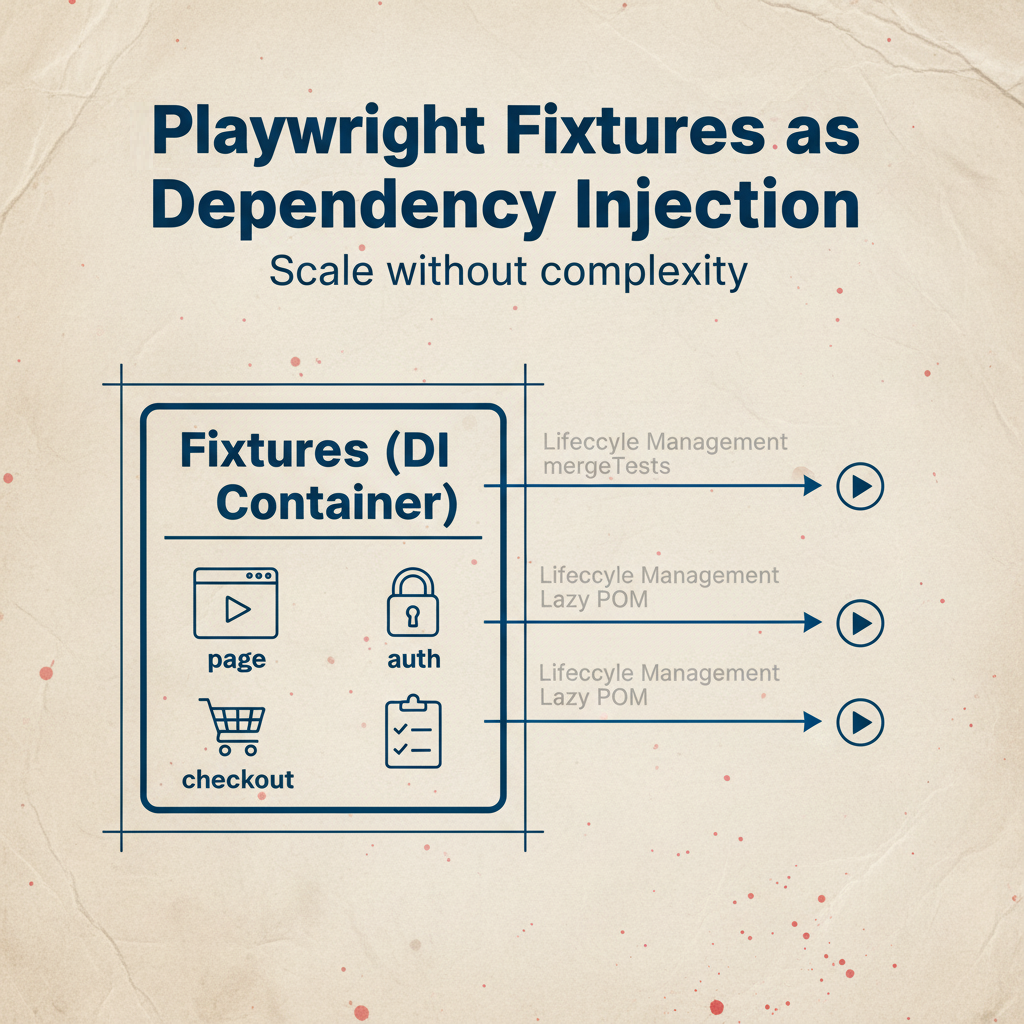
Playwright’s fixture system is, architecturally, a dependency injection container with lifecycle management. The key insight is that fixtures compose:

fixtures.ts
export const test = base.extend({
cartPage: async ({ page }, use) => {
await use(new CartPage(page));
},
checkoutPage: async ({ page }, use) => {
await use(new CheckoutPage(page));
},
// Playwright resolves dependencies automatically
checkoutFlow: async ({ cartPage, checkoutPage }, use) => {
const flow = new CheckoutFlow(cartPage, checkoutPage);
await use(flow);
await flow.cleanup(); // teardown guaranteed regardless of test outcome
},
});

Playwright builds the dependency graph, resolves it in the correct order, and handles teardown. If five tests depend on cartPage, Playwright creates one instance per test — not five, not one shared instance. The isolation is automatic.

The caching behavior matters: when multiple fixtures in the same test depend on the same fixture (e.g., both checkoutFlow and analyticsFlow depend on cartPage), Playwright creates exactly one cartPage instance for that test. This isn’t just an optimization — it means the two flows share state correctly, as they would in a real user session.


Here’s the argument that matters for long-lived codebases: use fixtures even when the object seems stateless today.

CheckoutFlow might be a pure orchestrator right now — no state, no side effects, no external connections. But requirements change:

  • Next sprint: Flow needs to track an order ID for verification
  • Month after: Flow opens a WebSocket for real-time updates
  • Quarter later: Flow acquires a distributed lock that must be released

Each of these changes requires teardown. If CheckoutFlow is created with new in 300 tests, adding teardown means touching 300 files. If it’s in a fixture, you add one after use block:

checkoutFlow: async ({ cartPage, checkoutPage }, use) => {
const flow = new CheckoutFlow(cartPage, checkoutPage);
await use(flow);
await flow.releaseLock(); // added once, applies everywhere
await flow.closeConnection();
};

The fixture system gives you lifecycle management for free. The upfront investment is real — a few hours to set up the pattern properly. The cost of retrofitting it later: proportional to the number of tests.


The Pragmatic Rule: When Fixtures Are Overkill

Section titled “The Pragmatic Rule: When Fixtures Are Overkill”

Everything above is an argument for fixtures. Here’s the counterargument, because a good architecture isn’t about dogma.

Fixtures make sense when an object needs one or more of the following:

  • Lifecycle management — setup before the test, teardown after
  • Shared dependencies — the object depends on page, request, or another fixture
  • Potential for state — today stateless, but realistically might not be tomorrow

When none of these apply, a fixture is unnecessary indirection. A pure utility function — one that takes inputs and returns outputs with no side effects and no browser context — doesn’t belong in a fixture system. It belongs in a module:

// Just a function — no fixture needed
export function formatOrderId(id: string): string {
return `ORD-${id.toUpperCase()}`;
}
// Factory function — pure, no browser context
export function createUser(overrides?: Partial<User>): User {
return { role: 'customer', discount: 0, ...overrides };
}
// Fixture — depends on page, has implicit lifecycle
cartPage: async ({ page }, use) => {
await use(new CartPage(page));
};

The decision rule: if an object touches the browser context or has any chance of needing teardown as the codebase evolves — fixture. If it’s a pure function or a data factory with no external dependencies — just export it and call it directly.

The cost of using fixtures when you don’t strictly need it: near zero. The cost of not using them when you should have: proportional to the number of tests you need to update.

Putting everything into fixtures because “it might need lifecycle someday” is the same mistake as premature optimization. It adds indirection without value and makes the codebase harder to read. The goal is judgment, not consistency for its own sake.


Lazy POM: Why Getters Beat Constructor Assignments

Section titled “Lazy POM: Why Getters Beat Constructor Assignments”

The standard Page Object pattern assigns locators in the constructor:

// Technically safe, architecturally suboptimal
class CartPage {
private readonly submitButton: Locator;
constructor(private page: Page) {
this.submitButton = page.locator('button#submit');
}
}

Playwright locators are lazy — they don’t query the DOM at construction time, they query it at the moment of interaction. So a locator assigned in the constructor won’t go stale: even if the DOM re-renders between construction and use, Playwright finds the element fresh when you call .click() or .isVisible(). This is technically fine.

The problem is what this pattern enables: the temptation to compute actual state in the constructor.

// This is a race condition bomb
constructor(page: Page) {
(async () => {
this.initialItemCount = await page.locator('.item').count();
})();
}

The IIFE fires and is forgotten. The test accesses initialItemCount before the promise resolves. In a fast local environment this usually works. Under CI load with multiple workers competing for resources, it fails intermittently and is nearly impossible to reproduce.

The architectural fix: getters enforce statelessness

class CartPage {
constructor(private page: Page) {}
// Evaluated fresh on every access — no state, no race conditions
get submitButton() {
return this.page.getByRole('button', { name: 'Place order' });
}
get items() {
return this.page.locator('.cart-item');
}
// For computed state, return a promise explicitly
async getItemCount(): Promise<number> {
return this.items.count();
}
}

Getters make it structurally impossible to cache state at construction time. The Page Object is forced to be stateless — it can only describe how to find elements and interact with them, not what their current state is. Reading state is always an explicit async operation.

This is the State Trap pattern in reverse: instead of accidentally capturing a DOM snapshot at construction time, you’re architecturally prevented from doing so.


workerIndex as a faker seed is the most common data isolation mistake. The reasoning seems sound: each worker gets a unique number, so data is unique. The failure mode is subtle.

On 10 parallel CI shards, each shard has its own “Worker 0”, “Worker 1”, etc. The workerIndex namespace is shard-local. If the same test runs on Shard 1 Worker 0 and Shard 2 Worker 0 — during a retry, or due to shard misconfiguration — both generate identical data for the same testId. In a shared database, this means collisions — and the kind of intermittent failures that look like application bugs.

The correct seed: combine test identity with CI build ID

utils/faker.utils.ts
import { TestInfo } from '@playwright/test';
import { faker } from '@faker-js/faker';
function hashCode(str: string): number {
return str.split('').reduce((acc, char) => {
return (Math.imul(31, acc) + char.charCodeAt(0)) | 0;
}, 0);
// Note: not cryptographically secure, but collision probability is negligible
// for the number of tests in any realistic suite — fine for faker seeding
}
export function seedFaker(testInfo: TestInfo): typeof faker {
const RUN_ID = process.env.RUN_ID ?? 'local';
// Three components:
// testId: hash of file path + test name — unique per test, stable across runs
// RUN_ID: CI build ID — different builds get different data
// repeatEachIndex: handles retries — same test run gets same data on retry
const seed = hashCode(`${testInfo.testId}-${RUN_ID}-${testInfo.repeatEachIndex}`);
faker.seed(seed);
return faker;
}
fixtures.ts
export const test = base.extend({
faker: async ({}, use, testInfo) => {
await use(seedFaker(testInfo));
},
});

The repeatEachIndex component is worth explaining: when a test retries, it runs on potentially a different worker. Without repeatEachIndex in the seed, a retry would generate different data than the original run. If the failure was data-dependent, you can’t reproduce it. With repeatEachIndex, retries are deterministic — same seed, same data, reproducible failure.

The debugging payoff: when a test fails in CI, take the RUN_ID from the pipeline logs and run the test locally with RUN_ID=<value> npx playwright test <test-name>. You get the exact data that was generated in CI. This transforms “I can’t reproduce this” into a reproducible failure in under a minute.


Factory Pattern: Separating Structure From Noise

Section titled “Factory Pattern: Separating Structure From Noise”

Random data everywhere obscures test intent. If a field doesn’t affect the outcome, it shouldn’t be visible in the test.

user.factory.ts
export interface User {
id: string;
email: string;
name: string;
role: 'customer' | 'vip' | 'admin';
discount: number;
}
export function createUser(overrides?: Partial<User>, f: typeof faker = faker): User {
return {
id: f.string.uuid(),
email: f.internet.email(),
name: f.person.fullName(),
role: 'customer',
discount: 0,
...overrides,
};
}

The factory provides structure and defaults. Overrides express what the test actually cares about:

// Only the meaningful fields are visible
test('VIP discount applied at checkout', async ({ checkoutFlow, faker }) => {
const user = createUser({ role: 'vip', discount: 0.15 }, faker);
const order = await checkoutFlow.asUser(user).checkout();
expect(order.total).toBe(order.subtotal * 0.85);
});

For business scenarios that repeat across multiple tests, extract named datasets rather than duplicating overrides:

data/datasets/users.ts
export const VIP_USER = {
role: 'vip',
discount: 0.15,
} as const satisfies Partial<User>;
export const ADMIN_USER = {
role: 'admin',
discount: 0,
} as const satisfies Partial<User>;
// In tests — intent is immediately clear
const user = createUser({ ...VIP_USER }, faker);

The satisfies operator here is doing real work: it validates that the dataset fields match the User type without widening the type. If someone adds a required field to User and forgets to update the dataset, TypeScript catches it at compile time.

When to consider the Builder pattern instead

The factory + overrides approach works well when objects are simple and combinations are limited. When complexity grows — a user with a role, subscription tier, notification preferences, and order history — the override object becomes unwieldy:

// Hard to read at a glance
const user = createUser(
{
role: 'vip',
subscription: 'premium',
notifications: { email: true, sms: false },
orderCount: 3,
},
faker,
);

A Builder makes the same intent readable:

// Builder — reads like a specification
const user = new UserBuilder(faker)
.asVip()
.withPremiumSubscription()
.withNotifications({ email: true, sms: false })
.withOrderHistory(3)
.build();
user.builder.ts
class UserBuilder {
private overrides: Partial<User> = {};
constructor(private f: typeof faker) {}
asVip() {
this.overrides.role = 'vip';
this.overrides.discount = 0.15;
return this;
}
withPremiumSubscription() {
this.overrides.subscription = 'premium';
return this;
}
withOrderHistory(count: number) {
this.overrides.orderCount = count;
return this;
}
build(): User {
return createUser(this.overrides, this.f);
}
}

The Builder delegates to the factory at the end — so you keep one source of truth for defaults, and the Builder just provides a fluent API for complex combinations. Use it when you have more than 3–4 meaningful combinations that appear repeatedly across tests. For simpler cases, the factory with overrides is less code and just as clear.


Scaling Fixtures: mergeTests and Namespacing

Section titled “Scaling Fixtures: mergeTests and Namespacing”

A single fixtures.ts file works until it doesn’t. The inflection point is usually around 15–20 fixtures, when multiple engineers are editing the same file simultaneously and merge conflicts become routine.

Domain-driven fixture splitting:

auth.fixtures.ts
import { test as base } from '@playwright/test';
import { LoginPage, AdminPage } from '../pages';
type AuthFixtures = { loginPage: LoginPage; adminPage: AdminPage };
export const authTest = base.extend<AuthFixtures>({
loginPage: async ({ page }, use) => {
await use(new LoginPage(page));
},
adminPage: async ({ page }, use) => {
await use(new AdminPage(page));
}
});
// cart.fixtures.ts
type CartFixtures = { cartPage: CartPage; checkoutPage: CheckoutPage };
export const cartTest = base.extend<CartFixtures>({ ... });
// fixtures.ts — composition point
import { mergeTests } from '@playwright/test';
import { authTest } from './auth.fixtures';
import { cartTest } from './cart.fixtures';
export const test = mergeTests(authTest, cartTest);
export { expect } from '@playwright/test';

Tests import from fixtures.ts and see nothing change. The split is organizational, not behavioral.

The silent collision problem:

mergeTests doesn’t check for fixture name conflicts. If auth.fixtures.ts and billing.fixtures.ts both export a user fixture, the last one registered wins — silently. Tests that worked before mergeTests may start using a different user object without any error.

Namespacing eliminates this class of bug:

type AuthFixtures = {
auth: {
admin: Admin;
user: User;
guest: Guest;
};
};
export const authTest = base.extend<AuthFixtures>({
auth: async ({ page }, use) => {
await use({
admin: new Admin(page),
user: new User(page),
guest: new Guest(page),
});
},
});
// Collision is now structurally impossible
// auth.user vs billing.user — different namespaces, different objects
test('admin manages billing', async ({ auth, billing }) => {
await auth.admin.login();
await billing.user.subscribe();
});

The namespace also makes test code self-documenting: auth.admin vs billing.user is unambiguous in a way that two separate admin and user fixtures are not.

The quality of step descriptions in your reports determines how useful they are for debugging. The native Playwright tool is test.step():

// Technical log — breaks when implementation changes
async login() {
await test.step('Click the login button', async () => {
await this.page.getByRole('button', { name: 'Login' }).click();
});
}
// Business intent — survives refactoring
async loginAs(user: User) {
await test.step(`Authenticate as "${user.username}"`, async () => {
await this.loginPage.login(user.username, user.password);
});
}

The second version remains valid even if the login mechanism changes from a form to SSO. The report reads like a scenario, not a sequence of DOM operations.

In BDR methodology, this pattern is formalized with a @Step decorator that wraps methods automatically — eliminating the manual test.step() wrapping. If you’re building at scale and want cleaner syntax, it’s worth exploring.


The fixture architecture only works if objects aren’t created with new inside tests. Document the rule in code:

.eslintrc.js
module.exports = {
overrides: [
{
// Scoped to test files only — won't flag Pagination or other non-POM classes
files: ['tests/**/*.ts', '**/*.spec.ts'],
rules: {
'no-restricted-syntax': [
'error',
{
selector: 'NewExpression[callee.name=/.*Page$/]',
message: 'Instantiate Page Objects via fixtures, not new. See fixtures.ts.',
},
{
selector: 'NewExpression[callee.name=/.*Flow$/]',
message: 'Instantiate Flow objects via fixtures, not new. See fixtures.ts.',
},
],
},
},
],
};

When a genuine exception exists — a factory function that creates a Page Object for testing purposes, for instance — the escape hatch is // eslint-disable-next-line with a mandatory comment:

// eslint-disable-next-line no-restricted-syntax
// Factory function — not a test file, constructing for unit testing POM behavior
const page = new LoginPage(mockPage);

The comment makes the exception visible and reviewable. Blanket disables without explanation are a red flag in code review.


DecisionWrongRightWhy
Object creationnew PageObject() in testsFixturesSingle update point when constructor changes
Locator definitionConstructor assignmentsGettersPrevents state capture, enforces statelessness
Faker seedworkerIndextestId + RUN_ID + repeatEachIndexStable across shards and retries
Fixture organizationOne monolithic fileDomain files + mergeTestsParallel editing, clear ownership
Fixture namingFlat namespaceDomain namespacingEliminates silent collisions
Architecture enforcementCode review commentsESLint rules scoped to tests/**Automated, consistent, zero overhead
Step reportingTechnical descriptionstest.step() with business intentReport reads like a scenario, not a DOM log

None of this is complex to implement. The fixture DI pattern is an afternoon. Seeded faker is 20 lines. Namespacing is a refactor you can do incrementally.

What it solves is the compounding cost of the alternative. Every new PageObject() in a test is a future refactoring touchpoint. Every workerIndex seed is a potential data collision waiting for sufficient parallelism to trigger. Every flat fixture namespace is a silent collision waiting for the second engineer to add a fixture with the same name.

The architecture described here doesn’t make tests faster or more readable in the short term. It makes the codebase cheaper to maintain as it grows — which is the only metric that matters at scale.


Reference implementation: Playwright BDR Template
Your Playwright Tests Will Need Refactoring. Here's How to Make It Painless

Your Playwright Tests Will Need Refactoring. Here’s How to Make It Painless CONCEPT

Section titled “Your Playwright Tests Will Need Refactoring. Here’s How to Make It Painless ”

You write 50 tests. Everything works. Six months later the team grows, tests become 300, and someone changes a constructor — and you spend two days updating imports across the entire project. Sound familiar?

This isn’t a discipline problem. It’s an architecture problem. And it’s fixable before it happens.

Code examples are simplified for clarity — focus on the idea, not the boilerplate.


  1. Never instantiate Page Objects with new inside tests — use fixtures
  2. Use getters instead of constructor assignments in Page Objects
  3. Seed your test data with a combination of testId + RUN_ID + repeatEachIndex for reproducibility
  4. Split fixtures by domain when the file gets large — use mergeTests
  5. Use Namespacing to avoid silent fixture name collisions

Before we dive in — this article uses the term Flow, which might be unfamiliar.

In a well-structured Playwright project, tests are built in three layers:

  • Page Object (POM) — knows how to interact with elements on a specific page: find a button, fill a field, click a link
  • Flow — knows how to complete a business scenario: “checkout”, “register a user”, “reset a password”. It orchestrates Page Objects in the right sequence so tests don’t have to
  • Test — just calls the Flow and checks the result

So when you see checkoutFlow.submitOrder() in a test, that one line is hiding a sequence of page navigations, form fills, and button clicks — all managed by the Flow. The test doesn’t need to know the details.


The Problem: Architecture That Fights You at Scale

Section titled “The Problem: Architecture That Fights You at Scale”

At 50 tests, messy architecture is invisible. At 300 tests, it becomes expensive. Two separate problems compound each other:

Data isolation breaks in parallel runs. Two workers create a user named “Ivan”, one test reads the other’s data, both fail. You spend an hour debugging something that has nothing to do with your application. This is a data seeding problem — solved in Rule #3.

Refactoring takes days instead of hours. Someone changes a constructor signature. Now you have 150 files to update. With modern tools this is still risky — you might miss one. This is a dependency management problem — solved in Rule #1.

Tests are impossible to read. Ten lines of setup before the actual test logic. New team members can’t tell what’s being tested and what’s just noise. This too is a dependency management problem — when setup lives in fixtures, tests read like specifications.


This is the most common pattern that makes refactoring painful:

// Every test manages its own dependencies
test('checkout', async ({ page }) => {
const cartPage = new CartPage(page);
const checkoutPage = new CheckoutPage(page);
const checkoutFlow = new CheckoutFlow(cartPage, checkoutPage);
await checkoutFlow.submitOrder();
});

If CartPage needs a new dependency tomorrow — a logger, a config object, an API client — you update every single test that creates it. That’s your two days of refactoring.

The fix: fixtures as a DI container

// fixtures.ts — one place to manage all object creation
export const test = base.extend({
cartPage: async ({ page }, use) => {
await use(new CartPage(page));
},
checkoutFlow: async ({ cartPage, checkoutPage }, use) => {
await use(new CheckoutFlow(cartPage, checkoutPage));
},
});
// The test reads like a specification
test('checkout', async ({ checkoutFlow }) => {
await checkoutFlow.submitOrder();
});

When CartPage constructor changes — you update fixtures.ts. One file. Done.

Why fixtures even when Flow seems stateless today:

Your CheckoutFlow might be pure today — no state, no side effects. But requirements change. Tomorrow it needs to track an order ID. Next month it opens a WebSocket connection that needs to be closed after the test.

If Flow is created via new in every test, adding teardown means updating hundreds of files. If it’s in a fixture, you add after use cleanup in one place:

checkoutFlow: async ({ cartPage, checkoutPage }, use) => {
const flow = new CheckoutFlow(cartPage, checkoutPage);
await use(flow);
await flow.cleanup(); // added in one place, applies everywhere
};

The upfront investment is real — a few hours to set up fixtures properly. The cost of refactoring later: days, proportional to how many tests you have.

A note on pragmatism: Fixtures are for managing state and lifecycle. If you have a stateless utility function — like formatDate or a math helper — don’t wrap it in a fixture. A simple ES6 import is faster and less complex. Use fixtures for things that hold a page context or require setup/teardown. Everything else is just a function.


Rule #2: Use Getters in Page Objects, Not Constructor Assignments

Section titled “Rule #2: Use Getters in Page Objects, Not Constructor Assignments”

This is subtle but important. Most tutorials show this:

// Locator computed once at construction time
class CartPage {
private submitButton: Locator;
constructor(page: Page) {
this.submitButton = page.locator('button#submit');
}
}

This looks fine. Playwright locators are lazy — they don’t query the DOM at construction time, they query it when you interact with them. So assigning a locator in the constructor is technically safe.

The real danger is what this pattern enables — the temptation to capture actual state in the constructor:

// Never do this
constructor(page: Page) {
(async () => {
this.itemCount = await page.locator('.items').count(); // race condition bomb
})();
}

This creates an unmanaged race condition. Your test might read itemCount before the async function inside the constructor has resolved. This causes random CI failures that are nearly impossible to reproduce locally.

The fix: lazy getters

Getters are the architectural solution — not because they prevent stale locators (Playwright handles that), but because they make it structurally impossible to capture state at construction time. A getter can’t be async, so you physically can’t write this.itemCount = await something inside one.

// Fresh locator on every access, stateless by design
class CartPage {
constructor(private page: Page) {}
get submitButton() {
return this.page.getByRole('button', { name: 'Place order' });
}
// Named cartItems, not itemCount — this returns a locator, not a number
get cartItems() {
return this.page.locator('.cart-item');
}
// For actual count — explicit async method, not a getter
async getItemCount(): Promise<number> {
return this.cartItems.count();
}
}

The Page Object stays stateless. Reading state is always an explicit async operation, never something that happens silently at construction time.


Rule #3: Isolate Test Data for Parallel Runs

Section titled “Rule #3: Isolate Test Data for Parallel Runs”

When you run 1000 tests in parallel across multiple CI shards, data collisions are inevitable — unless you design against them.

The common mistake is using workerIndex as a seed for test data. It seems logical: each worker gets a unique number, so data should be unique. The problem is that workerIndex resets per shard. On 10 parallel CI agents, each has its own “Worker 0”. Collisions are guaranteed.

The fix: combine test identity with CI build ID — not worker index

utils/faker.utils.ts
import { TestInfo } from '@playwright/test';
import { faker } from '@faker-js/faker';
function hashCode(str: string): number {
return str.split('').reduce((acc, char) => {
return (Math.imul(31, acc) + char.charCodeAt(0)) | 0;
}, 0);
}
export function seedFaker(testInfo: TestInfo) {
const RUN_ID = process.env.RUN_ID || 'local';
const seed = hashCode(`${testInfo.testId}-${RUN_ID}-${testInfo.repeatEachIndex}`);
faker.seed(seed);
return faker;
}
// fixtures.ts
export const test = base.extend({
faker: async ({}, use, testInfo) => {
await use(seedFaker(testInfo));
},
});

Three components in the seed:

  • testId — unique hash of the test file path and test name
  • RUN_ID — the CI build ID (e.g. GITHUB_RUN_ID), so different builds get different data
  • repeatEachIndex — handles retries correctly

Note: RUN_ID is an environment variable provided by your CI system — for example, GITHUB_RUN_ID in GitHub Actions. If it’s missing, the code falls back to 'local', so everything works on your machine without any extra setup.

The payoff: when a test fails in CI, grab the RUN_ID from the pipeline logs, run the test locally with the same ID, and you get the exact same names, emails, and UUIDs that were generated in CI. Reproducible failures instead of “I can’t reproduce this locally.”


Rule #4: Structure Test Data With Factories and Overrides

Section titled “Rule #4: Structure Test Data With Factories and Overrides”

Random data everywhere creates noise. If a field doesn’t affect the test outcome, it shouldn’t be visible in the test.

// user.factory.ts — sensible defaults
export function createUser(overrides?: Partial<User>, f = faker): User {
return {
id: f.string.uuid(),
email: f.internet.email(),
name: f.person.fullName(),
role: 'customer',
...overrides,
};
}
// In the test — only what matters
test('VIP discount applies at checkout', async ({ checkoutFlow, faker }) => {
const user = createUser({ role: 'vip', discount: 0.15 }, faker);
await checkoutFlow.asUser(user).applyPromo();
});

The test declares intent, not implementation. When you read it, you know exactly what’s being tested: VIP role and discount. Everything else — name, email, UUID — is noise that the factory handles.

For data that represents specific business cases and appears repeatedly, extract it as a named dataset:

data/datasets/users.ts
export const VIP_USER = { role: 'vip', discount: 0.15 } as const;
// In tests
const user = createUser({ ...VIP_USER }, faker);

Pro tip: Use the satisfies operator (TypeScript 4.9+) instead of as const for datasets. It ensures your data matches the User type without losing the specific literal values — catching type errors before you even run the test:

export const VIP_USER = {
role: 'vip',
discount: 0.15,
} satisfies Partial<User>;

If someone adds a required field to User and forgets to update the dataset, TypeScript will tell you at compile time, not at runtime.


Rule #5: Scale Fixtures With mergeTests and Namespacing

Section titled “Rule #5: Scale Fixtures With mergeTests and Namespacing”

One fixtures.ts file is fine at the start. At 20+ fixtures it becomes a 400-line file that multiple people edit simultaneously.

Split by domain:

auth.fixtures.ts
import { test as base } from '@playwright/test';
import { LoginPage } from '../pages/LoginPage';
export const authTest = base.extend<{ loginPage: LoginPage }>({
loginPage: async ({ page }, use) => {
await use(new LoginPage(page));
},
});
// cart.fixtures.ts
import { test as base } from '@playwright/test';
import { CartPage } from '../pages/CartPage';
export const cartTest = base.extend<{ cartPage: CartPage }>({
cartPage: async ({ page }, use) => {
await use(new CartPage(page));
},
});
// fixtures.ts — merge everything
import { mergeTests } from '@playwright/test';
import { authTest } from './auth.fixtures';
import { cartTest } from './cart.fixtures';
export const test = mergeTests(authTest, cartTest);

Tests don’t change at all — they still import from fixtures.ts. The split is purely organizational.

Watch out for name collisions:

If auth.fixtures.ts and cart.fixtures.ts both define a fixture called user, Playwright won’t warn you. The last one wins silently. This creates subtle bugs that are very hard to track down.

The fix is namespacing — group fixtures by domain:

// No collision possible
import { test as base } from '@playwright/test';
import { Admin } from '../pages/Admin';
import { User } from '../pages/User';
export const test = base.extend<{ auth: { admin: Admin; user: User } }>({
auth: async ({ page }, use) => {
await use({
admin: new Admin(page),
user: new User(page),
});
},
});
// In tests
test('admin can manage users', async ({ auth }) => {
await auth.admin.login();
await auth.user.register();
});

Rule #6: Write Business Steps, Not Technical Logs

Section titled “Rule #6: Write Business Steps, Not Technical Logs”

If you use Allure or any step-based reporter, the quality of your step descriptions determines how useful the report is.

The native Playwright way is test.step():

// Technical log — describes implementation
async login() {
await test.step('Click the login button', async () => {
await this.page.getByRole('button', { name: 'Login' }).click();
});
}
// Business intent — describes what happened
async loginAs(user: User) {
await test.step(`Authenticate as "${user.username}"`, async () => {
await this.loginPage.login(user.username, user.password);
});
}

The first version breaks when you rename the button. The second version remains valid even if the entire login mechanism changes from a form to SSO. The report reads like a scenario, not a DOM manipulation log.

In BDR methodology we use a @Step decorator instead of wrapping every method manually — same result, cleaner syntax. If you’re interested in that approach, check it out.


ESLint: Enforce the Architecture Automatically

Section titled “ESLint: Enforce the Architecture Automatically”

The best rule is one that doesn’t require a code review comment:

.eslintrc.js
module.exports = {
overrides: [
{
// Only applies inside test files — won't flag Page Object factories or helpers
files: ['tests/**/*.ts', '**/*.spec.ts'],
rules: {
'no-restricted-syntax': [
'error',
{
selector: 'NewExpression[callee.name=/.*Page$/]',
message: 'Use fixtures instead of new for Page Objects. See fixtures.ts.',
},
{
selector: 'NewExpression[callee.name=/.*Flow$/]',
message: 'Use fixtures instead of new for Flow objects. See fixtures.ts.',
},
],
},
},
],
};

Scoping to tests/** prevents false positives — new Pagination() in your app code won’t trigger this. Only new LoginPage() inside test files will.


SymptomRoot causeFix
Refactoring takes daysnew PageObject() in every testMove to fixtures
Parallel tests corrupt each other’s dataworkerIndex as seedSeed with testId + RUN_ID
Can’t reproduce CI failures locallyNon-deterministic test dataSeeded faker fixture
fixtures.ts is 400 linesNo domain separationmergeTests + domain files
Fixture collision, wrong object usedFlat fixture namespaceNamespace by domain
Report is unreadableTechnical step descriptionstest.step() with business intent (or @Step in BDR)

This architecture handles the object lifecycle and data isolation. The next layer is async reliability — expect.poll, idempotency keys for parallel API calls, and cleaning up test data without relying on afterEach.

Want to go deeper? Check out the advanced version: Playwright Architecture at Scale: What Senior Engineers Do Differently


All patterns in this article are implemented in the Playwright BDR Template on GitHub.

Playwright CI: What Senior Engineers Do Differently

Playwright CI: What Senior Engineers Do Differently PRO IMPLEMENTATION

Section titled “Playwright CI: What Senior Engineers Do Differently ”

New to Playwright architecture? Start with the fundamentals first: Why Your Playwright Tests Fail in CI (And Never Locally) — the same concepts with more explanation and simpler examples.

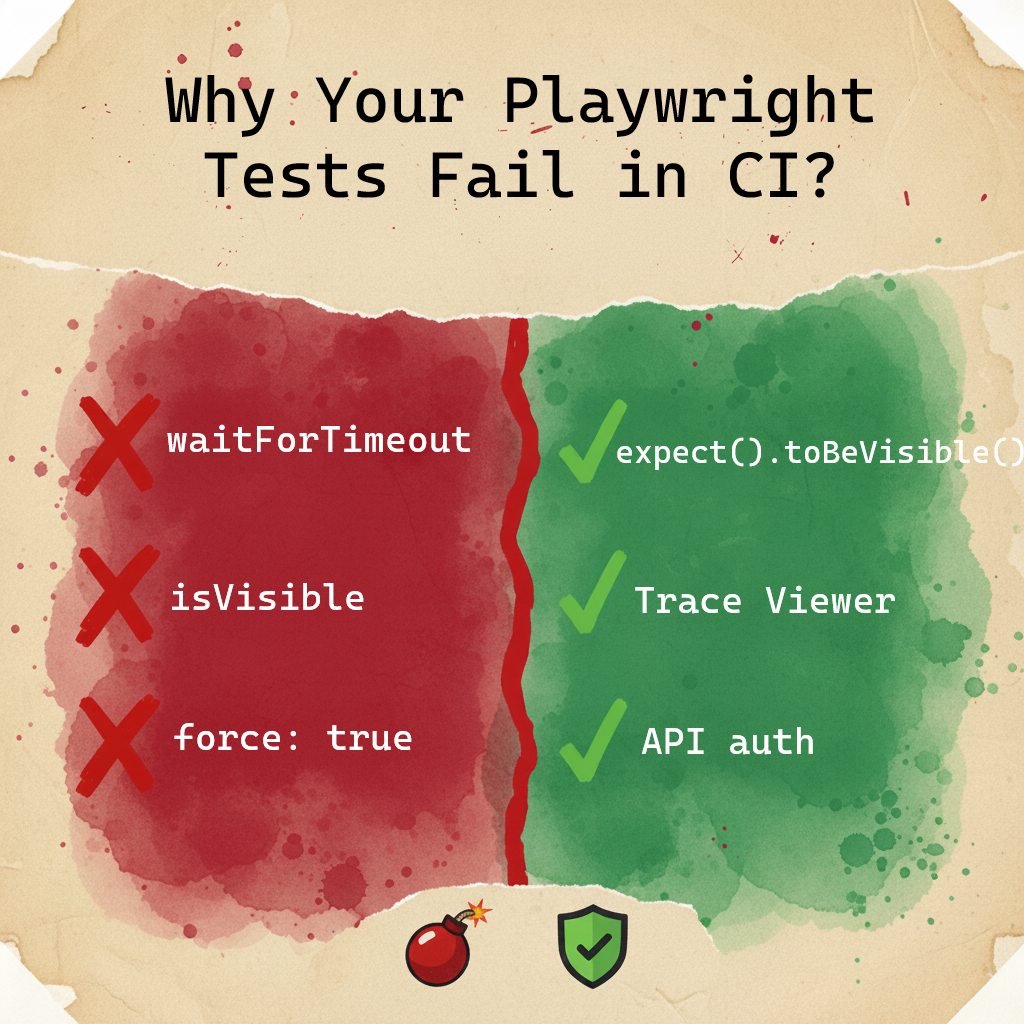
Most teams reach a point where their test suite becomes a liability. Green locally, red in CI. Passes on retry, fails on the next run. The usual response is to increase timeouts, add waitForTimeout, and move on. The problem compounds quietly until someone spends a full day debugging a test that was never actually broken.

This guide is about the architectural decisions that prevent that from happening. Not “use better selectors” — you already know that. The decisions that determine whether your test infrastructure scales or slowly collapses under its own weight.

Code examples are intentionally simplified — focus on the architectural pattern, not the implementation details.


Mental Model Shift: Leaving Legacy Baggage Behind

Section titled “Mental Model Shift: Leaving Legacy Baggage Behind”

##TL;DR

Dependency Projects over globalSetup — fail fast when the environment is down, not after 800 tests. API auth in 50ms, not UI auth in 5 seconds. getByRole queries the accessibility tree — role survives refactoring, { name } doesn’t survive translation. Web-first assertions poll until ready — isVisible() is a snapshot. expect.poll for state that changes outside the UI — webhooks, background jobs, queues. Trace Viewer’s Action/Before/After snapshots show you why a click failed, not just that it did.


Before getting into architecture, a quick audit. Senior engineers migrating from Selenium or Puppeteer often bring habits that fight Playwright instead of leveraging it. These aren’t stylistic preferences — they’re architectural differences that affect reliability at scale.

If any of these look familiar in your codebase, fix them before layering on anything else:

  • page.$() or page.$$()getByRole(), getByLabel(), getByTestId() Playwright locators are lazy and auto-retried on assertions. $() executes immediately against the current DOM state and cannot be polled.

  • waitForSelector() or waitForTimeout() → Remove them Playwright auto-waits for actionability before every interaction. Explicit waits are almost always either redundant or masking a real problem.

  • waitForNavigation()await expect(page).toHaveURL('/dashboard') waitForNavigation() is prone to race conditions — it can resolve before the page is actually ready. toHaveURL polls until the URL matches, which is what you actually want.

  • isVisible(), isEnabled() in assertions → expect(loc).toBeVisible(), expect(loc).toBeEnabled() Snapshot methods return the state at one millisecond. Web-first assertions retry until the condition is true or the timeout expires.

  • console.log('HERE') → Trace Viewer Logs tell you that something happened. Traces show you the DOM, network, and console at the exact moment it happened — in CI, after the fact.

If your team is mid-migration, this is worth a dedicated refactor sprint. The patterns below assume you’re past this baseline.


The Problem With How Most Teams Structure Test Infrastructure

Section titled “The Problem With How Most Teams Structure Test Infrastructure”

The typical Playwright setup looks like this: a globalSetup file that handles authentication, maybe some shared fixtures, and a flat list of test files. This works at 50 tests. At 500, the cracks appear.

globalSetup runs once, outside Playwright’s normal execution context. When it fails, you get dry Node.js logs. No trace, no network timeline, no DOM snapshots. You’re debugging blind.

More critically: there’s no built-in way to say “don’t run 800 tests if the environment is down.” You get 800 failures that all say the same thing and tell you nothing useful.


The Architecture: Dependency Projects as a Dependency Graph

Section titled “The Architecture: Dependency Projects as a Dependency Graph”

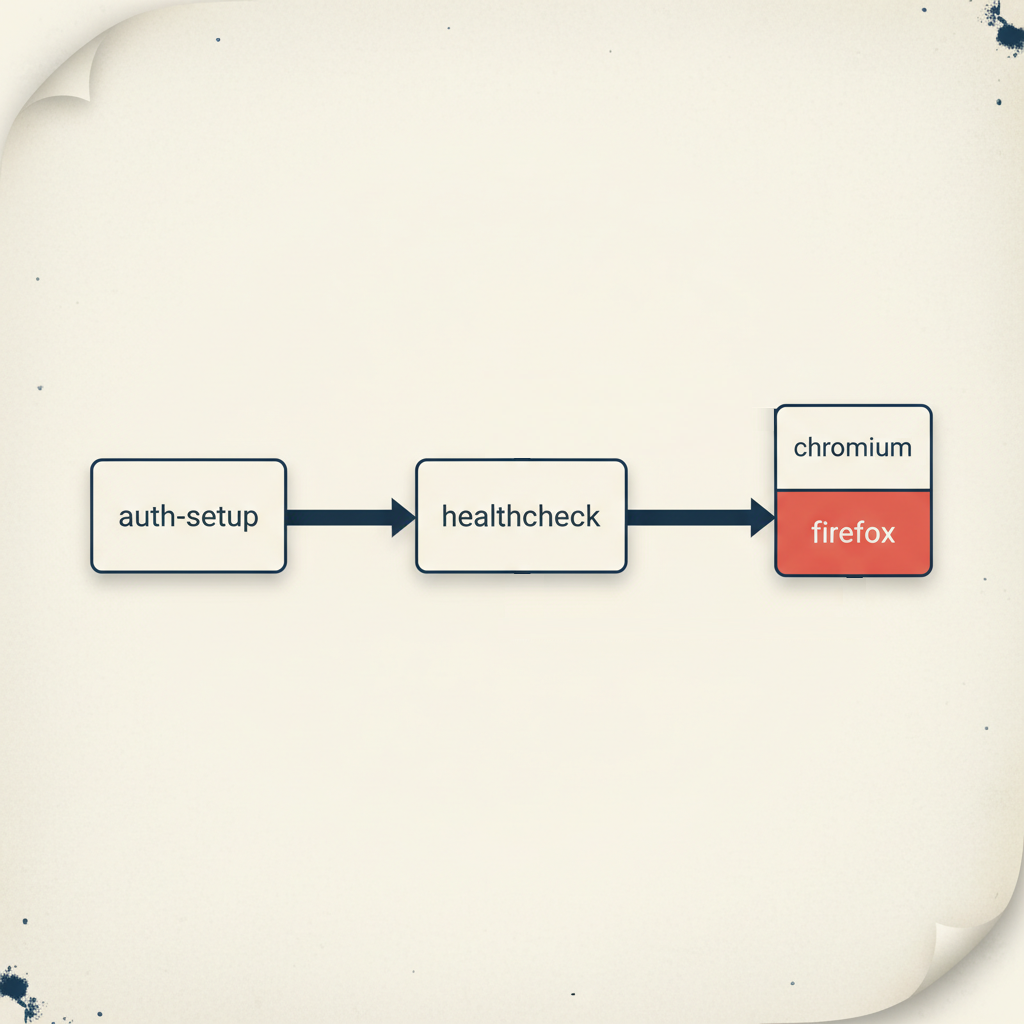
The senior approach treats test infrastructure as a directed acyclic graph. Each node has prerequisites. If a prerequisite fails, dependent nodes don’t run.

playwright.config.ts
export default defineConfig({
projects: [
{
name: 'auth-setup',
testMatch: /.*\.auth\.setup\.ts/,
},
{
name: 'healthcheck',
testMatch: /.*\.health\.setup\.ts/,
dependencies: ['auth-setup'],
},
{
name: 'chromium',
use: { ...devices['Desktop Chrome'] },
dependencies: ['healthcheck'],
},
{
name: 'firefox',
use: { ...devices['Desktop Firefox'] },
dependencies: ['healthcheck'],
},
],
});

The order in the array doesn’t matter — Playwright builds the graph automatically. What matters is the dependencies field.

What this buys you:

When the staging environment goes down at 2am, your CI doesn’t burn 40 minutes running tests that will all fail for the same reason. The healthcheck fails, Playwright stops, you get one clear failure instead of eight hundred.

When auth breaks after a backend deploy, you know immediately — not after waiting for the full suite to time out.

And crucially: every node in this graph is a real Playwright test. That means full Trace Viewer support. When auth setup fails in CI, you open the trace and see exactly which API call returned 401, what the response body said, and what the DOM looked like if there was a redirect. Compare that to parsing a stack trace from globalSetup.


Authentication: The 50ms vs 4 Second Decision

Section titled “Authentication: The 50ms vs 4 Second Decision”

Every test that needs authentication has to pay the auth cost. The question is how much.

UI login on a realistic app with SSR, asset loading, and form rendering: 2–5 seconds. API login: 50–100ms. At 500 tests, that’s 2500 seconds vs 50 seconds of auth overhead — before you’ve even started testing anything.

auth.setup.ts
test('authenticate', async ({ request }) => {
const response = await request.post('/api/auth/login', {
data: {
email: process.env.TEST_USER_EMAIL,
password: process.env.TEST_USER_PASSWORD,
},
});
expect(response.status()).toBe(200);
// Cookies are automatically captured from the request context
await request.storageState({ path: '.auth/user.json' });
});
playwright.config.ts
use: {
storageState: '.auth/user.json',
}

The non-obvious part: you should have exactly one test that tests the login UI. Every other test that requires authentication just consumes the saved state. You’re not testing login 500 times — you’re testing it once and reusing the result.

This also means your login test is isolated. If the login flow changes, one test fails, clearly, with a good error message. Not 400 tests failing with “element not found” somewhere in the middle of an unrelated scenario.


Locator Strategy: Understanding the Model, Not Memorizing the Rules

Section titled “Locator Strategy: Understanding the Model, Not Memorizing the Rules”

The common framing — “use getByRole for actions, getByTestId for stable anchors” — is a simplification that leads engineers to make wrong choices in edge cases. The more useful mental model is understanding what each locator actually queries and what that means for test reliability.

What getByRole actually does

getByRole queries the accessibility tree, not the DOM. The accessibility tree is a parallel representation of the page that browsers expose to screen readers and assistive technology. It’s built from semantic HTML — <button>, <input>, <h1> — plus ARIA attributes.

This distinction matters: CSS classes, DOM structure, and visual styling don’t affect the accessibility tree. A <div class="btn-primary"> has no role. A <button> always has role button regardless of how it’s styled.

One important nuance: getByRole usually takes a { name: '...' } parameter to identify which element you mean. That name is resolved from the element’s text content, aria-label, or aria-labelledby. The role itself survives refactoring — but the name is tied to visible text, which means it breaks in multilingual apps when the locale changes. This is why getByTestId or a fixed aria-label are better choices when text is dynamic.

When getByRole fails to find an element, it usually means one of two things: the element genuinely doesn’t exist yet (timing issue), or the element has no semantic role (accessibility issue). The second case is a real bug in your application — your test is catching it.

// This finds the button by its role and accessible name
// Works regardless of CSS class, DOM nesting, or visual styling
await page.getByRole('button', { name: 'Place order' }).click();
// If this fails because there's no button role —
// that's an accessibility bug worth fixing, not a test bug

The accessible name in { name: '...' } can come from: the element’s text content, an aria-label attribute, or an aria-labelledby reference. Playwright checks all three automatically.

Why getByLabel is semantically stronger than getByTestId for forms

getByLabel finds form inputs by their associated label. The label is a contract: it tells users (and screen readers) what the field is for. If that contract changes, your test should know.

// If the label changes from 'Email address' to 'Work email'
// this test fails — correctly, because the UX changed
await page.getByLabel('Email address').fill('user@example.com');

getByTestId on the same field would pass silently. You might want that stability, or you might want the test to catch the label change. The choice depends on whether the label is a UX requirement or an implementation detail.

When getByTestId is the right choice — and why

getByTestId bypasses the accessibility tree entirely. It finds elements by a data-testid attribute you add to the DOM. This makes it stable in specific situations where semantic locators genuinely don’t work:

  • Complex component libraries (Ant Design, MUI) — these generate DOM structures where a single Select or Combobox contains multiple elements with the same role: a hidden native input, a trigger button, a text field. getByRole('combobox') picks the first in DOM order — deterministic, but often wrong. And it can change between library versions as internal structure shifts
  • Multi-language applicationsgetByRole('button', { name: 'Submit' }) breaks when the locale changes to French. getByTestId('submit-button') doesn’t care about the label language
  • A/B tests and personalization — button text varies per user variant; getByTestId gives you a stable anchor
  • Icon-only buttons — SVG icons without aria-label have no accessible name; getByTestId is the fallback

The tradeoff is real: getByTestId passes even if the element is visually broken, hidden by styles, or completely inaccessible to screen readers. You’re opting out of semantic validation.

The decision algorithm

1. Does the element have a reliable semantic role?
→ Yes: use getByRole
→ No: continue
2. Is it a form field with a label?
→ Yes: use getByLabel
→ No: continue
3. Can you ask the developer to add aria-label?
→ Yes: add it, then use getByRole(..., { name: 'aria-label value' })
→ No: continue
4. Use getByTestId — consciously, not by default

The correction to the “actions vs assertions” mental model

The framing “use getByTestId for clicks, getByRole for assertions” is wrong in both directions. The question is not what you’re doing with the element — it’s how stable the element’s semantics are.

// Both clicks — different locators because semantics differ
await page.getByRole('button', { name: 'Place order' }).click(); // stable role + name
await page.getByTestId('lang-switcher').click(); // dynamic text, no stable role
// Both assertions — different locators for the same reason
await expect(page.getByRole('heading')).toHaveText('Order confirmed'); // content IS the requirement
await expect(page.getByTestId('order-status')).toBeVisible(); // existence matters, not label

Use getByRole whenever the element has reliable semantics — for both clicks and assertions. Use getByTestId when semantics are unreliable — for both clicks and assertions.


Web-First Assertions: Why the Implementation Matters

Section titled “Web-First Assertions: Why the Implementation Matters”

The difference between isVisible() and expect(locator).toBeVisible() isn’t just syntax. It’s the difference between a point-in-time snapshot and a polling loop.

isVisible() makes one DOM query and returns immediately. If the element isn’t there at that exact millisecond, you get false. If your app is 10ms slower than usual in CI, the test fails.

expect(locator).toBeVisible() polls the DOM every ~100ms until the condition is true or the timeout expires. It’s designed for asynchronous UIs.

// Snapshot — fails if element isn't ready at this exact moment
const visible = await page.getByRole('dialog').isVisible();
expect(visible).toBe(true);
// Polling — waits for the element to appear
await expect(page.getByRole('dialog')).toBeVisible();

The more interesting case is expect.poll for non-UI state — and the contrast with waitForTimeout is worth making explicit.

The tempting pattern:

// Guessing — works until it doesn't
await page.getByText('Place order').click();
await page.waitForTimeout(5000);
const order = await api.getOrder(id);
expect(order.status).toBe('PAID');

This works in development where the backend is fast and the machine is unloaded. In CI under parallel execution, the backend takes 5001ms on a slow run. The test fails — not because the feature is broken, but because you guessed wrong about timing.

waitForTimeout is deterministic in the wrong direction: it fails on the system being slower than expected, but also wastes time when the system is faster. At 1000 tests, those wasted seconds add up to real CI cost.

The boundary that matters: web-first assertions (toBeVisible, toHaveURL, toHaveText) cover 95% of cases — they have built-in retry and should always be your first choice. expect.poll is for the remaining 5%: state that changes outside the UI with no visible indicator. A background job updating order status in the DB. A payment webhook from Stripe arriving and updating payment state. A message processed from Kafka by another service. The common pattern: you triggered something, the UI has nothing useful to show, and you can only verify the result via a direct API call.

// Background job updated order status — only verifiable via API
await expect
.poll(
async () => {
const response = await request.get(`/api/orders/${orderId}`);
const order = await response.json();
return order.status;
},
{
message: 'Order should reach CONFIRMED status',
timeout: 30_000,
},
)
.toBe('CONFIRMED');

This is the correct tool for Eventual Consistency scenarios — distributed systems where the UI updates before the database has committed, or where background jobs need to complete before the state is queryable.

A common mistake: manually setting intervals: [1000, 2000, 5000] on every poll. Playwright’s default intervals are reasonable. If you need custom timing, set a global timeout via test.setTimeout(60_000) for slow scenarios rather than tuning every individual poll.


expect.toPass: When You Need to Retry an Entire Interaction

Section titled “expect.toPass: When You Need to Retry an Entire Interaction”

expect.poll retries a single assertion. Sometimes you need to retry a whole sequence of actions — click a button, wait for a state change, verify the result. That’s expect.toPass:

await expect(async () => {
await page.getByRole('button', { name: 'Sync' }).click();
await expect(page.getByTestId('sync-status')).toHaveText('Complete');
}).toPass({
intervals: [1_000, 2_000, 5_000],
timeout: 15_000,
});

Here the intervals make sense — you’re controlling how often to repeat a user-visible action, not an internal polling check.

The decision boundary between poll and toPass:

Use expect.poll when you’re checking state without side effects — reading an API endpoint, querying a value. The polling itself is invisible to the system.

Use expect.toPass when the check requires triggering an action — clicking a refresh button, submitting a form, calling an endpoint that changes state. Here you want explicit control over retry frequency because each attempt has a visible effect.

Mixing them up creates subtle problems: using expect.toPass for a pure state check works but fires unnecessary user actions. Using expect.poll when you need to click something doesn’t work at all — poll only retries the assertion, not the preceding action.


Hydration: The Silent Test Killer in SSR Applications

Section titled “Hydration: The Silent Test Killer in SSR Applications”

If your application uses Next.js, Nuxt, or any other SSR framework, you’ve likely hit this: Playwright clicks a button, no error is thrown, but the application doesn’t respond. The test eventually times out waiting for a state change that never came.

The cause is hydration. The server sends fully-rendered HTML — the page looks complete, the button is in the DOM, Playwright’s actionability checks pass. But the JavaScript bundle hasn’t executed yet. There are no event listeners. The click lands on a dead element.

The solution is to wait for a signal that hydration is complete before starting meaningful interactions:

// Many frameworks add a class or attribute when hydration completes
await page.waitForSelector('[data-hydrated="true"]', { state: 'attached' });
// Or wait for a loading indicator to disappear
await expect(page.locator('#app-loading')).toBeHidden();
// Or wait for a specific element that only appears post-hydration
await expect(page.getByRole('navigation')).toBeVisible();

The right signal depends on your application. Work with your frontend team to add a reliable hydration marker if one doesn’t exist. It’s a small investment that eliminates an entire category of intermittent failures.

A note on force: true:

When a click does nothing, force: true is tempting. Understand what you’re actually disabling. Playwright’s actionability checks verify four things before every interaction:

  • Visible — element is not hidden by CSS or outside the viewport
  • Stable — element is not moving (animations, transitions in progress)
  • Enabled — element is not in a disabled or read-only state
  • Receiving events — element is not covered by another element

Bypassing these means your test no longer reflects what a real user can do. The test passes; the user is still stuck.

There is one legitimate exception: hidden file inputs (<input type="file">). The native element is hard to style, so developers often intentionally hide it and show a custom button instead. In such cases, Playwright cannot interact with the hidden element without force: true. When you genuinely need force: true, document it:

// force: true required — file input is visually hidden by design
await page.locator('input[type="file"]').setInputFiles('document.pdf', { force: true });

For everything else: find what’s blocking the element and wait for it to clear. force: true without a comment is a code smell that should fail review.


Network Hygiene: What’s Actually Slowing Your Tests

Section titled “Network Hygiene: What’s Actually Slowing Your Tests”

Third-party scripts are a common source of CI flakiness that’s easy to overlook. Analytics, support chat, session recording tools — these make network requests that can:

  • Trigger networkidle waits to never settle (if a script sends requests every 400ms)
  • Add latency to page loads
  • Occasionally fail with 5xx errors that your application handles gracefully but that affect timing

The fix is straightforward:

// In a base fixture, applied to all tests
await page.route(/google-analytics\.com|segment\.com|intercom\.io|fullstory\.com/, (route) => {
// fulfill with 200 rather than abort — prevents apps from retrying indefinitely
route.fulfill({ status: 200, body: '' });
});

One subtlety: don’t block web fonts unless you’ve confirmed your app handles them gracefully. Missing fonts cause layout shifts, which fail Playwright’s stability checks and can make elements appear to move right before you try to interact with them.


Trace Viewer: Making CI Failures Debuggable

Section titled “Trace Viewer: Making CI Failures Debuggable”

The difference between a test suite that’s maintainable and one that isn’t often comes down to how debuggable failures are. A screenshot tells you what the page looked like. A trace tells you everything that happened.

playwright.config.ts
use: {
trace: 'retain-on-failure',
screenshot: 'only-on-failure',
video: 'retain-on-failure', // optional but useful for complex interactions
}

Navigating a trace effectively:

Metadata tab — check this first when a test fails in CI but passes locally. It shows the browser version, viewport size, and launch parameters. “Element not found” failures that only happen in CI are often caused by a different viewport — the element exists but is off-screen or hidden by a responsive breakpoint.

Snapshots: Action / Before / After — this is where most debugging happens. Each action in the trace has three states:

  • Before: DOM state before Playwright started the action
  • Action: The moment of interaction — you’ll see a red dot showing exactly where Playwright clicked
  • After: DOM state after the action completed

When a click does nothing, open the Action snapshot. If you see the red dot landing on a loading skeleton or an overlay div instead of your button, that’s your answer. The button was there, but something was on top of it.

Network tab — click any request to see headers, payload, and response body. When a test fails because a state change didn’t happen, check whether the API call was made, what it returned, and how long it took. A 200 response with an error in the body is a common cause of tests that fail without obvious reason.

Interactive DOM — snapshots aren’t screenshots. They’re live DOM captures you can inspect with DevTools. Open any snapshot, right-click an element, and you have full access to computed styles, attributes, and the element tree — at the exact moment in time when the action occurred. This is the feature that makes Trace Viewer genuinely different from video recording.


ESLint: Enforcing Architecture Automatically

Section titled “ESLint: Enforcing Architecture Automatically”

The best architectural rules are the ones that don’t require human enforcement. Configure these once and they apply to every PR forever:

// .eslintrc.js (ESLint v8)
module.exports = {
extends: ['plugin:playwright/recommended'],
rules: {
// Hard failures — these break things
'playwright/no-wait-for-timeout': 'error',
'playwright/no-focused-test': 'error',
'playwright/no-page-pause': 'error',
'playwright/missing-playwright-await': 'error',
// Warnings — architectural debt worth addressing
'playwright/prefer-web-first-assertions': 'warn',
'playwright/no-force-option': 'warn',
'playwright/no-skipped-test': 'warn',
// Prevent bypassing seeded faker (if you use deterministic test data)
'no-restricted-imports': [
'error',
{
paths: [
{
name: '@faker-js/faker',
message: 'Use the seeded faker fixture from test context for reproducible test data.',
},
],
},
],
},
};

For ESLint v9+:

eslint.config.mjs
import playwright from 'eslint-plugin-playwright';
export default [
{
files: ['tests/**'],
...playwright.configs['flat/recommended'],
rules: {
...playwright.configs['flat/recommended'].rules,
'playwright/no-wait-for-timeout': 'error',
'playwright/no-focused-test': 'error',
'playwright/no-page-pause': 'error',
'playwright/missing-playwright-await': 'error',
'playwright/prefer-web-first-assertions': 'warn',
'playwright/no-force-option': 'warn',
},
},
];

The error vs warn distinction matters. error means the CI pipeline fails. warn means the developer sees it in their IDE and in the PR, but it doesn’t block a merge. Use error for things that will definitely cause test failures or leave debug artifacts in CI. Use warn for patterns that indicate technical debt but may have legitimate exceptions.

On that note: rules exist to be broken consciously. If you’re working with a heavy component library — Ant Design, MUI with deeply nested generated selectors — sometimes // eslint-disable-next-line is the honest answer. The difference between a senior and a junior here isn’t that the senior never disables rules. It’s that they write a comment explaining why, and they don’t do it as a reflex.


When a test fails intermittently, the question isn’t “why did it fail this time?” It’s “what class of problem is this?”

SymptomRoot causeSolution
Click lands, nothing happensHydration — JS not loaded yetWait for hydration signal
Passes locally, fails in CI consistentlyResource contention / network latencyBlock third-party scripts, check workers config
Fails on 1 in 10 runs, no patternRace condition in assertionReplace snapshot assertion with Web-first assertion
All tests fail simultaneouslyEnvironment down / auth brokenAdd healthcheck dependency project
Fails after deploy, selector not foundFragile locatorReplace CSS with getByTestId or getByRole
Timeout waiting for state changeEventual consistencyReplace waitForTimeout with expect.poll

The last row is where most teams go wrong. When a test times out waiting for a database state change, the instinct is to increase the timeout. The correct fix is to stop guessing how long the operation takes and start asking the system when it’s done.


fullyParallel: true is one line. The consequences of getting the worker count wrong are dozens of intermittent failures that look like application bugs.

The math: each Playwright worker runs a browser instance. A Chromium instance needs roughly 200–300MB of RAM under load. On a CI agent with 4GB RAM, running 20 workers means 4–6GB just for browsers — before Node.js, your application server, and the OS.

playwright.config.ts
export default defineConfig({
fullyParallel: true,
workers: process.env.CI ? '50%' : undefined,
});

50% of available cores leaves headroom for everything else. The tests run slightly slower than theoretical maximum, but they run reliably. The alternative — running at 100% and getting OOM kills that look like test failures — is worse in every way.


None of these patterns are difficult to implement. The dependency graph takes an afternoon. API auth is 20 lines. ESLint config is copy-paste.

The compounding value is that they change the economics of flakiness. Without them, every intermittent failure requires investigation — is this a real bug or noise? With them, most failures are deterministic and self-explanatory.

A healthcheck that fails clearly is better than 800 timeouts that might be anything. A trace that shows “button covered by loading overlay” is better than 40 minutes of local reproduction attempts. An ESLint error that prevents waitForTimeout from being committed is better than a code review comment that gets ignored.

The goal isn’t zero flakiness — distributed systems are inherently non-deterministic. The goal is failures that tell you something useful.


The patterns in this article are implemented in the Playwright BDR Template — a reference implementation you can clone and run.

Why Your Playwright Tests Fail in CI (And Never Locally)

Why Your Playwright Tests Fail in CI (And Never Locally) CONCEPT

Section titled “Why Your Playwright Tests Fail in CI (And Never Locally) ”

You run your tests locally — everything is green. You push to CI — three tests fail. You run CI again — different three tests fail. Sound familiar?

This isn’t bad luck. It’s a set of fixable architectural mistakes. In this guide I’ll walk you through the six rules that eliminated flakiness in our test suite. No magic, no “just increase the timeout” advice.

All code examples are simplified for clarity — focus on the idea, not the boilerplate.


  1. Use Dependency Projects instead of globalSetup — if the environment is down, stop immediately instead of running 1000 failing tests
  2. Locator priority: getByRole > getByLabel > getByTestId. CSS selectors — last resort only
  3. Never use isVisible() in assertions — it’s a snapshot. Use Web-first assertions that wait
  4. Block analytics and tracking scripts with page.route — they cause networkidle to hang
  5. Trace Viewer is your debugging tool. Screenshots show you what, traces show you why
  6. Always authenticate via API, not UI — 50ms vs 5 seconds, per test

Your local machine is fast. CI is not. Less CPU, higher latency between services, multiple parallel processes all competing for resources. Asynchronous problems exist locally too — a powerful machine and fast network just hide them. When conditions get slightly worse, timings fall apart.

This is why “works on my machine” is such a common story in test automation.


When your staging environment goes down at night, do you want to run 1000 tests just to get 1000 failures? Of course not. But that’s exactly what happens without a proper dependency chain.

The solution: Dependency Projects

Instead of one big globalSetup file, build a dependency graph in your Playwright config:

playwright.config.ts
export default defineConfig({
projects: [
// Step 1: Authenticate and save session
{
name: 'auth-setup',
testMatch: /.*\.auth\.setup\.ts/,
},
// Step 2: Check if the environment is actually alive
{
name: 'healthcheck',
testMatch: /.*\.health\.setup\.ts/,
dependencies: ['auth-setup'],
},
// Step 3: Only run real tests if steps 1 and 2 passed
{
name: 'chromium',
use: { ...devices['Desktop Chrome'] },
dependencies: ['healthcheck'],
},
],
});

If auth fails or the environment is down — Playwright stops immediately. No wasted CI minutes, no flood of useless alerts.

Why not globalSetup?

globalSetup gives you dry logs when something fails. Dependency Projects give you full Trace Viewer support — you can see exactly what happened during setup: network requests, screenshots, console errors. And you can run just one project in isolation: npx playwright test --project=auth-setup.


UI login is slow. A full page load with all assets and rendering takes 2–5 seconds. An API login call takes 50–100ms. At CI scale, this difference adds up fast.

More importantly: you shouldn’t be testing your login form 500 times. Test it once, in a dedicated test. For everything else, just reuse the session.

auth.setup.ts
test('authenticate', async ({ request }) => {
// Direct API call — no browser rendering needed
await request.post('/api/login', {
data: { username: 'user@example.com', password: 'secret' },
});
// Save cookies and storage state for all other tests
await request.storageState({ path: '.auth/user.json' });
});

Then in your config:

use: {
storageState: '.auth/user.json',
}

Every test now starts already authenticated. Zero UI login overhead.


Rule #3: Use the Right Locators — and Know Why

Section titled “Rule #3: Use the Right Locators — and Know Why”

A locator isn’t just a way to find an element. It’s a statement about what your test actually cares about. The wrong locator makes tests brittle. The right locator makes failures meaningful.

Why getByRole is the default choice

getByRole finds elements by their semantic role in the accessibility tree — button, heading, link, dialog. This matters because role is tied to behavior, not implementation. A CSS class can be renamed, a DOM structure can be refactored — but if the element is still a button, getByRole still finds it.

One important nuance: getByRole often takes a { name: '...' } parameter to narrow down which element you mean. That name comes from the button’s text or aria-label. If you rely on visible text and the app is multilingual — that name changes per locale, and your locator breaks. The role survives translation. The name doesn’t.

There’s a bonus: if getByRole can’t find your element, it often means the element has no semantic role — which is an accessibility bug. Your test is catching a real problem.

// Finds the button regardless of CSS class or DOM structure
await page.getByRole('button', { name: 'Place order' }).click();

Why getByLabel for form fields

getByLabel finds inputs by their associated label text. The label is a contract between the UI and the user — if it changes, that’s a UX change worth knowing about. This locator also catches cases where a field exists but has no label — another real bug.

await page.getByLabel('Email address').fill('user@example.com');

When getByTestId is the right answer

getByTestId is stable but semantically blind — it finds the element regardless of its role, text, or visual state. That’s a feature in specific situations:

  • Ant Design, Material UI, or other component libraries — these generate DOM structures where a single Select or Combobox contains multiple elements with the same role: a hidden native input, a trigger button, a text field. getByRole(‘combobox’) picks the first one in DOM order, which is often not the one you need to interact with — and it can change between library versions
  • Multi-language apps — button text changes per locale; getByTestId doesn’t care
  • A/B tests or personalization — the label varies per user variant
  • Icon buttons without text — SVG icons with no aria-label
// Stable regardless of language or variant
await page.getByTestId('checkout-button').click();

The tradeoff: getByTestId passes even if the button is visually broken, hidden by styles, or inaccessible to screen readers. You’re trading semantic coverage for stability. That’s a conscious choice, not a default.

The decision algorithm

  1. Try getByRole first — if the element has a semantic role, this is always better
  2. If text is dynamic (translations, A/B) or the element has no stable role — ask your developer to add an aria-label. Then use getByRole(..., { name: 'aria-label value' })
  3. If that’s not possible — use getByTestId without guilt
// Both of these use getByRole — role is stable
await page.getByRole('button', { name: 'Place order' }).click();
await expect(page.getByRole('heading')).toHaveText('Order confirmed');
// Both of these use getByTestId — text is dynamic
await page.getByTestId('checkout-button').click();
await expect(page.getByTestId('order-status')).toHaveText('Confirmed');

Rule #4: Stop Using isVisible() in Assertions

Section titled “Rule #4: Stop Using isVisible() in Assertions”

This is one of the most common sources of flakiness. Here’s why:

// This checks visibility at this exact millisecond
const isVisible = await page.getByRole('button').isVisible();
expect(isVisible).toBeTruthy();

If the page is still loading at that millisecond — the test fails. Not because something is broken, but because you asked too early.

Web-first assertions wait for you:

// This polls the DOM until the condition is true (or timeout)
await expect(page.getByRole('button')).toBeVisible();

The difference: expect(locator).toBeVisible() keeps checking every ~100ms until the element appears or the timeout is reached. It’s a built-in retry loop.

Quick reference:

Instead of thisUse this
await loc.isVisible()await expect(loc).toBeVisible()
await loc.textContent() === '...'await expect(loc).toHaveText('...')
await loc.count()await expect(loc).toHaveCount(3)
await loc.isChecked()await expect(loc).toBeChecked()
await loc.isEnabled()await expect(loc).toBeEnabled()

One exception: isVisible() is fine inside conditional logic — for example, to decide whether to close a cookie banner before continuing. Just don’t use it as a final assertion.


Rule #5: waitForTimeout is not a solution — here’s what to use instead

Section titled “Rule #5: waitForTimeout is not a solution — here’s what to use instead”

If you feel the urge to add waitForTimeout — stop. In 95% of cases there’s a better tool. The question is which one.

Use web-first assertions (toBeVisible, toHaveText, toHaveURL, etc.) when:

  • An element appears or disappears after a click
  • The URL changes after navigation
  • Text updates after data loads
  • A form shows a validation error
  • Anything that is visible in the UI

This covers the vast majority of cases. Web-first assertions have built-in retry — you don’t need anything else.

// Built-in retry — no polling needed
await expect(page.getByText('Order confirmed')).toBeVisible();
await expect(page).toHaveURL('/dashboard');

Use expect.poll when:

  • A background job updated order status in the DB, and the UI only shows a spinner
  • A payment webhook arrived from Stripe or PayPal and updated the payment status
  • A message was processed from a queue (Kafka, RabbitMQ) by another service

The common pattern: you clicked something, the UI shows nothing useful (or just a spinner), but something should have happened behind the scenes. You can only verify it via a direct API call.

// Background job updated order status — not visible in UI
await expect
.poll(
async () => {
const response = await request.get(`/api/orders/${orderId}`);
const order = await response.json();
return order.status;
},
{
message: 'Waiting for order status to become PAID',
timeout: 30_000,
},
)
.toBe('PAID');

Use expect.toPass when:

  • You need to click a button repeatedly until the UI shows the expected result
  • An action needs to be repeated until a condition is met
// Click Refresh until status appears in UI
await expect(async () => {
await page.getByRole('button', { name: 'Refresh' }).click();
await expect(page.getByText('Status: Ready')).toBeVisible();
}).toPass({
intervals: [1_000, 2_000, 5_000],
timeout: 15_000,
});

Warning: If you find yourself writing expect.poll more than once or twice per test file — stop and reconsider. Either the UI is missing proper loading indicators, or the architecture needs rethinking. expect.poll is a last resort, not a default tool.


Rule #6: Block Analytics and Tracking Scripts

Section titled “Rule #6: Block Analytics and Tracking Scripts”

Your app loads Google Analytics, a support chat widget, maybe a heatmap tool. These services are slow, sometimes unreliable, and completely irrelevant to what you’re testing. They also interfere with networkidle waits.

Block them:

// In your fixture or beforeEach
await page.route(/google-analytics\.com|intercom\.io|hotjar\.com/, (route) => {
// Use fulfill instead of abort so the app doesn't hang waiting for a response
route.fulfill({ status: 200, body: 'ok' });
});

Watch out for fonts: Blocking external fonts can cause layout shifts, which may trigger Playwright’s stability checks and slow things down. Either allow fonts through or make sure your app handles missing fonts gracefully.


Rule #7: Use Trace Viewer, Not Screenshots

Section titled “Rule #7: Use Trace Viewer, Not Screenshots”

When a test fails in CI, a screenshot shows you what the page looked like. Trace Viewer shows you why it failed.

A screenshot: a frozen image of a page that looks fine.

Trace Viewer: every action, every network request, every console error, the DOM state before and after each step — all in a timeline you can scrub through.

Enable it in your config:

playwright.config.ts
use: {
// Only save traces when tests fail — keeps your artifacts small
trace: 'retain-on-failure',
screenshot: 'only-on-failure',
}

What to look for in Trace Viewer:

  • Actionability tab: If a click didn’t work, this tells you exactly which element was blocking it (a loading skeleton, an overlay, a tooltip)
  • Network tab: See which API calls were slow or failed
  • Console tab: See JavaScript errors that don’t show up in your test output
  • Snapshots: The actual DOM state at each step — you can open DevTools on a past moment in time

When a test fails because a button was “covered by another element” — Trace Viewer shows you the exact element, with a red dot on the snapshot. No guessing required.


Hydration: Why Clicks Sometimes Do Nothing

Section titled “Hydration: Why Clicks Sometimes Do Nothing”

If you work with React, Next.js, Vue, or Nuxt — you’ve probably seen this: Playwright clicks a button, no error is thrown, but nothing happens.

This is hydration. The server sends HTML that looks like a working page, but the JavaScript hasn’t loaded yet. The button exists in the DOM but has no event listeners. Playwright clicks it, the click lands, and nothing responds.

The fix: Wait for a signal that the app is ready before interacting:

// Wait for a loading indicator to disappear
await expect(page.locator('#global-loader')).toBeHidden();
// Or wait for a class that your app adds when hydration is complete
await page.waitForSelector('.app-ready', { state: 'attached' });

About force: true:

You might be tempted to use force: true to bypass Playwright’s checks. Before you do, understand what you’re skipping. Playwright’s actionability checks verify that an element is:

  • Visible — not hidden by CSS or outside the viewport
  • Stable — not moving (animations, transitions)
  • Enabled — not disabled or read-only
  • Receiving events — not covered by another element like a modal or overlay

When you add force: true, all four checks are disabled. You’re no longer testing what a real user experiences — you’re manipulating the DOM directly. The test passes, the user is still stuck.

There is one legitimate exception: hidden file inputs (<input type="file">). Browsers render this element as a native, hard-to-style button. Developers often intentionally hide it (make it invisible) and draw a custom button on top, consistent with the rest of the design. In such cases, Playwright cannot interact with the hidden element without force: true.

// force: true required — file input is visually hidden by design,
// replaced by a styled button that triggers it
await page.locator('input[type="file"]').setInputFiles('file.pdf', { force: true });

For everything else — find the root cause. If an element is covered, wait for the overlay to disappear. If it’s disabled, wait for the enabled state. force: true without a comment is a red flag in code review.


Don’t explain these rules in every code review. Automate it:

.eslintrc.js
module.exports = {
extends: ['plugin:playwright/recommended'],
rules: {
'playwright/no-wait-for-timeout': 'error', // No sleeps
'playwright/no-focused-test': 'error', // No test.only in commits
'playwright/no-page-pause': 'error', // No page.pause() in commits
'playwright/prefer-web-first-assertions': 'warn', // Nudge toward better assertions
'playwright/no-force-option': 'warn', // Flag force: true usage
},
};

error for things that definitely break your tests or CI. warn for architectural debt that’s worth addressing but not blocking.

One more thing: rules exist to be broken consciously. If you’re working with a component library that generates dynamic selectors you can’t control, // eslint-disable-next-line is sometimes the honest answer. The key word is consciously — disable the rule, write a comment explaining why, and move on. What you want to avoid is blanket disables that hide real problems.


Migration Cheat Sheet: Old Playwright vs Current

Section titled “Migration Cheat Sheet: Old Playwright vs Current”

If you’re coming from Selenium or older Playwright patterns, here’s the direct translation:

What you used to doWhat to do nowWhy
page.$(), page.$$()getByRole(), getByLabel(), getByTestId()Lazy evaluation + automatic retry on assertions
waitForSelector()Not needed — built into actionsPlaywright waits for actionability before every click/fill
waitForTimeout(3000)expect(loc).toBeVisible()Polls until ready instead of guessing
waitForNavigation()await expect(page).toHaveURL('/dashboard')toHaveURL has built-in polling, no race condition
isVisible() in assertionsexpect(loc).toBeVisible()One is a snapshot, the other waits
console.log('HERE')Trace ViewerFull timeline with network, DOM, console — in CI

SymptomLikely causeFix
Click lands, nothing happensHydrationWait for app-ready signal
Timeout in CI, passes locallySlow network / analyticsBlock third-party scripts
Selector not found after deployFragile CSS / text changedUse data-testid or getByRole
Random failures, no patternRace condition in assertionsSwitch to Web-first assertions
All tests fail at onceEnvironment downAdd healthcheck dependency

These six rules cover the most common sources of flakiness. Once you have them in place, the next level is async handling at scale — expect.poll, idempotency keys, contract testing, and data hygiene.

Want to go deeper into the architecture? Check out the advanced version of this guide: Playwright CI: What Senior Engineers Do Differently


All patterns in this article are implemented in the Playwright BDR Template on GitHub — clone it and see how everything fits together.

Why flat test architectures fail: Moving beyond POM to a 3-layer BDR approach

Why flat test architectures fail: Moving beyond POM to a 3-layer BDR approach PRO IMPLEMENTATION

Section titled “Why flat test architectures fail: Moving beyond POM to a 3-layer BDR approach ”

This is a technical deep dive into BDR’s layered architecture. For an introduction to why BDR exists and how the @Step decorator works internally, see Beyond Cucumber: A Type-Safe 4-Layer BDD Architecture with Playwright.

Note: BDR (Behavior-Driven Living Requirements) is my own architectural approach to organizing Playwright tests — a Cucumber-free alternative to BDD that I designed and documented at bdr-methodology.dev.


Most Playwright projects start with two layers: Page Objects and tests. It works fine at twenty tests. At two hundred, it collapses.

Here’s a typical flat architecture failure:

// The test knows too much
test('User can complete purchase', async ({ page }) => {
// Setup — copy-pasted from 40 other tests
await page.goto('/login');
await page.getByLabel('Email').fill('user@example.com');
await page.getByLabel('Password').fill('password123');
await page.getByRole('button', { name: 'Log In' }).click();
// The actual test
await page.getByTestId('add-to-cart').click();
await page.getByTestId('checkout-submit').click();
await page.getByLabel('Card Number').fill('4242424242424242');
await page.getByRole('button', { name: 'Pay' }).click();
await expect(page.getByText('Order confirmed')).toBeVisible();
});

When this test fails, your report shows:

✗ Test: User can complete purchase
- goto
- fill
- fill
- click
- click
- click
- fill
- click

Which click failed? What was the state? What was being tested — login, cart, or payment? Nobody knows without reading the entire test.


The standard advice is “add a Flow layer”. But most teams add it for the wrong reason — DRY. They think “I keep copy-pasting the cart setup, let me extract it into a Flow.”

DRY is a nice side effect. It’s not the point.

The real reason for three layers is separation of abstraction levels. Each layer speaks a different language:

  • POM speaks the language of markup: “click this button”, “fill this field”, “find this element”
  • Flow speaks the language of business: “add product to cart”, “place order”, “process payment” — these are self-contained business entities, not just reusable helpers
  • Spec speaks the language of scenarios: assembles business entities like Lego to express intent

Here’s what that looks like in practice with an e-commerce app:

// Three separate business entities — each its own Flow
class CartFlow { async addProduct(product: Product) {...} }
class CheckoutFlow { async placeOrder(address: Address) {...} }
class PaymentFlow { async pay(card: Card) {...} }
// Spec assembles them for different scenarios
test('Full purchase flow', async ({ cart, checkout, payment }) => {
await cart.addProduct(laptop);
await checkout.placeOrder(address);
await payment.pay(card);
});
test('Cart total updates correctly', async ({ cart }) => {
await cart.addProduct(laptop);
await cart.addProduct(mouse);
await cart.verifyTotal(1225);
});

Same building blocks, different scenarios. CartFlow exists not because you’ll reuse it (though you will), but because “managing the cart” is a real business concept with its own rules and boundaries.

This distinction matters because it changes how you design Flows. A DRY-driven Flow is shaped by what’s convenient to reuse. A business-entity Flow is shaped by what the business actually does. The second one is stable. The first one drifts.

Here’s the precise responsibility of each layer:

Job: Encapsulate raw Playwright interactions. Know about selectors. Know nothing else.

pom/CartPage.ts
export class CartPage {
constructor(private page: Page) {}
// Exposes WHAT can be done, not HOW the business uses it
get checkoutButton(): Locator {
return this.page.getByTestId('checkout-submit');
}
async clickCheckout() {
await this.checkoutButton.click();
}
}

What it must NOT do:

// WRONG: POM containing business logic
async proceedToCheckoutAndVerify() {
await this.checkoutButton.click();
// This is business logic — it doesn't belong here
await expect(this.page).toHaveURL('/payment');
}

Why? Because the URL /payment is a business rule, not a UI detail. If the business decides to show a modal instead of navigating — your POM shouldn’t need to change.


Job: Orchestrate business processes using Page Objects. Know about business rules. Know nothing about selectors.

flows/CheckoutFlow.ts
export class CheckoutFlow {
// Dependency Injection: receives ready Page Object instances
constructor(
private cartPage: CartPage,
private paymentPage: PaymentPage,
) {}
async completePurchase(orderData: OrderData) {
await test.step('WHEN: User proceeds to checkout', async () => {
await this.cartPage.clickCheckout();
// Business rule: payment form must appear
await expect(this.paymentPage.form).toBeVisible();
});
await test.step('WHEN: User fills payment details', async () => {
// Data comes from outside — no hardcoded values in Flows
await this.paymentPage.fillDetails(orderData.card);
await this.paymentPage.submit();
});
}
}

What it must NOT do:

// WRONG: Flow reaching into selectors
async completePurchase(orderData: OrderData) {
// This bypasses the POM entirely — now Flow is coupled to selectors
await this.page.getByTestId('checkout-submit').click();
}

Why does this matter? If checkout-submit becomes checkout-btn, you now have to find and fix this in every Flow that touches it — instead of fixing it once in CartPage.


Job: Express business intent. Read like a user story. Know nothing about implementation.

tests/checkout.spec.ts
test('User can complete a purchase', async ({ checkoutFlow }) => {
await BDR.Given('the user has items in their cart', async () => {
await checkoutFlow.addProductToCart(testProduct);
});
await BDR.When('the user completes the purchase', async () => {
await checkoutFlow.completePurchase(testOrderData);
});
await BDR.Then('the order is confirmed', async () => {
await checkoutFlow.verifyOrderConfirmation();
});
});

A non-engineer can read this and understand exactly what’s being tested. That’s the goal.

What it must NOT do:

// WRONG: Test reaching into POM directly
test('User can complete a purchase', async ({ page }) => {
// Test now knows about selectors — living documentation is broken
await page.getByTestId('checkout-submit').click();
});

Here’s what actually happens when teams blur the boundaries:

Month 1: “It’s just one selector in the Flow, it’s fine.”

Month 2: The selector changes. You fix it in the POM — but the Flow breaks too. Two places to fix instead of one.

Month 3: A new developer adds business logic to the POM because “that’s where the page stuff is”. Now the POM has assertions.

Month 6: Every layer knows about every other layer. Changing anything breaks everything. Nobody knows where to look when a test fails.

The three-layer rule isn’t aesthetic. It’s the thing that keeps your test suite maintainable at scale.


What the report looks like with proper layering

Section titled “What the report looks like with proper layering”

With this architecture, your Allure report becomes a business document:

✓ User can complete a purchase
✓ GIVEN: The user has items in their cart
📊 Cart Contents: [Laptop Pro x1, $1200]
✓ WHEN: User proceeds to checkout
✓ WHEN: User fills payment details
📊 Payment Data: [Card: **** 4242, Amount: $1200]
✓ THEN: Order is confirmed
📊 Order Summary: [ID: #12345, Status: confirmed]

When a test fails:

✗ User can complete a purchase
✓ GIVEN: The user has items in their cart
✗ WHEN: User proceeds to checkout
📊 Cart State before click: [button status: disabled, reason: stock_unavailable]
❌ Expected payment form to be visible

Thirty seconds from opening the report to understanding the failure. No code diving required.


Fixtures: the dependency injection container

Section titled “Fixtures: the dependency injection container”

The glue that makes all this work without boilerplate is Playwright’s fixture system:

fixtures/index.ts
import { test as base } from '@playwright/test';
import { CartPage } from '../pom/CartPage';
import { PaymentPage } from '../pom/PaymentPage';
import { CheckoutFlow } from '../flows/CheckoutFlow';
type Fixtures = {
cartPage: CartPage;
paymentPage: PaymentPage;
checkoutFlow: CheckoutFlow;
};
export const test = base.extend<Fixtures>({
cartPage: async ({ page }, use) => {
await use(new CartPage(page));
},
paymentPage: async ({ page }, use) => {
await use(new PaymentPage(page));
},
// Flow receives its Page Objects automatically via DI
checkoutFlow: async ({ cartPage, paymentPage }, use) => {
await use(new CheckoutFlow(cartPage, paymentPage));
},
});

Your test declares what it needs — Playwright provides it. Fresh instance per test, no shared state, no manual wiring.


Anti-pattern 1: The God Test The test does everything: setup, interaction, assertion, cleanup — all with raw Playwright calls. Sign: test file is 100+ lines.

Anti-pattern 2: The Smart POM Page Object contains assertions, navigation logic, or business rules. Sign: expect() calls inside a POM method.

Anti-pattern 3: The Leaky Flow Flow accesses page directly or imports locators. Sign: this.page.getBy... inside a Flow class.

Anti-pattern 4: The Copy-Paste Chain Same setup code (login, navigate, seed data) repeated across test files. Sign: changing one thing requires a grep-and-replace.


Each layer talks only to the layer directly below it. Spec → Flow → POM. Never skip a level. Never reach up.

Follow this and your test suite stays maintainable. Violate it and you’ll be rewriting everything in six months.


This architecture is implemented in the BDR Playwright template — ready to clone and use:


I’m open to QA Automation roles — remote, contract, or full-time. dmitryAQA@outlook.com | @DmitryMeAQA

Nobody reads your test reports. Here's how I re-engineered them with a 3-layer architecture

Nobody reads your test reports. Here’s how I re-engineered them with a 3-layer architecture. CONCEPT

Section titled “Nobody reads your test reports. Here’s how I re-engineered them with a 3-layer architecture. ”

Note: BDR (Behavior-Driven Living Requirements) is my own architectural approach to organizing Playwright tests — a Cucumber-free alternative to BDD that I designed and documented at bdr-methodology.dev.


Monday morning. Coffee. You open GitLab — and CI is red. Classic.

You open the report. There’s a wall of text, five screens long. Somewhere in there: TimeoutError on a click. The selector looks fine — data-testid="checkout-submit". But why did it fail? Was the database down? Did the frontend not render the button? Did some API return an unexpected response?

To find out, you have to dive into the test code and debug it line by line. Mentally reconstruct what the app state was. Read through fifty lines of setup just to understand what was being tested.

This is the real cost of unreadable test reports. Not the failure itself — but the hour you spend just figuring out what failed and why.


The classic POM: looks clean, reports terribly

Section titled “The classic POM: looks clean, reports terribly”

Most teams start here. You write a clean Page Object:

import { Page } from '@playwright/test';
export class CartPage {
constructor(private readonly page: Page) {}
async clickCheckout() {
await this.page.getByTestId('checkout-submit').click();
}
}

The code looks great. Clean, atomic, no logic in the wrong place.

But the report? It looks like this:

✓ Test: User can complete purchase
- clickCheckout
- fillDetails
- submit

How do you understand the context from that in five seconds? You can’t. The developer opens the test code, reads through it, swears, mentally reconstructs what was happening. Time gone.


Example of a bad report — raw method names, no context


“Just use test.step everywhere” — don’t do this

Section titled ““Just use test.step everywhere” — don’t do this”

Someone will suggest: “Just wrap everything in test.step, what’s the problem?”

Don’t. It works for three tests. At a hundred, it kills the project.

Copy-paste will destroy you. The login → cart → checkout chain ends up in most test files. Login logic changes? Congratulations, you’re editing fifty files by hand.

Maintenance becomes a nightmare. Checkout now requires a “agree to terms” checkbox? Go insert await page.click(...) in a hundred places.

Tests lose their meaning. A ten-line test balloons to fifty lines of await test.step(...) noise. The actual business intent disappears behind the boilerplate.


The fix: a Flow layer between POM and tests

Section titled “The fix: a Flow layer between POM and tests”

The solution is a layer between “dumb” pages and tests. But here’s the key insight most teams miss: a Flow is not just a reusable helper. It’s a business entity.

Think of an e-commerce app. You have three distinct business actions:

  • Adding a product to the cart — a self-contained business event
  • Placing an order — another self-contained business event
  • Processing payment — yet another

Each of these deserves its own Flow class. Not because of DRY (though that’s a nice side effect), but because each one represents a real business concept with its own rules and responsibilities.

Then your Spec just assembles them like Lego:

// Scenario 1: full happy path
await cart.addProduct(laptop);
await checkout.placeOrder(address);
await payment.pay(card);
// Scenario 2: just verify cart behaviour
await cart.addProduct(laptop);
await cart.verifyTotal(1200);

Same building blocks, different scenarios. The Spec doesn’t care how “add product” works internally — it just uses the business entity.

This distinction has a real consequence. If the business process for checkout changes from one screen to three, your test remains the same:

await checkoutFlow.completePurchase(orderData);

You change the implementation inside the Flow, but the test — the business intent — stays untouched. That’s the difference between a brittle script and a resilient test framework.

A Flow is a conductor — it knows nothing about selectors or clicks. It only knows about the business process.

export class CheckoutFlow {
constructor(
private cartPage: CartPage,
private paymentPage: PaymentPage,
) {}
async completePurchase(orderData: OrderData) {
await test.step('WHEN: User proceeds to checkout', async () => {
await this.cartPage.clickCheckout();
await expect(this.paymentPage.form).toBeVisible();
});
await test.step('WHEN: User fills payment details', async () => {
await this.paymentPage.fillDetails(orderData.card);
await this.paymentPage.submit();
});
}
}

Now the report looks like this:

✓ Test: User can complete purchase
✓ WHEN: User proceeds to checkout
✓ WHEN: User fills payment details
✓ THEN: Order confirmation is displayed

Clean report with business-level step names


Test failed? The developer opens the report. Thirty seconds — and they know exactly which business step broke. No code diving required.


Why three layers — and what breaks if you skip one

Section titled “Why three layers — and what breaks if you skip one”

This is the part most teams skip. They add a Flow layer but let the boundaries blur. A month later, everything is tangled again.

Here’s why each layer exists and what happens when you violate it:

POM knows about selectors. Nothing else. If your POM starts containing business logic — “click checkout AND verify the payment page appeared” — you’ve coupled UI structure to business rules. Change the UI, and your business logic breaks with it.

Flow knows about business processes. Nothing about selectors. If your Flow starts calling page.getByTestId(...) directly, you’ve lost the separation that makes refactoring safe. Now a selector change requires touching both the POM and the Flow.

Spec knows about intent. Nothing about implementation. Your test should read like a user story. If it’s full of .fill() and .click() calls, a non-engineer can’t read it — and you’ve lost the “living documentation” value entirely.

The rule: each layer talks only to the layer directly below it. Spec → Flow → POM. Never skip a level.


With this architecture, your Allure report stops being a log of browser actions and becomes a record of business events.

When a test fails, the report answers three questions immediately:

  • What was being tested (the test name)
  • Where it broke (the step name)
  • What the state was (attached tables with data)

That’s the difference between a report that developers ignore and one they actually use.


This architecture is the foundation of BDR — Behavior-Driven Living Requirements.


I’m open to QA Automation roles — remote, contract, or full-time. dmitryAQA@outlook.com | @DmitryMeAQA

Beyond Cucumber: A Type-Safe 4-Layer BDD Architecture with Playwright

Beyond Cucumber: A Type-Safe 4-Layer BDD Architecture with Playwright PRO IMPLEMENTATION

Section titled “Beyond Cucumber: A Type-Safe 4-Layer BDD Architecture with Playwright ”

If you want the story behind why BDR exists — I wrote about it this Article. This article is the technical deep dive: architecture, real code, and implementation details.

Note: BDR (Behavior-Driven Living Requirements) is my own architectural approach to organizing Playwright tests — a Cucumber-free alternative to BDD that I designed and documented at bdr-methodology.dev.


You write your scenario in a .feature file, then wire it to TypeScript in a step definition file, and your IDE has no idea they’re connected. Rename a method — nothing breaks at compile time. Run your tests — everything breaks at runtime.

BDR solves this by keeping Given/When/Then directly in TypeScript. Same BDD philosophy, zero translation layer.


BDR enforces strict separation of concerns across 4 layers. Each layer has one job:

LayerResponsibilityExample
SpecificationBusiness intent. Reads like a user story.test('User can log in')
ScenarioGiven/When/Then stepsBDR.When('User enters credentials', ...)
Action (Flow)Reusable business logicloginFlow.submitCredentials(user)
Technical (POM)Raw selectors and Playwright interactionspage.getByLabel('Username').fill(value)

The rule: no layer reaches down more than one level. Your Specification layer never touches selectors. Your POM layer never knows about business logic.

This means if you switch from Playwright to Selenium tomorrow — only the Technical layer changes. Business scenarios stay untouched.


Instead of Gherkin strings wired to step definitions, BDR gives you a fluent API:

bdr/bdr.ts
const createStep = (prefix: string) => {
return async (name: string, ...args: any[]): Promise<any> => {
const body = args.pop();
if (typeof body !== 'function') {
throw new Error(`BDR.${prefix}: Last argument must be a function`);
}
const stepName = `${prefix.toUpperCase()}: ${formatTitle(name, args)}`;
const executionFn = async () => (body.length > 0 ? body(...args) : body());
return test.step(stepName, executionFn);
};
};
export const BDR = {
Given: createStep('Given'),
When: createStep('When'),
Then: createStep('Then'),
And: createStep('And'),
};

Usage in a test:

test('User can log in with valid credentials', async ({ loginPage, page }) => {
await BDR.Given('the user is on the login page', async () => {
await loginPage.goto();
});
await BDR.When('the user enters valid credentials', async () => {
await loginPage.login('testuser', 'password123');
});
await BDR.Then('the user is redirected to the dashboard', async () => {
await expect(page).toHaveURL('/dashboard');
});
});

Your IDE fully understands this. loginPage.login is a real TypeScript method — rename it and the IDE updates every reference instantly.


Smart title interpolation with formatTitle

Section titled “Smart title interpolation with formatTitle”

Step titles support argument interpolation — so your reports are always meaningful:

bdr/utils.ts
export function formatTitle(template: string, args: any[]): string {
let argIndex = 0;
return template.replace(/{(\d+|[\w.]*)}/g, (match, key) => {
if (key === '') {
return argIndex < args.length ? String(args[argIndex++]) : match;
}
const parts = key.split('.');
const index = parseInt(parts[0], 10);
if (!isNaN(index) && index >= 0 && index < args.length) {
let value = args[index];
for (let i = 1; i < parts.length; i++) {
if (value && typeof value === 'object') {
value = value[parts[i]];
} else return match;
}
return value !== undefined ? String(value) : match;
}
return match;
});
}

This supports three interpolation modes:

// Index-based
formatTitle('Login as {0}', ['admin']);
// → "Login as admin"
// Sequential
formatTitle('Filter by {} and {}', ['Electronics', 'price']);
// → "Filter by Electronics and price"
// Nested property access
formatTitle('Welcome {0.user.name}', [{ user: { name: 'John' } }]);
// → "Welcome John"

Your Allure report shows WHEN: Filter by Electronics and price — not a generic string, but a meaningful description of what actually happened.


For reusable business flows, BDR provides a @Step decorator that wraps class methods automatically:

bdr/decorators.ts
export function Step(title: string, options: StepOptions = {}) {
return function (...args: any[]) {
const wrapMethodInStep = (originalMethod: Function) => {
return async function (this: any, ...methodArgs: any[]) {
const stepName = formatTitle(title, methodArgs);
return test.step(stepName, async () => originalMethod.apply(this, methodArgs));
};
};
// Supports both Legacy and Stage 3 decorators
if (typeof args[1] === 'object' && 'kind' in args[1]) {
return wrapMethodInStep(args[0]); // Stage 3
}
if (typeof args[1] === 'string') {
const descriptor = args[2];
descriptor.value = wrapMethodInStep(descriptor.value);
return descriptor; // Legacy
}
};
}

Usage in a Flow class:

flows/ProductFlow.ts
export class ProductFlow {
constructor(private products: Product[]) {}
@Step('GIVEN: I have a product catalog with {0} items')
async logProducts(count: number) {
await attachTable('Source Product Catalog', this.products);
}
@Step('WHEN: I filter products by category "{0}"')
async filterByCategory(category: string) {
const filtered = this.products.filter((p) => p.category === category);
await attachTable(`Filtered Products: ${category}`, filtered);
return filtered;
}
@Step('THEN: The total price should be calculated')
async calculateTotalPrice() {
const total = this.products.reduce((sum, p) => sum + p.price, 0);
await attachTable('Price Summary', [
{ 'Total Items': this.products.length, 'Total Price': `$${total.toFixed(2)}` },
]);
return total;
}
}

Every public method is automatically wrapped in a named test.step. The report shows exactly which business action was running when something failed.


Fixtures inject Page Objects and Flows into tests automatically. No manual instantiation, no shared state between tests:

fixtures/index.ts
import { test as base } from '@playwright/test';
import { LoginPage } from '../pom/LoginPage';
import { ProductsPage } from '../pom/ProductsPage';
type MyFixtures = {
loginPage: LoginPage;
productsPage: ProductsPage;
};
export const test = base.extend<MyFixtures>({
loginPage: async ({ page }, use) => {
await use(new LoginPage(page));
},
productsPage: async ({ page }, use) => {
await use(new ProductsPage(page));
},
});
export { expect } from '@playwright/test';

Each test gets a fresh instance. No state leaking between tests. And because it’s TypeScript — if you remove a fixture, every test that depends on it fails at compile time, not at runtime.


This is where BDR goes beyond standard Playwright reporting. attachTable generates a styled HTML table and attaches it directly to the Allure report step:

bdr/tables.ts
export async function attachTable(name: string, data: any[]) {
if (!data || data.length === 0) return;
const html = generateHtmlTable(data);
await test.info().attach(name, {
body: Buffer.from(html),
contentType: 'text/html',
});
}
function generateHtmlTable(data: any[]): string {
const headers = Object.keys(data[0]);
const ths = headers.map((h) => `<th>${h}</th>`).join('');
const trs = data
.map((row) => {
const tds = headers
.map((h) => {
const val = row[h];
return `<td>${val === undefined || val === null ? '' : val}</td>`;
})
.join('');
return `<tr>${tds}</tr>`;
})
.join('');
return `
<html><head><style>
table { border-collapse: collapse; width: 100%; box-shadow: 0 2px 15px rgba(0,0,0,0.1); }
th { background-color: #2c3e50; color: #fff; padding: 12px 15px; text-transform: uppercase; }
td { padding: 12px 15px; border-bottom: 1px solid #ddd; }
tr:nth-child(even) { background-color: #f8f9fa; }
tr:hover { background-color: #f1f4f6; }
</style></head>
<body>
<table>
<thead><tr>${ths}</tr></thead>
<tbody>${trs}</tbody>
</table>
</body></html>`;
}

Here’s what this looks like in the report:


Allure report — test step with attachTable showing a styled HTML table inside the step


This is the diagnostic killer feature. When a test fails on a data mismatch, attachCompareTable shows you exactly which fields don’t match:

export async function attachCompareTable(name: string, expected: any, actual: any) {
const allKeys = Array.from(new Set([...Object.keys(expected), ...Object.keys(actual)]));
const comparisonData = allKeys.map((key) => {
const exp = expected[key];
const act = actual[key];
const isMatch = JSON.stringify(exp) === JSON.stringify(act);
return {
Field: key,
Expected: exp === undefined ? '<undefined>' : JSON.stringify(exp),
Actual: act === undefined ? '<undefined>' : JSON.stringify(act),
Result: isMatch ? '✅ MATCH' : '❌ MISMATCH',
};
});
await attachTable(name, comparisonData);
}

Instead of:

AssertionError: expected { role: 'admin' } to equal { role: 'user' }

You get a table in the report:

FieldExpectedActualResult
id”123""123”MATCH
emailjohn@example.com""john@example.comMATCH
role”user""admin”MISMATCH

Allure report — attachCompareTable showing Expected vs Actual with MATCH/MISMATCH status per field


A complete hybrid scenario: API setup + UI verification

Section titled “A complete hybrid scenario: API setup + UI verification”

Here’s a real-world scenario that uses all the layers together:

test('User created via API can log in through UI', async ({ loginPage, page, request }) => {
const newUser = {
email: 'john.doe@example.com',
password: 'SecurePass123',
role: 'customer',
};
await BDR.Given('a user exists in the system', async () => {
await attachTable('New User Payload', [newUser]);
const response = await request.post('/users', { data: newUser });
expect(response.status()).toBe(201);
const created = await response.json();
await attachTable('Created User Response', [created]);
});
await BDR.When('the user logs in through the UI', async () => {
await loginPage.goto();
await loginPage.login(newUser.email, newUser.password);
});
await BDR.Then('the user sees their dashboard', async () => {
await expect(page).toHaveURL('/dashboard');
});
});

When this test fails, your report shows: the exact payload sent to the API, the response received, and a screenshot at the moment of failure. No reproduction needed.


Cucumber vs BDR — the technical comparison

Section titled “Cucumber vs BDR — the technical comparison”
Cucumber + GherkinBDR
Where scenarios liveSeparate .feature filesDirectly in TypeScript
IDE supportSteps are strings — no autocompleteFull TypeScript — autocomplete, go-to-definition
Compile-time safetyNone — errors at runtimeFull — broken references caught immediately
Renaming a methodHunt across .feature files manuallyIDE updates every reference instantly
Report richnessBasic pass/fail + step namesSteps + styled HTML tables + screenshots + API logs
Decorator supportN/A@Step with title interpolation and nested property access
Maintenance costTwo places to updateOne place


I’m open to QA Automation roles — remote, contract, or full-time. If you’re building a team and care about test architecture, reach out. _dmitryAQA@outlook.com | @DmitryMeAQA_

Your test failed. But why? — How I built BDR to actually answer that question

Your test failed. But why? — How I built BDR to actually answer that question CONCEPT

Section titled “Your test failed. But why? — How I built BDR to actually answer that question ”

Note: BDR (Behavior-Driven Living Requirements) is my own architectural approach to organizing Playwright tests — a Cucumber-free alternative to BDD that I designed and documented at bdr-methodology.dev.


A developer once left a comment on one of my articles about test automation. He described something painfully familiar:

“You can see the button is disabled, so the click doesn’t work. But now the question is — why? And where is the developer supposed to find the answer? You try to reproduce it manually… and suddenly it works fine. So what happened? Nobody knows. You need logs. You need video. You need something.”

He was right. And that comment stuck with me.

Because that’s not a rare edge case. That’s Tuesday in QA.

Test fails in CI. You open the report. You see: Error: element not clickable. That’s it. No context. No screenshot at the right moment. No API logs. No idea what the app state was. You spend an hour trying to reproduce it locally — and it doesn’t reproduce. The ticket gets closed as “flaky”. The bug stays in production.

This is the real problem with most test automation: tests tell you that something broke, but not why.

Of course, you can enable Playwright Trace Viewer, videos, and screenshots. It’s the standard advice. But here’s the reality:

  • Trace Viewer is a firehose of data. If you have 300 tests running in parallel, opening a 50MB trace file for every single flaky test is a full-time job. It shows you what happened, but it doesn’t tell you why the business logic failed.
  • Videos are useless for high-speed flaky bugs. You spend minutes watching a 30-second video at 0.5x speed, trying to catch that one flicker of an error message.
  • The core problem remains: These tools tell you how it failed, but they don’t explain what the application state was from a business perspective.

My goal with BDR wasn’t just to see the crash — it was to make the crash self-explanatory.


I looked at BDD. Then I looked at Cucumber. Then I had a problem.

Section titled “I looked at BDD. Then I looked at Cucumber. Then I had a problem.”

BDD made sense to me. Given/When/Then is a great way to write tests that humans can actually read. Business-readable scenarios. Living documentation. Tests that explain intent, not just implementation.

The promise of BDD is powerful:

  • Business sees exactly what the product does — in plain language
  • Engineers write tests that serve as living requirements
  • When a test fails, it’s a signal that a business requirement is broken

So I looked at Cucumber. And I saw the idea was right — but the implementation was painful.

Here’s what you actually get with Cucumber in practice:

  • .feature files that live separately from your code
  • Step definitions that need to be wired up manually
  • A developer renames a button → you spend an afternoon hunting which .feature file broke
  • A test fails → you read the Gherkin, then find the step definition, then find the actual code, then maybe understand what happened
  • Every new scenario requires writing in two places: the .feature file AND the TypeScript

You’re not writing tests anymore. You’re maintaining a translation layer between English and code. That’s the Gherkin tax — and it compounds as your suite grows.

And here’s the painful irony: business still doesn’t read those .feature files. They’re buried in a repository nobody outside engineering opens. You paid the Gherkin tax and got nothing for it.


Cucumber + GherkinBDR
Where scenarios liveSeparate .feature filesDirectly in code
IDE supportLimited — steps are stringsFull — TypeScript, autocomplete, refactoring
Renaming a methodHunt across .feature filesIDE updates everything instantly
Error caughtAt runtimeAt compile time
Report richnessBasic pass/fail + stepsSteps + tables + screenshots + API logs
Business reads it?Rarely (it’s in a repo)Yes — via Allure report, no repo access needed
Maintenance costHigh — two places to updateLow — one place

What if Given/When/Then lived directly in code?

Section titled “What if Given/When/Then lived directly in code?”

That’s the question that led me to build BDR — Behavior-Driven Living Requirements.

BDR is not a framework. It’s a methodology. The core idea is simple:

Keep everything that’s good about BDD. Remove the part that slows you down.

  • Given/When/Then structure — kept
  • Business-readable scenarios — kept
  • Living documentation — kept, and made richer
  • .feature files — gone
  • Step definition wiring — gone
  • Gherkin maintenance — gone

The result: a happy engineer makes a transparent product for the business.


BDR separates concerns into 4 layers. Each layer has one job and doesn’t bleed into others:

LayerWhat it doesExample
SpecificationBusiness intent. Reads like a user story.test('User can log in with valid credentials')
ScenarioGiven/When/Then stepstest.step('When user enters credentials')
ActionBusiness logic. Reusable flows.loginPage.login(username, password)
TechnicalRaw selectors and Playwright interactionspage.getByLabel('Username').fill(value)

This separation means: if you switch from Playwright to Selenium tomorrow, only the Technical layer changes. Your business scenarios stay untouched.


Technical Layer — Page Objects with robust locators

Section titled “Technical Layer — Page Objects with robust locators”
pages/LoginPage.ts
import { Page, Locator } from '@playwright/test';
export class LoginPage {
constructor(private page: Page) {}
get usernameInput(): Locator {
return this.page.getByLabel('Username');
}
get passwordInput(): Locator {
return this.page.getByLabel('Password');
}
get loginButton(): Locator {
return this.page.getByRole('button', { name: 'Log In' });
}
async goto() {
await this.page.goto('/login');
}
async login(username: string, password: string) {
await this.usernameInput.fill(username);
await this.passwordInput.fill(password);
await this.loginButton.click();
}
}

No magic strings. No CSS selectors that break on every UI change. Full IDE support.

This is the glue of the whole architecture. Fixtures inject Page Objects into your tests automatically — no manual instantiation, no boilerplate:

baseFixtures.ts
import { test as base } from '@playwright/test';
import { LoginPage } from './pages/LoginPage';
import { ProductsPage } from './pages/ProductsPage';
type MyFixtures = {
loginPage: LoginPage;
productsPage: ProductsPage;
};
export const test = base.extend<MyFixtures>({
loginPage: async ({ page }, use) => {
await use(new LoginPage(page));
},
productsPage: async ({ page }, use) => {
await use(new ProductsPage(page));
},
});
export { expect } from '@playwright/test';

Now every test gets a fresh, properly initialized Page Object — just by declaring it as an argument.

Specification Layer — Given/When/Then in code

Section titled “Specification Layer — Given/When/Then in code”
tests/ui/login.spec.ts
import { test, expect } from '../baseFixtures';
test('User can log in with valid credentials', async ({ loginPage, page }) => {
await test.step('Given the user is on the login page', async () => {
await loginPage.goto();
});
await test.step('When the user enters valid credentials', async () => {
await loginPage.login('testuser', 'password123');
});
await test.step('Then the user should be redirected to the dashboard', async () => {
await expect(page).toHaveURL('/dashboard');
});
});

This reads exactly like a BDD scenario. But it’s real TypeScript. Your IDE catches errors at compile time, not when CI runs at 2am.


This is where BDR goes beyond what Gherkin can do. Every step can carry structured data — tables, payloads, state snapshots — directly in the report.

tests/ui/products.spec.ts
import { test, expect } from '../baseFixtures';
import { attachTable } from '@bdr/core';
test('Product search filters correctly', async ({ productsPage }) => {
await test.step('Given products are available', async () => {
await attachTable('Available Products', [
['ID', 'Name', 'Category', 'Price'],
['101', 'Laptop Pro', 'Electronics', '1200'],
['102', 'Mouse X', 'Electronics', '25'],
]);
await productsPage.goto();
});
await test.step('When the user filters by "Electronics"', async () => {
await productsPage.filterByCategory('Electronics');
});
await test.step('Then only Electronics products are displayed', async () => {
const displayed = await productsPage.getDisplayedProductNames();
expect(displayed).toEqual(['Laptop Pro', 'Mouse X']);
await attachTable('Filtered Results', [
['Name', 'Category'],
['Laptop Pro', 'Electronics'],
['Mouse X', 'Electronics'],
]);
});
});

Here’s what this looks like in the Allure report:


Allure report showing a passed test.


Business opens this report and sees exactly what happened — without touching the codebase. That’s living documentation.


Remember the developer’s comment from the beginning? Here’s what debugging looks like with and without BDR.

Without BDR:

Error: Timeout 30000ms exceeded

That’s it. Good luck.

With BDR:

The report shows:

  • The scenario stopped at step: "When: user submits the login form"
  • Attached table: Form state before click — username filled, password filled, button status: disabled
  • Attached: API request logPOST /auth returned 403 Forbidden
  • Screenshot: captured automatically at the moment of failure

Allure report showing a failed test with a detailed comparison table.


Now you know exactly what happened. No reproduction needed. The report IS the reproduction.


tests/api/users.spec.ts
import { test, expect } from '@playwright/test';
import { attachTable } from '@bdr/core';
test('Create a new user via API', async ({ request }) => {
const newUser = {
firstName: 'John',
lastName: 'Doe',
email: 'john.doe@example.com',
role: 'customer',
};
await test.step('When a POST request is sent to /users', async () => {
await attachTable('Request Payload', Object.entries(newUser));
const response = await request.post('/users', { data: newUser });
expect(response.status()).toBe(201);
});
await test.step('Then the user is created successfully', async () => {
const verify = await request.get(`/users?email=${newUser.email}`);
const users = await verify.json();
const created = users.find((u: any) => u.email === newUser.email);
expect(created).toMatchObject({ email: 'john.doe@example.com' });
await attachTable(
'Response',
Object.entries(created).filter(([k]) => ['id', 'email'].includes(k)),
);
});
});

Every request payload, every response — attached to the report. When something breaks in CI, you open the report and see exactly what was sent and what came back.


For engineers:

  • Full IDE support — autocomplete, compile-time errors, instant refactoring
  • One place to update when things change
  • Reports that answer “why?” without manual reproduction

For business:

  • Allure reports readable without engineering knowledge
  • Living documentation that’s always current — if the test runs, the doc is up to date
  • Clear signal when a business requirement is broken

The result: a happy engineer makes a transparent product for the business.


I’m open to QA Automation roles — remote, contract, or full-time. If you’re building a team and care about test architecture, I’d love to talk. _dmitryAQA@outlook.com | @DmitryMeAQA_